EasyManua.ls Logo

Alpine CDA-7939R - Page 35

Alpine CDA-7939R
47 pages
Print Icon
To Next Page IconTo Next Page
To Previous Page IconTo Previous Page
Loading...
(Remote
Control/Télécommande/
Controlador
remoto)
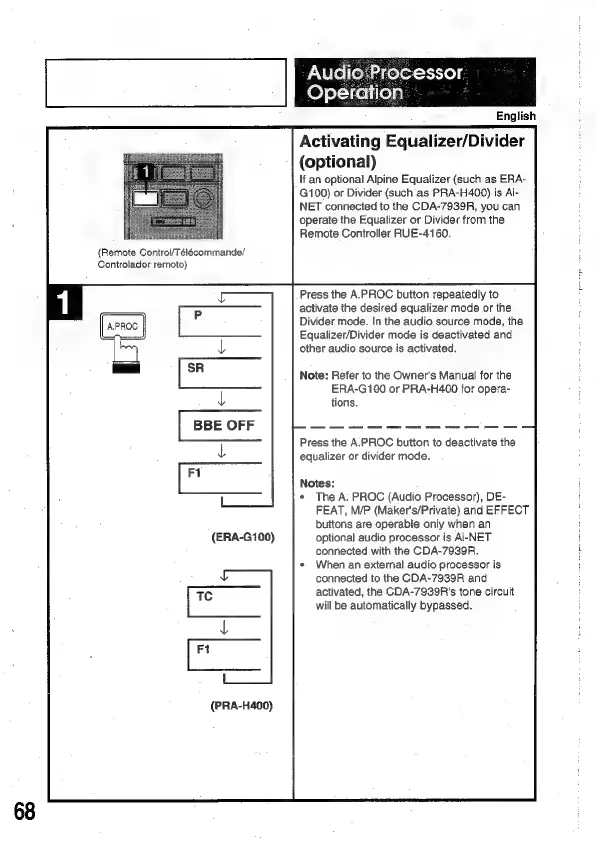
(ERA-G100)
(PRA-H400)
Audio
Processor
Operation
English
Activating
Equalizer/Divider
(optional)
If
an
optional
Alpine
Equalizer
(such
as
ERA-
G100)
or
Divider
(such
as
PRA-H400)
is
Ai-
NET
connected
to
the
CDA-7939R,
you
can
operate
the
Equalizer
or
Divider
from
the
Remote
Controller
RUE-4160.
Press
the
A.PROC
button
repeatedly
to
activate
the
desired
equalizer
mode
or
the
Divider
mode.
In
the
audio
source
mode,
the
Equalizer/Divider
mode
is
deactivated
and
other
audio
source
is
activated.
Note:
Refer
to
the
Owner's
Manual
for
the
ERA-G100
or
PRA-H400
for
opera-
Press
the
A.PROC
button
to
deactivate
the
equalizer
or
divider
mode.
Notes:
*
The
A.
PROC
(Audio
Processor),
DE-
FEAT,
M/P
(Maker's/Private)
and
EFFECT
buttons
are
operable
only
when
an
optional
audio
processor
is
Ai-NET
connected
with
the
CDA-7939R.
When
an
external
audio
processor
is
connected
to
the
CDA-7939R
and
activated,
the
CDA-7939R's
tone
circuit
will
be
automatically
bypassed.

Related product manuals