EasyManua.ls Logo

Alpine CDA-7939R - Page 4

Alpine CDA-7939R
47 pages
Print Icon
To Next Page IconTo Next Page
To Previous Page IconTo Previous Page
Loading...
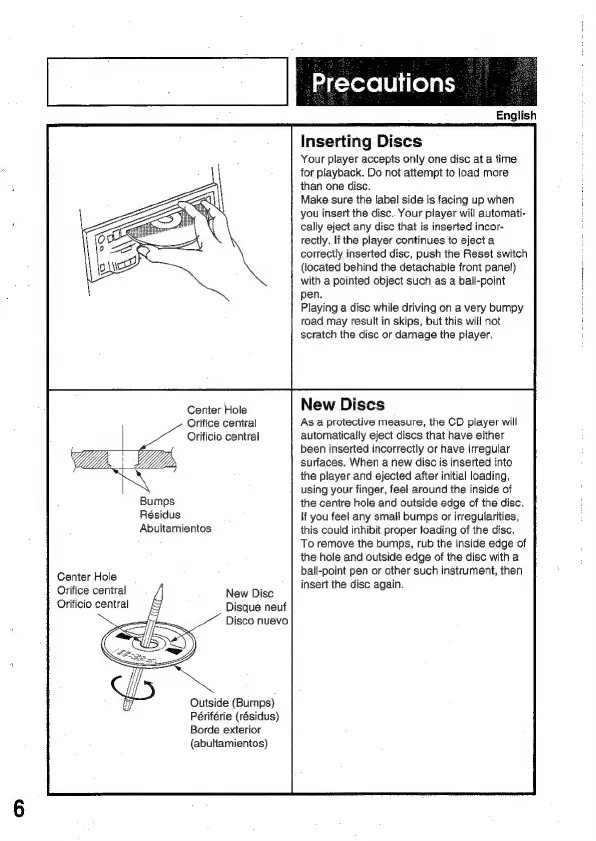
Center
Hole
Orifice
central
Orificio
central
aes
Bumps
Résidus
Abultamientos
Center
Hole
Orifice
central
Orificio
central
New
Disc
Disque
neuf
Disco
nuevo
Outside
(Bumps)
Périférie
(résidus)
Borde
exterior
{abultamientos)
ak=yere
[Ui
iceyaty
English
Inserting
Discs
Your
player
accepts
only
one
disc
at
a
time
for
playback.
Do
not
attempt
to
load
more
than
one
disc.
Make
sure
the
label
side
is
facing
up
when
you
insert
the
disc.
Your
player
will
automati-
cally
eject
any
disc
that
is
inserted
incor-
rectly.
If
the
player
continues
to
eject
a
correctly
inserted
disc,
push
the
Reset
switch
(located
behind
the
detachable
front
panel)
with
a
pointed
object
such
as
a
ball-point
pen.
Playing
a
disc
while
driving
on
a
very
bumpy
road
may
result
in
skips,
but
this
will
not
scratch
the
disc
or
damage
the
player.
New
Discs
As
a
protective
measure,
the
CD
player
will
automatically
eject
discs
that
have
either
been
inserted
incorrectly
or
have
irregular
surfaces.
When
a
new
disc
is
inserted
into
the
player
and
ejected
after
initial
loading,
using
your
finger,
feel
around
the
inside
of
the
centre
hole
and
outside
edge
of
the
disc.
If
you
feel
any
smali
bumps
or
irregularities,
this
could
inhibit
proper
loading
of
the
disc.
To
remove
the
bumps,
rub
the
inside
edge
of
the
hole
and
outside
edge
of
the
disc
with
a
ball-point
pen
or
other
such
instrument,
then
insert
the
disc
again.

Related product manuals