EasyManua.ls Logo

Alpine CDA-7939R - Page 41

Alpine CDA-7939R
47 pages
Print Icon
To Next Page IconTo Next Page
To Previous Page IconTo Previous Page
Loading...
CORRECT
CORRECTE
CORRECTO
SS
CORRECT
CORRECTE
CORRECTO
INCORRECT
INCORRECTE
INCORRECTO
Transparent
Sheet
Feuille
transparente
Hoja
transparente
Disc
Stabilizer
Stabilisateur
de
disque
Estabilizador
del
disco
DY
iXes
Gre]
c=)
English
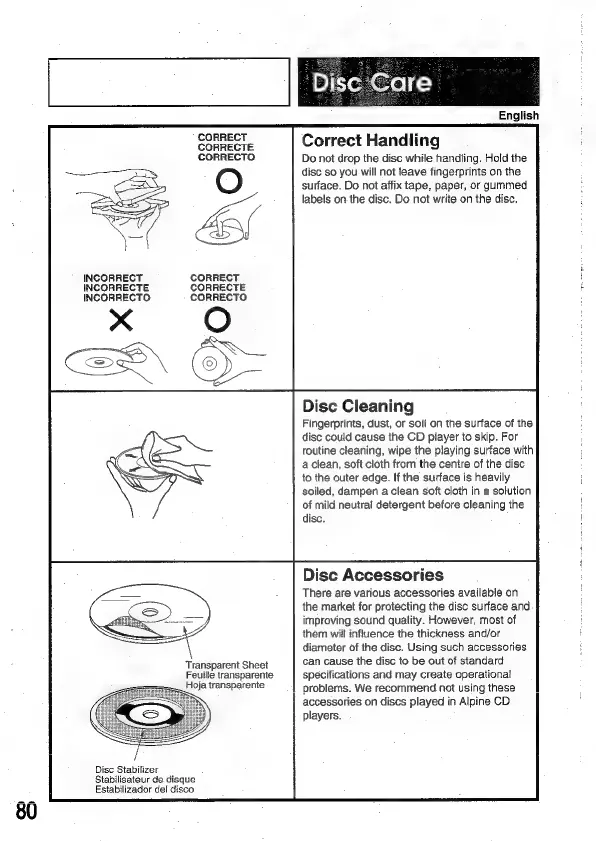
Correct
Handling
Do
not
drop
the
disc
while
handling.
Hold
the
disc
so
you
will
not
teave
fingerprints
on
the
surface.
Do
not
affix
tape,
paper,
or
gummed
labels
on
the
disc.
Do
not
write
on
the
disc.
Disc
Cleaning
Fingerprints,
dust,
or
soil
on
the
surface
of
the
disc
could
cause
the
CD
player
to skip.
For
routine
cleaning,
wipe
the
playing
surface
with
a
clean,
soft
cloth
from
the
centre
of
the
disc
to
the
outer
edge.
If
the
surface
is
heavily
soiled,
dampen
a
clean
soft
cloth
in
a
solution
of
mild
neutral
detergent
before
cieaning
the
disc.
Disc
Accessories
There
are
various
accessories
available
on
the
market
for
protecting
the
disc
surface
and
improving
sound
quality.
However,
most
of
them
will
influence
the
thickness
and/or
diameter
of
the
disc.
Using
such
accessories
can
cause
the
disc
to
be
out
of
standard
specifications
and
may
create
operational
problems.
We
recommend
not
using
these
accessories
on
discs
played
in
Alpine
CD
players.

Related product manuals