EasyManua.ls Logo

Alpine CDA-7939R - Page 9

Alpine CDA-7939R
47 pages
Print Icon
To Next Page IconTo Next Page
To Previous Page IconTo Previous Page
Loading...
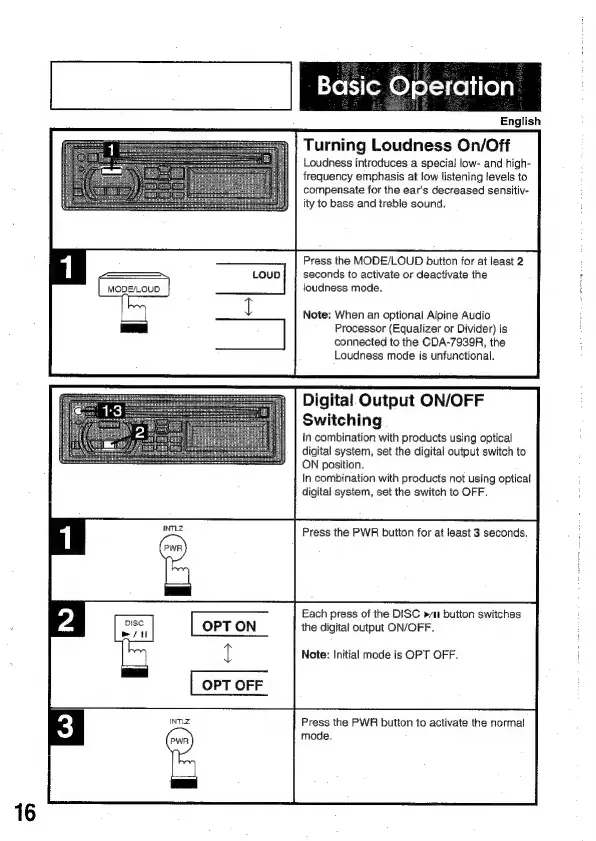
MODE/LOUD
Xo
tj
(om
®)
of-1
fe]
i(e)a)
English
Turning
Loudness
On/Off
Loudness
introduces
a
special
low-
and
high-
frequency
emphasis
at
low
listening
levels
to
compensate
for
the
ear's
decreased
sensitiv-
ity
to
bass
and
treble
sound.
Press
the
MODE/LOUD
button
for
at
least
2
seconds
to
activate
or
deactivate
the
joudness
mode.
Note:
When
an
optional
Alpine
Audio
Processor
(Equalizer
or
Divider)
is
connected
to
the
CDA-7939R,
the
Loudness
mode
is
unfunctional.
Digital
Output
ON/OFF
Switching
In
combination
with
products
using
optical
digital
system,
set
the
digital
output
switch
to
ON
position.
In
combination
with
products
not
using
optical
digital
system,
set
the
switch
to
OFF.
Press
the
PWR
button
for
at
least
3
seconds.
Each
press
of
the
DISC
»/11
button
switches
the
digital
output
ON/OFF.
Note:
Initial
mode
is
OPT
OFF.
Press
the
PWR
button
to
activate
the
normal
mode.

Related product manuals