Voice
Control
Operation
I
Fonction
de
controle
vocal
I
Operaciones
de
control
por
voz
English
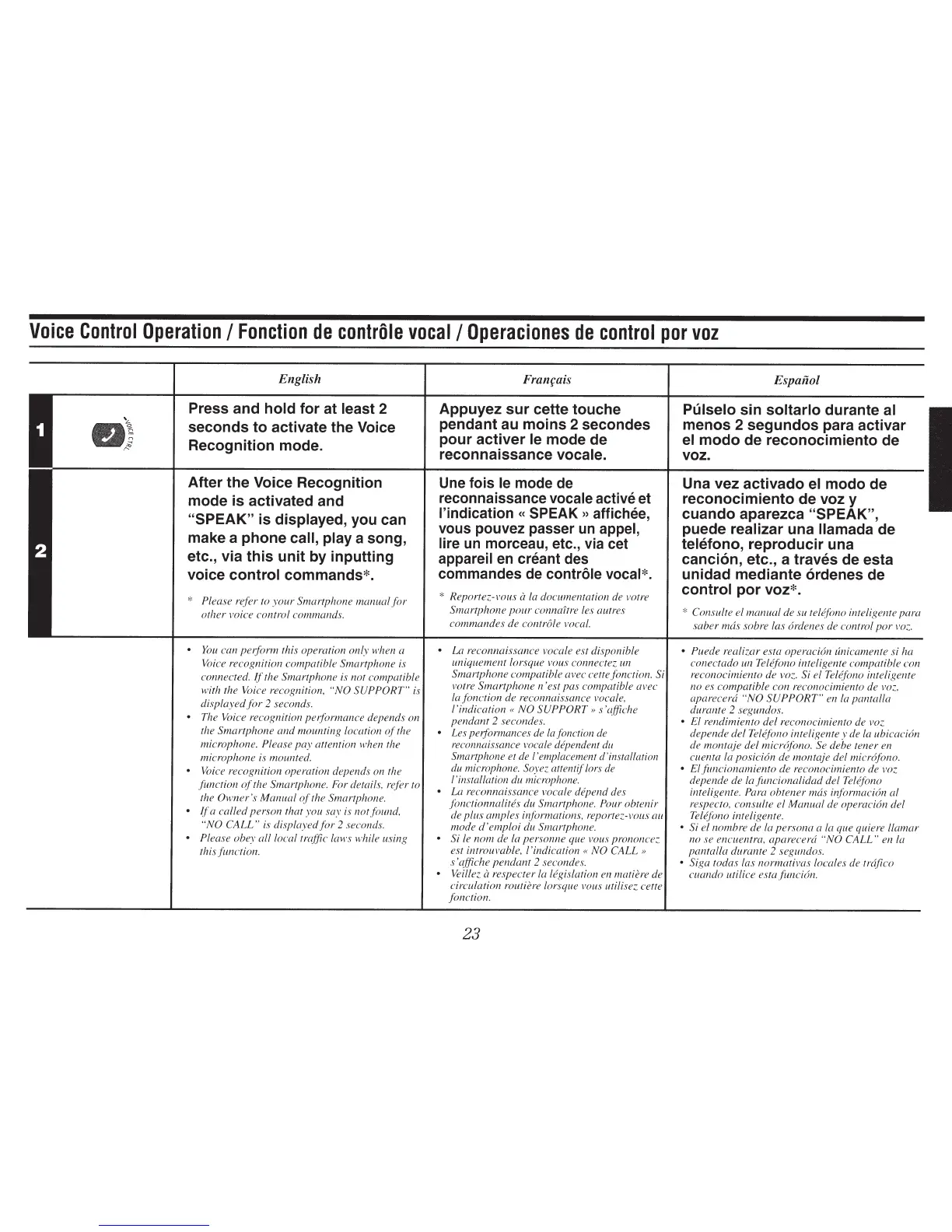
Press and
hold for at least
2
seconds to activate the Voice
Recognition mode.
After the Voice Recognition
mode
is activated and
"SPEAK" is
displayed,
you can
make a phone
call, play a song,
etc., via this unit by inputting
voice
control
commands*.
*
Please refer to
your
Smartphone manual
for
other voice control commands.
•
You
can perform this operation only when a
Voice recognition compatible Smartphone
is
connected.
ff
the Smartphone is not compatible
with the Voice recognition,
"NO SUPPORT"
is
displayedfor
2
seconds.
• The Voice recognition performance depends on
the Smartphone
and
mounting location
of
the
microphone.
Please
pay
attention when the
microphone is mounted.
•
VcJice
recognition operation depends on the
function
of
the Smartphone.
For
details, refer to
the Owner's Manual
of
the Smartphone.
•
if
a called person that you say is not found,
"NO
CALL"
is displayed
for
2
seconds.
•
Please obey all local traffic laws while using
this function.
Appuyezsurcettetouche
pendant au moins 2 secondes
pour activer
le
mode de
reconnaissance
vocale.
Une fois
le
mode de
reconnaissance
vocale active et
l'indication
«
SPEAK
»
affichee,
vous pouvez passer
un
appel,
lire
un
marceau, etc.,
via
cet
appareil
en
creant des
commandes de
controle vocal*.
*
Reportez-vous
a
La
documentation de votre
Smartphone
pour
connaitre les autres
commandes de controle vocal.
•
La reconnaissance vocale est disponible
uniquement lorsque vous connectez
un
Smartphone compatible avec cettefonction. Si
votre Smartphone n 'est pas compatible avec
lafonction
de reconnaissance vocate,
!'indication « NO
SUPPORT
>>
s'l~ffiche
pendant
2
secondes.
• Les peiformances de lafonction
de
reconnaissance vocale dependent
du
Smartphone et de !'emplacement d'installation
du
microphone. Soyez attentif lors
de
1 'installation du microphone.
•
La reconnaissance vocate
depend
des
fonctionnalites
du Smartphone.
Pour obtenir
de plus amples informations, reportez-vous au
mode
d'emploi
du Smartphone.
•
Si
le
nom
de la
pers·onne que
vous
prononcez.
est introuvable, !'indication
«NO
CALL»
s 'affiche pendant
2
secondes.
• Veillez
a
respecter
Ia
legislation en matiere de
circulation
routiere lorsque vous
utilisez
cette
fonction.
23
Espaiiol
Pulselo
sin
soltarlo
durante
al
menos 2 segundos para activar
el
modo de reconocimiento de
voz.
Una vez activado
el
modo de
reconocimiento
de
voz y
cuando aparezca "SPEAK",
puede
realizar
una
llamada
de
telefono, reproducir una
canci6n, etc., a traves de esta
unidad mediante 6rdenes de
control
por voz*.
*
Consulte el manual de su tel¢fono
inteligente para
saber mas sabre las 6rdenes de control
por
voz.
• Puede realizar esta operaci6n unicamente si ha
conectado
un Tel¢fono inteligente compatible con
reconocimiento de voz.
Si el
Tel¢fono
inteligente
no es compatible con reconocimiento de
voz,
aparecera
"NO
SUPPORT"
en
La
pantalla
durante
2
segundos.
•
El rendimiento del reconocimiento de
voz
depende del Telefono inteligente
y
de
la
ubicaci6n
de montaje del
micrdfono.
Se debe tener en
cuenta
Ia
posicion de montaje del micr6fono.
•
Elfuncionamiento
de reconocimiento de voz
depende de
lafuncionalidad
del Telefono
inteligente.
Para
obtener
mas
informacion al
respecto, consulte el Manual de operaci6n del
Telefono inteligente.
•
Si
elnombre
de
La
persona a
Ia
que quiere !lamar
nose
encuentra, aparecera
"NO
CALL"
en
Ia
pantalla durante
2
segundos.
•
Siga todas las normativas locales de trajico
cuando uti lice est a
funcidn.


 To Next Page