19-EN
Notes
• Adjustable only when DEFEAT is OFF.
• Adjustable when 2WAY/3WAY system mode is set to 2WAY.
• The Bass parameters affected contain EQ PRESETS, 9BAND EQ,
SUBWOOFER (when set this item via Alpine TuneIt App), X-OVER,
SUBW SYS and MX SETTING. These items are set automatically in
BASS ENGINE SQ mode and cannot be adjusted separately.
• From Level 0 to Level 6, the effect of BASS ENGINE SQ Enhance
increases level by level.
• If no operation is performed for 5 seconds, the unit automatically
returns to normal mode.
About Time Correction
The distance between the listener and the speakers in a car vary widely
due to the complex speaker placement. This difference in the distances
from the speakers to the listener creates a shift in the sounds image and
frequency characteristics. This is caused by the time delay between the
sound reaching the listener’s right versus the left ear.
To correct this, this unit is able to delay the audio signal to the speakers
closest to the listener. This effectively creates a perception of increased
distance for those speakers. The listener can be placed at an equal
distance between the left and right speakers for optimum staging.
The adjustment will be made for each speaker in 3.4cm steps.
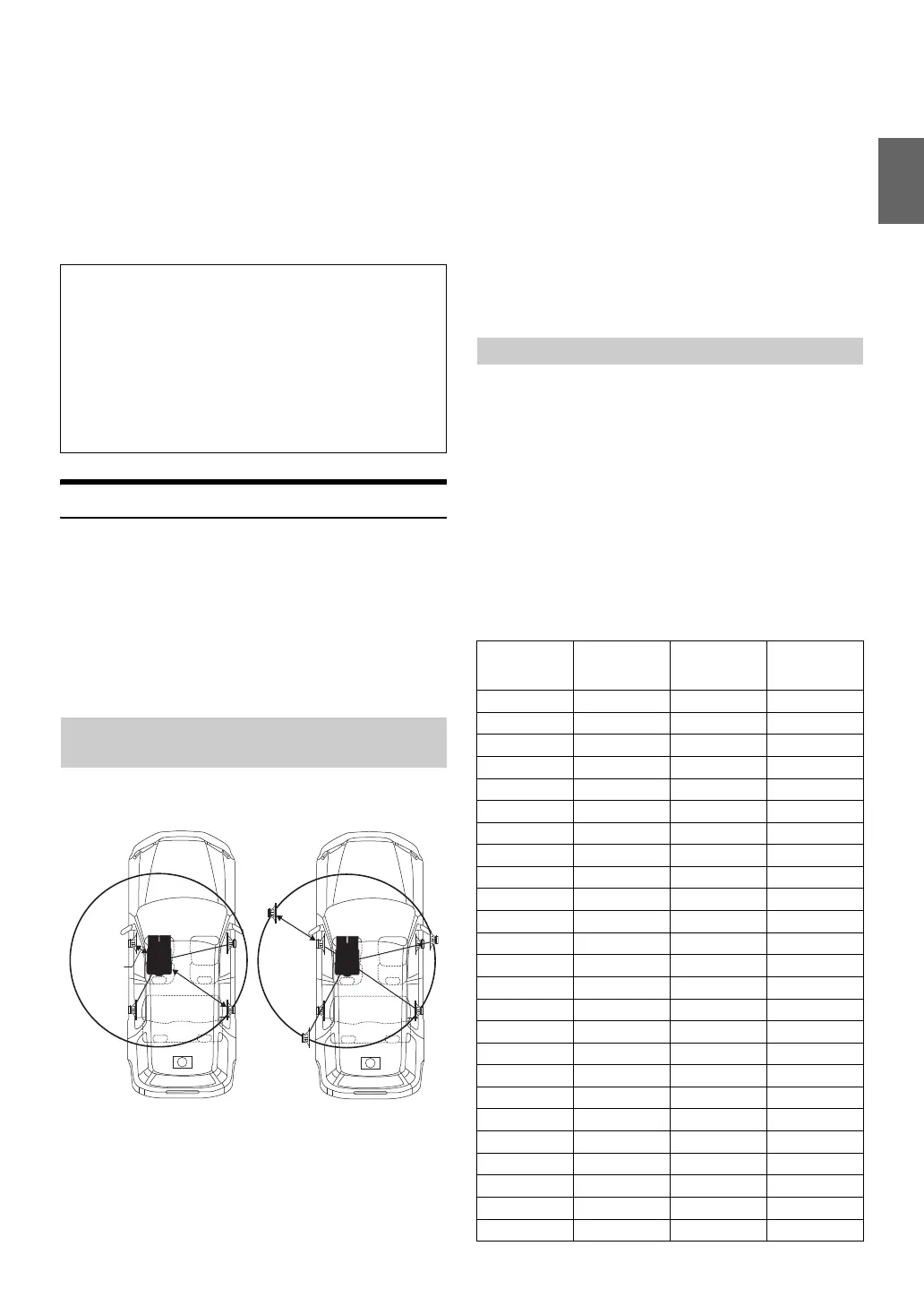
Adjust the time correction level of the front left speaker to a high value
and the rear right to zero or a low value.
The sound is not balanced because the distance between the listening
position and the various speakers is different.
The difference in distance between the front left speaker and the rear
right speaker is 1.75 m (68-7/8").
Here we calculate the time correction value for the front left speaker in
the diagram on the above.
Conditions:
Farthest Speaker – listening position: 2.25 m (88-9/16")
Front left speaker – listening position: 0.5 m (19-11/16")
Calculation: L = 2.25 m – 0.5 m = 1.75 m (68-7/8")
Time correction = 1.75 ÷ 343
*
× 1,000 = 5.1 (ms)
* Speed of sound: 343 m/s (765 mph) at 20°C
In other words, giving the front left speaker a time correction value of
5.1 ms makes it seem as if its distance from the listener is the same as the
distance to the farthest speaker.
Time correction eliminates the differences in the time required for the
sound to reach the listening position.
The time of the front left speaker is corrected by 5.1 ms so that its sound
reaches the listening position at the same time as the sound of other
speakers.
Adjust the time correction level of each speaker to almost the same level.
1
Sit in the listening position (driver’s seat, etc.) and
measure the distance (in metres) between your head and
the various speakers.
2
Calculate the difference between the distance correction
value to the farthest speaker and the other speakers.
L = (distance to farthest speaker) – (distance to other speakers)
These values are the time correction values for the different
speakers. Setting these values to make each sound reach the
listening position at the same time as the sound of other
speakers.
Time Correction Value List
About Setup when the external power amplifier is connected.
In order to optimize the BASS ENGINE SQ, we recommend the
following power amplifier setup.
After setting up, you can adjust the BASS ENGINE SQ Level
according to the music.
1 Set gain of the power amplifier to “MIN”.
2 Set the Crossover Mode Sector switch to “OFF”.
3 Set the BASS ENGINE SQ of this unit to “ON”, and the BASS
ENGINE SQ Level to “+3”.
4 Play a song of the genre you frequently listen to, and
adjust gain of the power amplifier.
Example 1. Listening Position: Front Left
Seat
Example 2. Listening Position: All Seats
Delay
Number
Time
Difference
(msec)
Distance
(cm)
Distance
(inch)
0 0.0 0.0 0.0
1 0.1 3.4 1.3
2 0.2 6.8 2.7
3 0.3 10.2 4.0
4 0.4 13.6 5.4
5 0.5 17.0 6.7
6 0.6 20.4 8.0
7 0.7 23.8 9.4
8 0.8 27.2 10.7
9 0.9 30.6 12.1
10 1.0 34.0 13.4
11 1.1 37.4 14.7
12 1.2 40.8 16.1
13 1.3 44.2 17.4
14 1.4 47.6 18.8
15 1.5 51.0 20.1
16 1.6 54.4 21.4
17 1.7 57.8 22.8
18 1.8 61.2 24.1
19 1.9 64.6 25.5
20 2.0 68.0 26.8
21 2.1 71.4 28.1
22 2.2 74.8 29.5
23 2.3 78.2 30.8
24 2.4 81.6 32.2


 To Next Page