12-EN
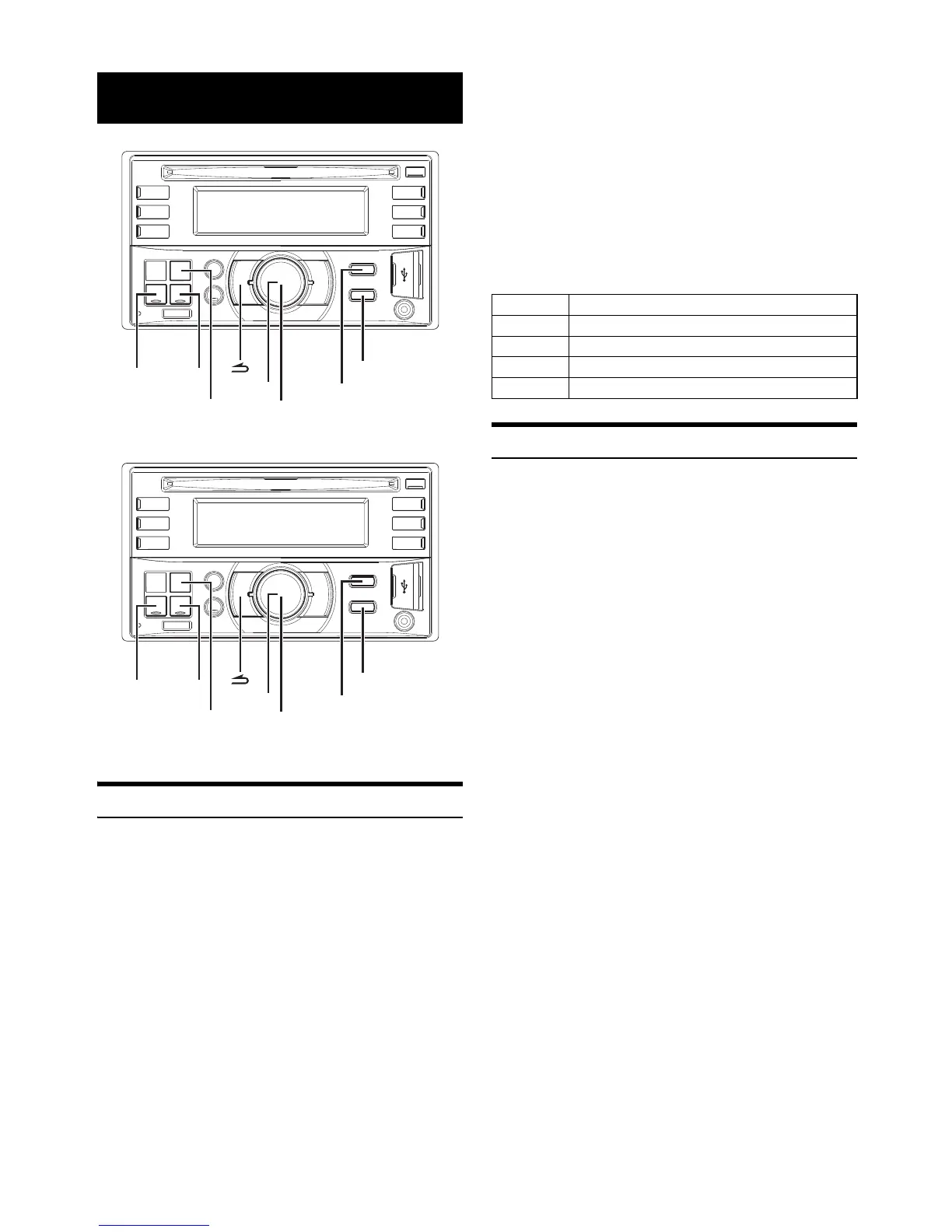
* The illustration is for CDE-W235BT.
* The illustration is for CDE-W233R.
Turning AF (Alternative Frequencies) ON/OFF
The RDS (Radio Data System) is a radio information system using the
57 kHz subcarrier of regular FM broadcast. The RDS allows you to
receive a variety of information such as traffic information, station
names, and to automatically re-tune to a stronger transmitter that is
broadcasting the same programme.
1
Press and hold AUDIO/SETUP (CDE-W235BT only) for at
least 2 seconds or press SETUP (CDE-W233R only) to
activate the SETUP selection mode.
2
Turn the Rotary encoder to select the “TUNER” setup
mode, and then press ENTER.
3
Turn the Rotary encoder to select the “AF”, and then press
ENTER.
4
Turn the Rotary encoder to select the AF (Alternative
Frequency) ON or OFF mode.
5
Press and hold AUDIO/SETUP (CDE-W235BT only) for at
least 2 seconds or press SETUP (CDE-W233R only) to
return to normal mode.
Notes
• When the AF ON mode is selected, the unit automatically tunes to a
strong signal station in the AF list.
• Use the AF OFF mode when automatic re-tuning is not required.
•Press to return to the previous mode.
• Pressing and holding for at least 2 seconds will return to normal
mode.
• If no operation is performed for 60 seconds, the unit will return to
normal mode automatically.
The RDS digital data includes the following:
Receiving RDS Regional (Local) Stations
1
Press and hold AUDIO/SETUP (CDE-W235BT only) for at
least 2 seconds or press SETUP (CDE-W233R only) to
activate the SETUP selection mode.
2
Turn the Rotary encoder to select the “TUNER” setup
mode, and then press ENTER.
3
Turn the Rotary encoder to select the “REGIONAL”, and
then press ENTER.
4
Turn the Rotary encoder to select ON or OFF.
In the OFF mode, the unit automatically keeps receiving the
related local RDS station.
5
Press and hold AUDIO/SETUP (CDE-W235BT only) for at
least 2 seconds or press SETUP (CDE-W233R only) to
return to normal mode.
Notes
•Press to return to the previous mode.
• Pressing and holding for at least 2 seconds will return to normal
mode.
• If no operation is performed for 60 seconds, the unit will return to
normal mode automatically.
RDS



 To Next Page