17-EN
Adjusting the Phone Calls Volume
Setting item:
Phone Calls
Setting level:
1 to 35 (Initial setting: 5)
Touch [ ] or [ ] of “Phone Calls” to set the calls
volume level.
Adjusting the Ringtones and Alerts
Level
Setting item:
Ringtones & Alerts
Setting level:
1 to 11 (Initial setting: 5)
Touch [ ] or [ ] of “Ringtones & Alerts” to set
the volume level for Ringtones and Alerts.
Adjusting the Notifications and
Guidance Level
Setting item:
Notifications & Guidance
Setting level:
1 to 35 (Initial setting: 10)
Touch [ ] or [ ] of “Notifications & Guidance”
to set the volume level for Notifications and
Guidance.
Adjusting the Voice Recognition Level
Setting item:
Voice Recognition
Setting level:
1 to 35 (Initial setting: 10)
Touch [ ] or [ ] of “Voice Recognition” to set
the volume level for voice recognition.
Adjusting the Microphone Level
Setting item:
Microphone Level
Setting level:
1 to 11 (Initial setting: 5)
Touch [ ] or [ ] of “Microphone Level” to set
the microphone volume level.
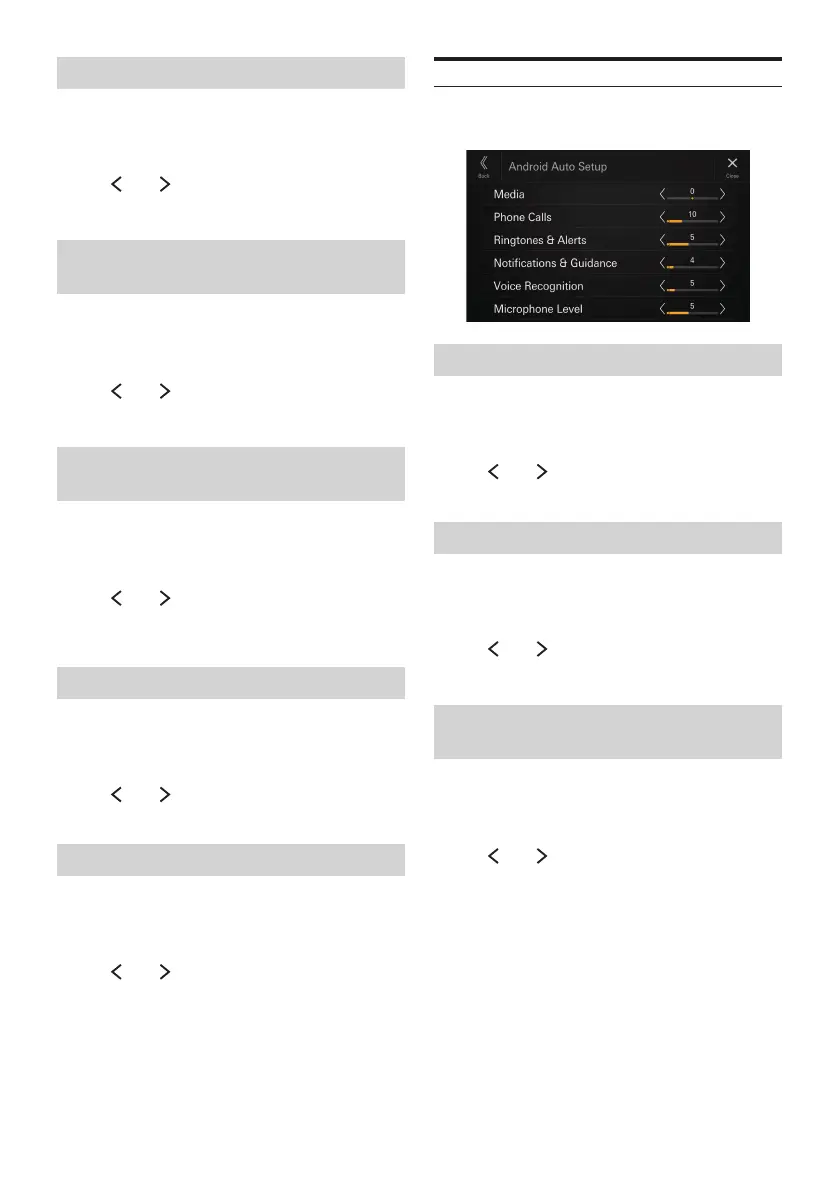
Android Auto Setup
[Android Auto] is selected on the Function Setup Menu
screen.
Adjusting the Media Level
Setting item:
Media
Setting level:
-14 to +14 (Initial setting: 0)
Touch [ ] or [ ] of “Media” to set the media
volume level for Android Auto playback.
Adjusting the Phone Calls Volume
Setting item:
Phone Calls
Setting level:
1 to 35 (Initial setting: 5)
Touch [ ] or [ ] of “Phone Calls” to set the calls
volume level.
Adjusting the Ringtones and Alerts
Level
Setting item:
Ringtones & Alerts
Setting level:
1 to 11 (Initial setting: 5)
Touch [ ] or [ ] of “Ringtones & Alerts” to set
the volume level for Ringtones and Alerts.


 To Next Page