EasyManua.ls Logo

Alpine HALO9 - Page 26

Alpine HALO9
35 pages
Print Icon
To Next Page IconTo Next Page
To Previous Page IconTo Previous Page
Loading...
Editing
the
HOME screen
You
can
customise
widgets
displayed
on
the
HOME
screen.
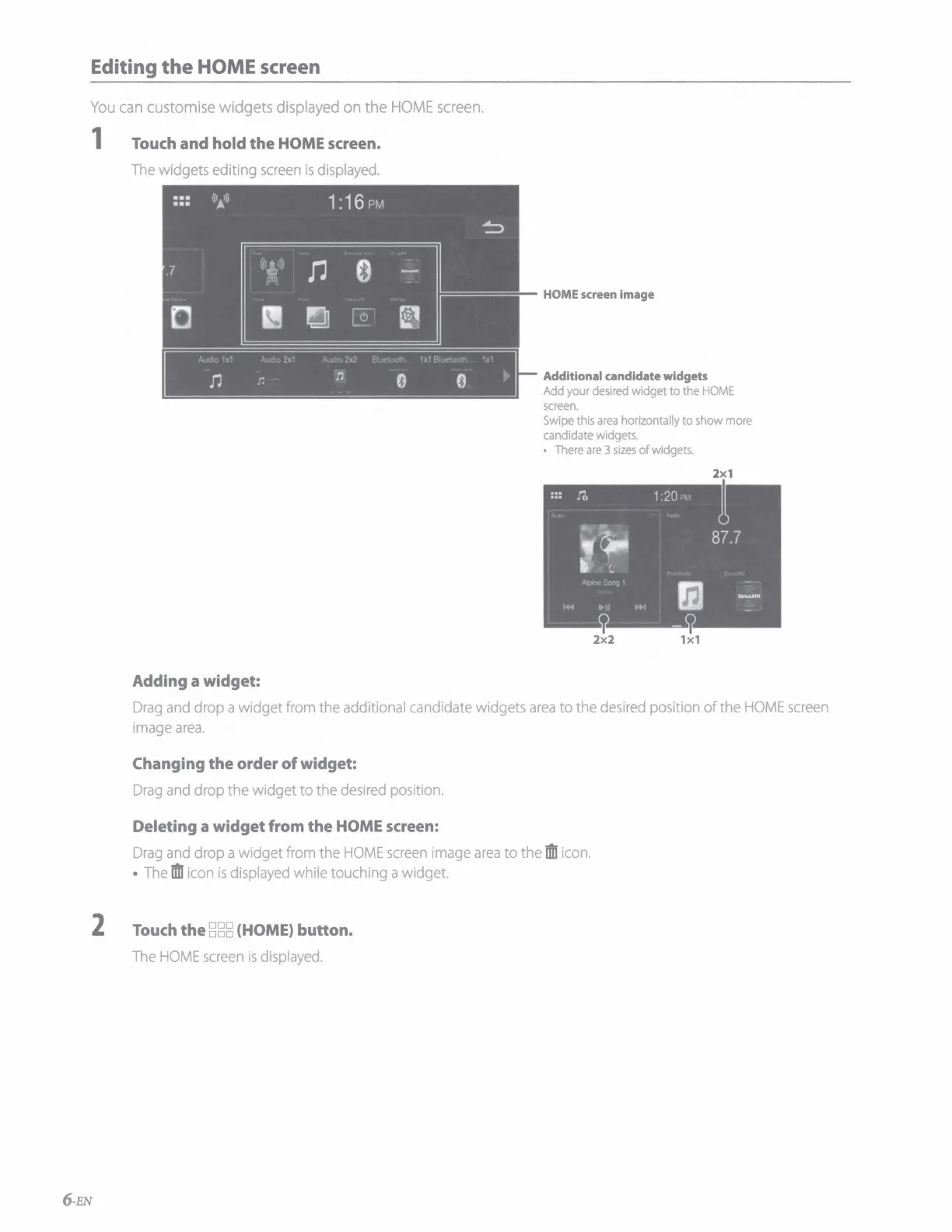
1 Touch and hold
the
HOME screen.
The
widgets editing
screen
is
displayed.
Adding a widget:
HOME screen image
Additional candidate widgets
Add
your
desired
widget to
the
HOME
screen.
Swipe
this
area
horizontally to
show
more
candidate
widgets.
There
are
3
sizes
of
widgets.
2x1
2x2
1x1
Drag
and
drop a widget
from
the additional candidate widgets
area
to the
desired
position of the
HOME
screen
image
area.
Changing
the
order
of
widget:
Drag
and
drop the widget to the
desired
position.
Deleting a
widget
from the HOME screen:
Drag
and
drop a widget
from
the
HOME
screen
image
area
to the
ffli
icon.
The
ifll
icon
is
displayed
while touching a widget.
2 Touch
the
888
(HOME) button.
The
HOME
screen
is
displayed.
6-EN

Other manuals for Alpine HALO9

Related product manuals