EasyManua.ls Logo

Alpine HALO9 - Page 8

Alpine HALO9
35 pages
Print Icon
To Next Page IconTo Next Page
To Previous Page IconTo Previous Page
Loading...
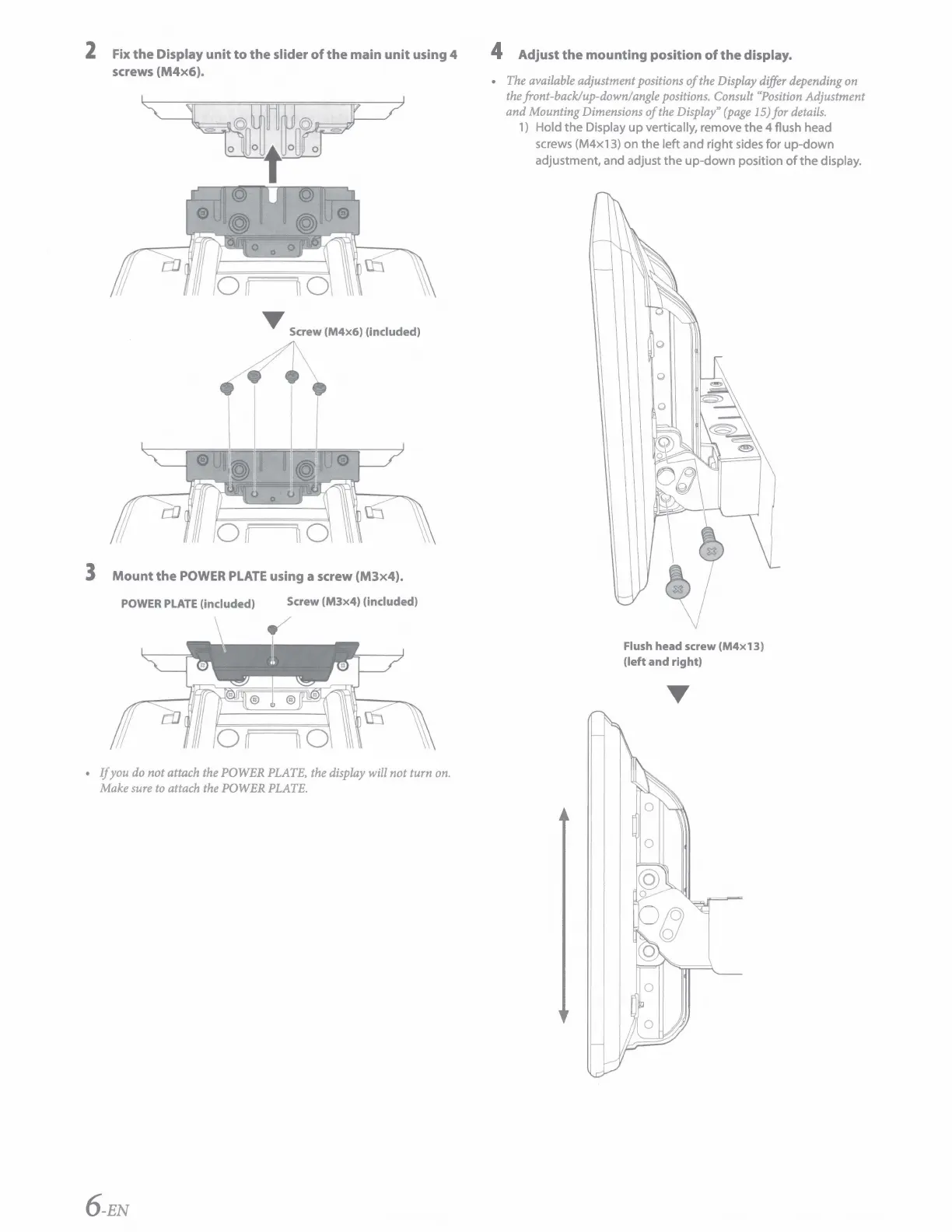
2 Fix
the
Display
unit
to
the
slider
of
the
main
unit
using 4
screws
(M4x6).
T Screw
(M4x6)
(included)
~
3
Mount
the
POWER
PLATE
using a screw
(M3x4).
POWER
PLATE
(included)
Screw
(M3x4)
(included)
I
If you
do
not attach the POWER
PLATE,
the
display
will not turn
on.
Make
sure
to
attach
the
POWER
PLATE.
6-EN
4 Adjust
the
mounting position
of
the
display.
The
available adjustment positions
of
the
Display differ depending
on
the
front-back/up-down/angle positions. Consult
"Position
Adjustment
and Mounting Dimensions
of
the
Display"
(page
15)
for
details.
1)
Hold the Display
up
vertically, remove the 4 flush head
screws (M4x13) on the left and right sides for
up-down
adjustment, and adjust the
up-down
position
of
the display.
Flush head screw
(M4x13)
(left and right)

Other manuals for Alpine HALO9

Related product manuals