44-EN
01GB06IVA100R.fm
ALPINE IVA-D100R 68-05946Z50-A (EN)
4
Divide the distances calculated for the different
speakers by the speed of sound (343 m/s
temperature 20°C).
This value is the time correction value for the various
speakers.
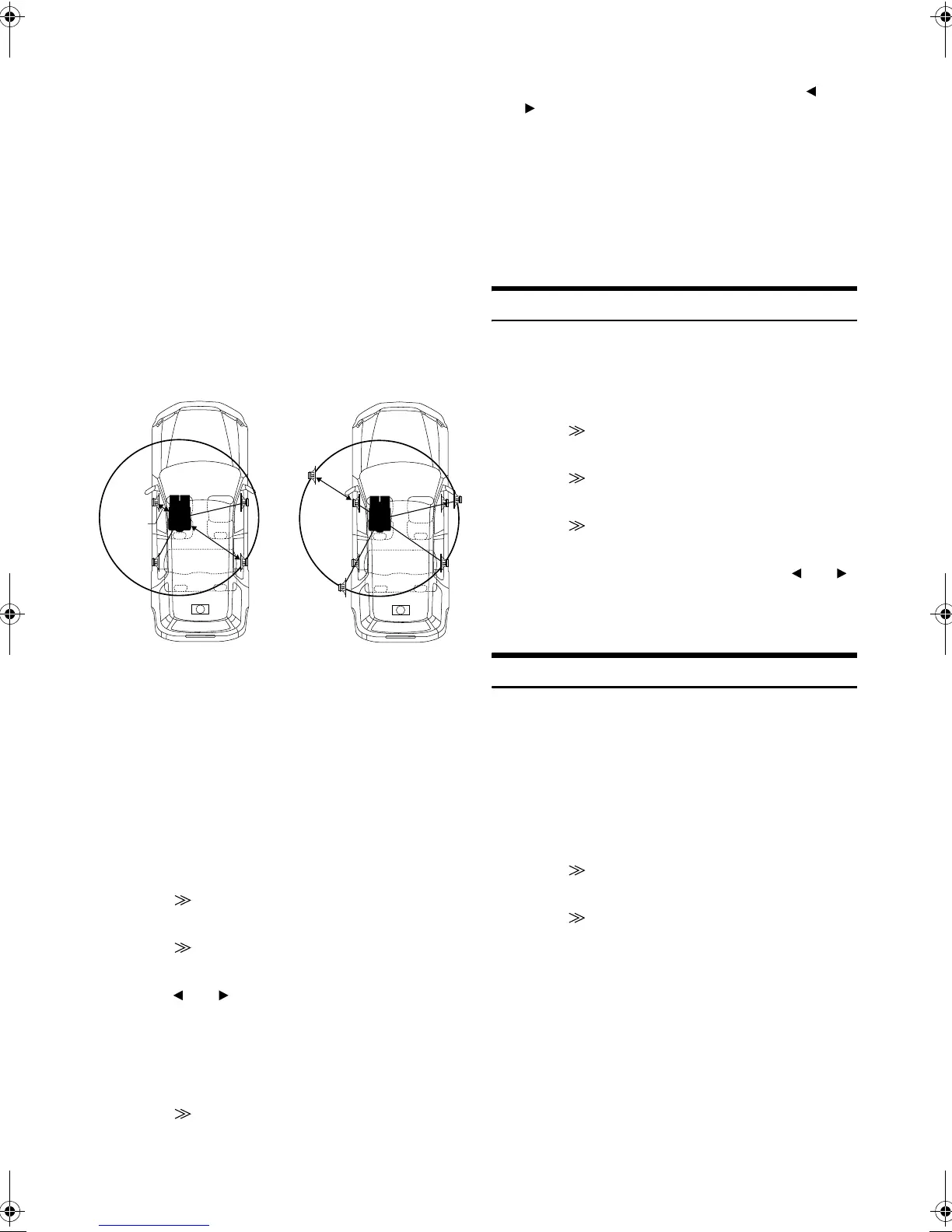
Concrete examples
Calculating the time correction value for the front left speaker on
the diagram below.
In other words, setting the time correction value for the front left
speaker to 5.1 (ms) sets a virtual distance matching the
distance to the farthest speaker.
5
Press SETUP.
The SETUP selection screen appears.
6
Touch [] of i-Personalize.
The i-Personalize screen appears.
7
Touch [] of A.PROCESSOR.
The A.PROC list screen is displayed.
8
Touch [] or [] of T.CORR.
Select L/R or L+R.
9
Touch [] of T.CORR.
The T.CORR adjustment screen appears.
10
Adjust the time correction value (0.0 - 20.0ms) of a
desired speaker by touching the respective [] or
[] button (1 step = 0.05ms).
11
Touch [RTN] to return to the previous screen.
• When the speaker is set to the “OFF” mode, the TCR for that
speaker cannot be set. Refer to “Setting the Speakers” (page 42).
• The adjustment value for FRONT 2 (speakers) which is adjusted in
time correction, is also applied to the front speakers in “Setting Bass
Focus” (page 46).
• The adjustment (AUTO TCR) cannot be automatically set on this
unit.
Phase Switching
1
Make sure that the defeat is turned off (pages 26, 27).
2
Press SETUP.
The SETUP selection screen is displayed.
3
Touch [] of i-Personalize.
The i-Personalize screen appears.
4
Touch [] of A.PROCESSOR.
The A.PROC list screen is displayed.
5
Touch [] of PHASE.
The PHASE adjustment screen appears.
6
Switch the phase (0° or 180°) by touching [] or []
of the desired speaker.
7
Touch [RTN] to return to the previous screen.
Graphic Equalizer Adjustments
The graphic equalizer allows you to modify the sound using 31 bands
each for the front (left and right), rear (left and right) and centre
speakers. An additional 10 bands are available for the subwoofer. This
allows you to customize the sound to suit your taste.
1
Check that the Defeat mode is off.
2
Press SETUP.
The SETUP selection screen appears.
3
Touch [] of i-Personalize.
The i-Personalize screen will appear.
4
Touch [] of A.PROCESSOR.
The A.PROC list screen appears.
Conditions:
Distance between farthest speaker and listening position:
2.25 m (88-3/4")
Distance between front left speaker and listening position:
0.5 m (20")
Calculation:
L = 2.25 m (88-3/4") – 0.5 m (20")= 1.75 m (68-3/4")
Compensation time = 1.75 ÷ 343 x 1000 = 5.1 (ms)
L/R: Different adjustment values can be set for the left and
right channels.
L+R: Sets the same adjustment values for the left and right
channels.
2.25m
0.5m
5.1ms
The sound is uneven because
the distance between the
listening position and the
different speakers is different.
The difference in the distance
between the front left and rear
right speakers is 1.75 meters
(68-3/4").
Time correction eliminates
the difference between the
time required for the sound
from the different speakers to
reach the listening position.
Setting the time correction of
the front left speaker to 5.1
ms makes it possible to
coordinate the distance from
the listening position to the
speaker.
01GB00IVAD100R.book Page 44 Friday, February 10, 2006 2:39 PM








 To Next Page