12-EN
RADIO
Listening to the Radio
To listen to the radio, press HOME then touch [Tuner].
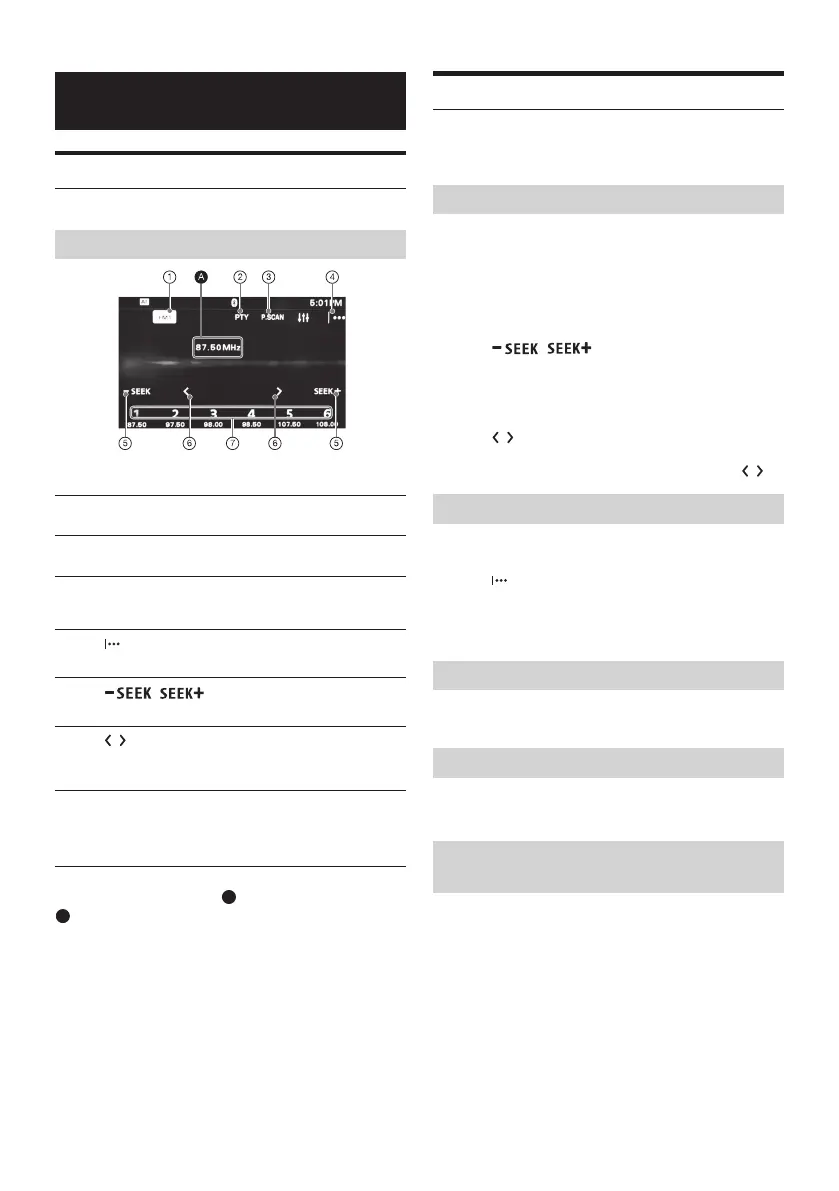
Reception controls/indications
Reception controls (1 to 7)
1
Current band icon
Opens the band list.
2
[PTY] (Programme Types) (FM only)
Opens the PTY list (page 13).
3
P. SCAN
Helps to find a desired station by listening to
preset stations for a few seconds.
4
Opens the tuner option menu.
5
/
Tunes in automatically.
6
/
Tunes in manually.
Touch and hold to continuously skip frequencies.
7
[1] to [6]
Selects a preset station.
Touch and hold to store the currently displayed
frequency in that preset.
Reception indications (
A
)
A
Frequency
Storing and Receiving Stations
Caution
When tuning to stations while driving, use Automatic Tuning
Memory (A.MEMO) to prevent an accident.
Tuning
1 Touch the current band.
The band list appears.
2 Touch the desired band ([FM1], [FM2], [FM3], [AM1], or
[AM2]).
3 Perform tuning.
To tune automatically
Touch
/.
Scanning stops when the unit receives a station.
Repeat this procedure until the desired station is
received.
To tune manually
Touch
/
repeatedly until the desired frequency is
received.
To skip frequencies continuously, touch and hold
/
Presetting Stations Automatically
1 Select the desired band ([FM1], [FM2], [FM3], [AM1], or
[AM2]).
2 Touch
3 Touch [A.MEMO], then [Search].
The unit stores the first six available stations in presets
([1] to [6]).
Presetting Stations Manually
1 While receiving the station that you want to store, press
and hold the desired preset number ([1] to [6]).
Receiving Preset Stations
1 Select the band.
2 Touch the desired preset number ([1] to [6]).
Searching for the desired station from preset
stations (Tuner Preset Scan)
Tuner Preset Scan helps you to find a desired station by listening to
preset stations for a few seconds.
1 While listening to radio, touch P. SCAN.
Tuner Preset Scan starts, and subsequent stations are received
in sequence.
2 Touch P. SCAN again when the desired station is
received.



 To Next Page