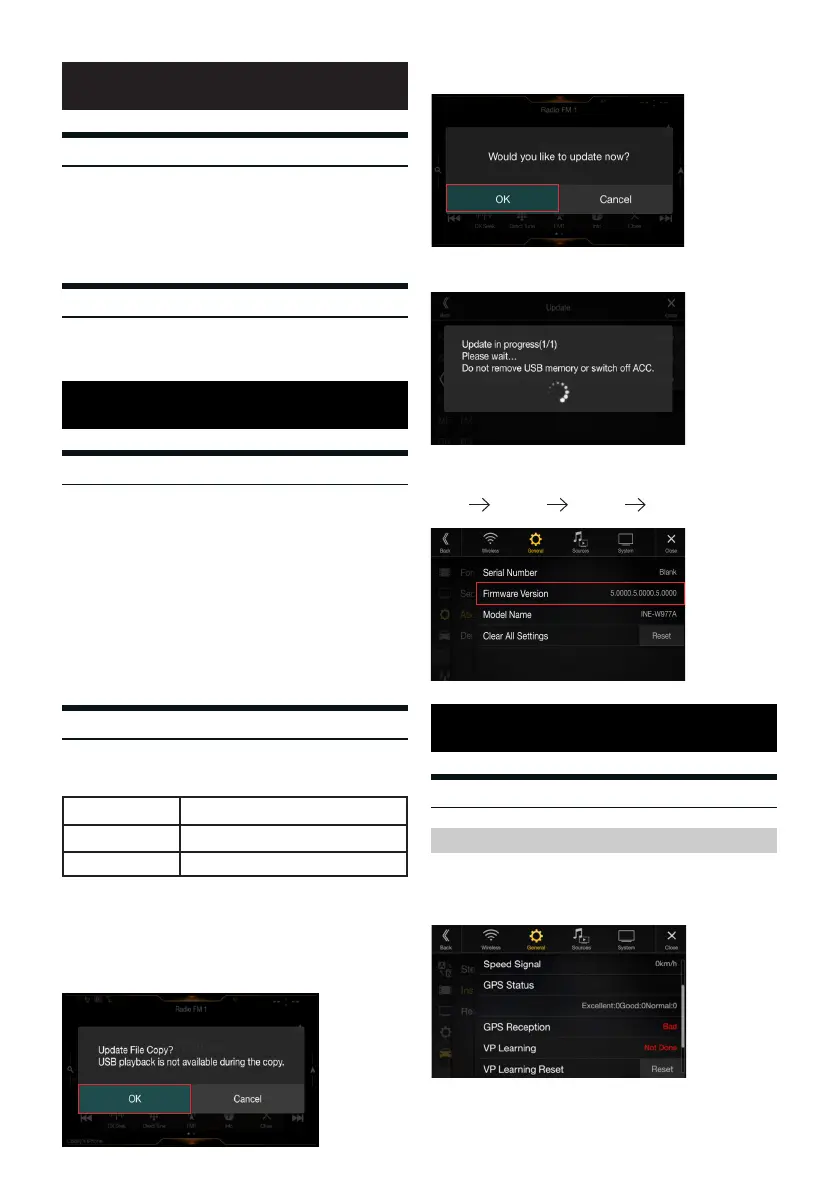
7 Once the update has completed, the Alpine unit will reset.
To check that the update was applied successfully follow the steps below.
Features
Update Instructions
Firmware Information
Precautions
Navigation
is Firmware update is specically intended for users with the Alpine
X208AU / INE-W977A/ iLX-702D. ere is one rmware update per
unit. If you are unsure if you need this update please contact your
nearest Alpine dealer.
Please note: e update is not required for Alpine units
with Firmware versions 5.0000 or higher
• Do NOT switch o the vehicle / switch o the unit’s power nor remove
the USB ash drive during the update process.
• Do NOT use compressed zip-les for update and do NOT change le
names.
• Do NOT store any other folders and les on the USB stick
• Do NOT operate the Alpine unit whilst updating nor update the Alpine
unit while driving
• e unit is updated via USB connection. Plug in the USB ash drive
into the USB socket of the Alpine unit to initialise the update
1 Ensure that the correct correct le is used to perform the update.
the product codes are listed below;
2 Un-zip the downloaded folder into the root directory of the USB
ash drive
3 Turn the vehicle on and plug in the USB ash drive into the USB
socket of the Alpine unit.
4 Once a prompt appears on the screen, press OK.
5 Press OK to conrm and initialise the update.
6 e update will take approximately 4 minutes to complete.
Navigation calibration/status can be viewed to allow deeper analysis
of the speed signal, GPS reception and leanring status of the vehicle
positioning
e reset button executes a reset of all navigation settings including the
GPS/GLONASS module
Introduction
Requirements and limitations
Performing the update
• Windows XP / Windows 7 / Windows 8 / Windows 10
• USB ash drive with a minimum capacity of 1 GB
X208AU NP00003A
INE-W977A NP00004A
iLX-702D
RE00010A
Calibration status
SETUP GENERAL GENERAL ABOUT
2



 To Next Page