EasyManua.ls Logo

Alpine X209D - Page 11

Alpine X209D
252 pages
Print Icon
To Next Page IconTo Next Page
To Previous Page IconTo Previous Page
Loading...
Owner's
JYlanual
Radio/HD
Radio"'/RBDS
HD
Radio™/RBDS
Operation
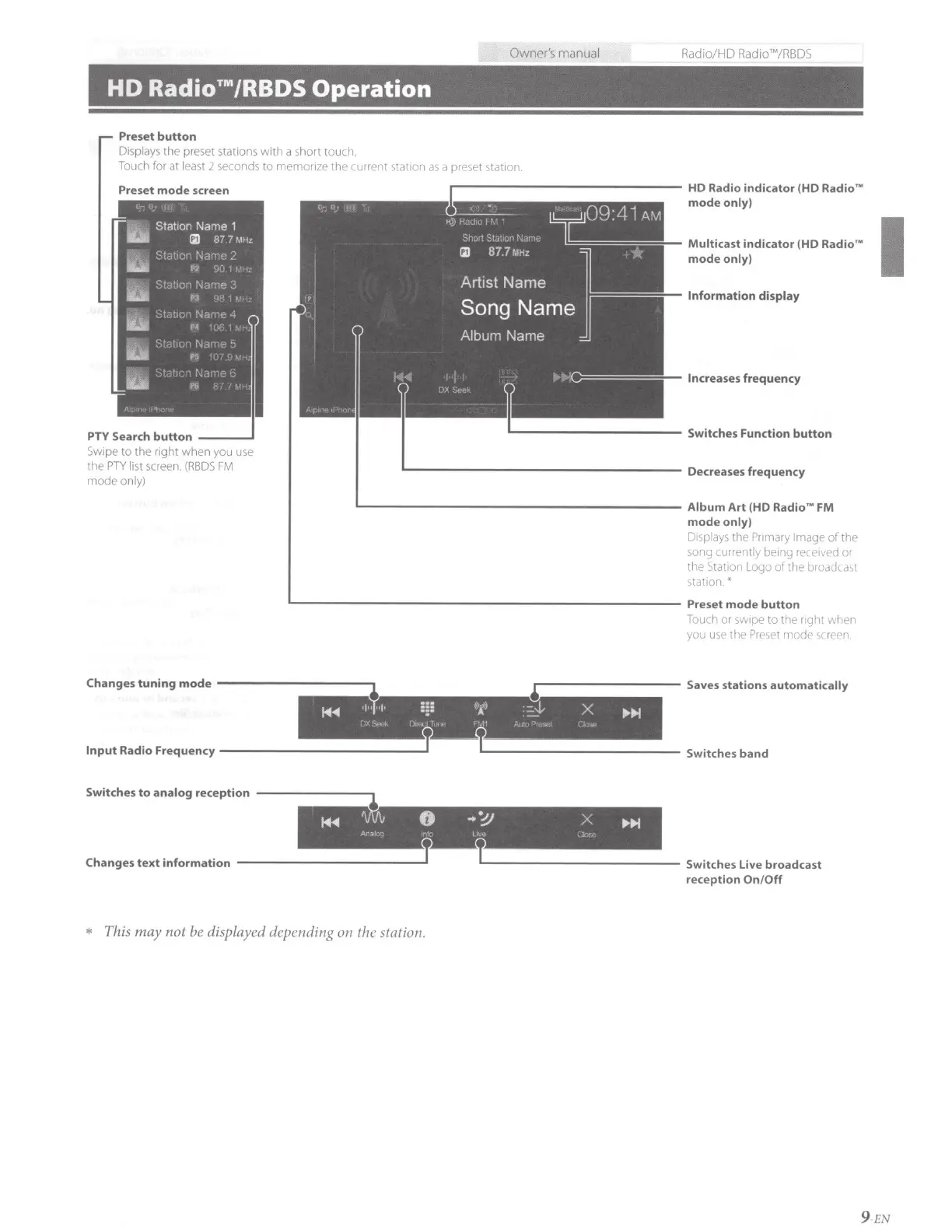
Preset button
Displa
ys
the preset stations with a short touch.
~
U•
h
f;
>r
3t
t
'--~onds
ro
memonze
the
~,mel'lt
,ration
clS
cl
preset
s•at•or
Preset
mode
screen
PTY
Search button
---...1
Sw1pe
to
the
nght when you
use
the
P
TY
list
scree
n.
(R
BDS
FM
mode
only)
Information
display
Increases
frequency
'----------------------
Album
Art
(HD
Radio
'"
FM
mode
only)
Oi•.plays
the
Pnmary
Image
of
the
song currently
be1ng
rt:'Ce1ved
or
the
:.tat10n
Logo
of
the
broadcJ>t
t.1t
>n
'-----------------------------Preset
mode
button
Changes
tuning
mode
----------.~
Input Radio Frequency
-------------.....1'
Switches
to
analog
reception
--------,~
Changes
text
information
____________
_.T
*
This
may
not be displayed depending
on
the station.
1
t
•r
w1r
t
th
r•-:JI,t
w~en
you
u,,.,
the
Preset
mode
~c
rEE'
1
....
-----------
Saves
stations
automatically
T._
_____________
Switches band
T..._
____________
Switches
live
broadcast
reception
On
/Off
9
EN

Table of Contents