43
ALPINE X903D-DU2-IM_03 (
EN
_ Tighten the four hex bolts with a 8mm
wrench.
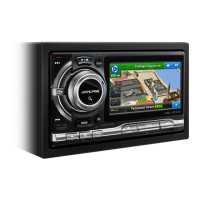
+ Front panel with buttons
Q Connect the left connector to the buttons.
W Connect the right connector to the
buttons.
DE
_ Ziehen Sie die vier Sechkantschrauben
mit einem 8mm Schlüssel fest.
+ Frontblende mit Tasten
Q Schliessen Sie den linken Stecker an die
Tasten an.
W Schliessen Sie den rechten Stecker an die
Tasten an.
FR
_ Serrez à moitié les vis sur l‘écran.
Attention: Prendre soin à bien serrer
l‘écran au font du support.
+ Cadre de nition de l‘écran.
Q Connectez le câble de gauche aux
boutons de gauche.
W Connectez le câble de droite aux boutons
de droite.
ES
_ Apriete los cuatro pernos hexagonales
con una llave de 8 mm.
+ Panel frontal con botones.
Q Conecte el conector izquierdo a los
botones.
W Conecte el conector derecho a los
botones.
IT
_ Stringere i quattro bulloni esagonali con
una chiave da 8 mm.
+ Stringere i quattro bulloni esagonali con
una chiave da 8 mm.
Q Collegare il connettore sinistro ai tasti.
W Collegare il connettore destro ai tasti.



 To Next Page