14
Altai Technologies Ltd. All rights reserved
Quick Setup Guide
3. Configure Station (CPE) Mode (2.4G/5G)
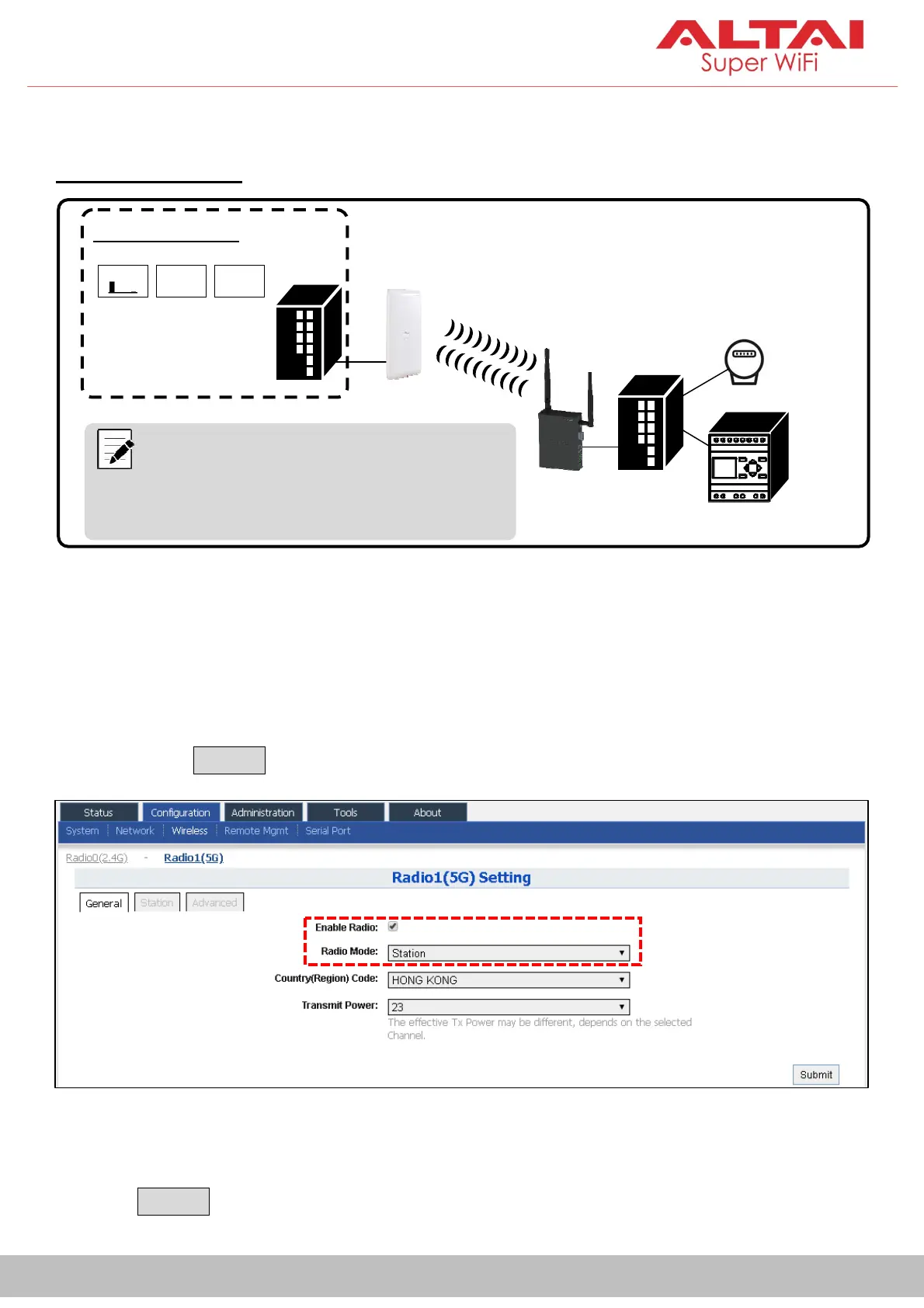
Network Scenario
Go to Configuration>Wireless>Radio0(2.4G)/Radio1(5G)>General. Below
screenshots show an example for 5G radio configuration only. Same
procedures can be applied to 2.4G radio configuration.
1. Check the box toEnable Radio. Select Stationfor the Radio Mode field.
Then click Submit button.
2. ClickStationtab. Enter theRemoteSSID that you want to connect to.Then
click Submit button.
Note:TheVX200 antennae shown in the
diagram are for illustration purpose only. Actual
antenna model should be selected subject to
coverage requirement.
Control Room
AP
VX200
(Station)
Switch PLC
Sensor


 To Next Page