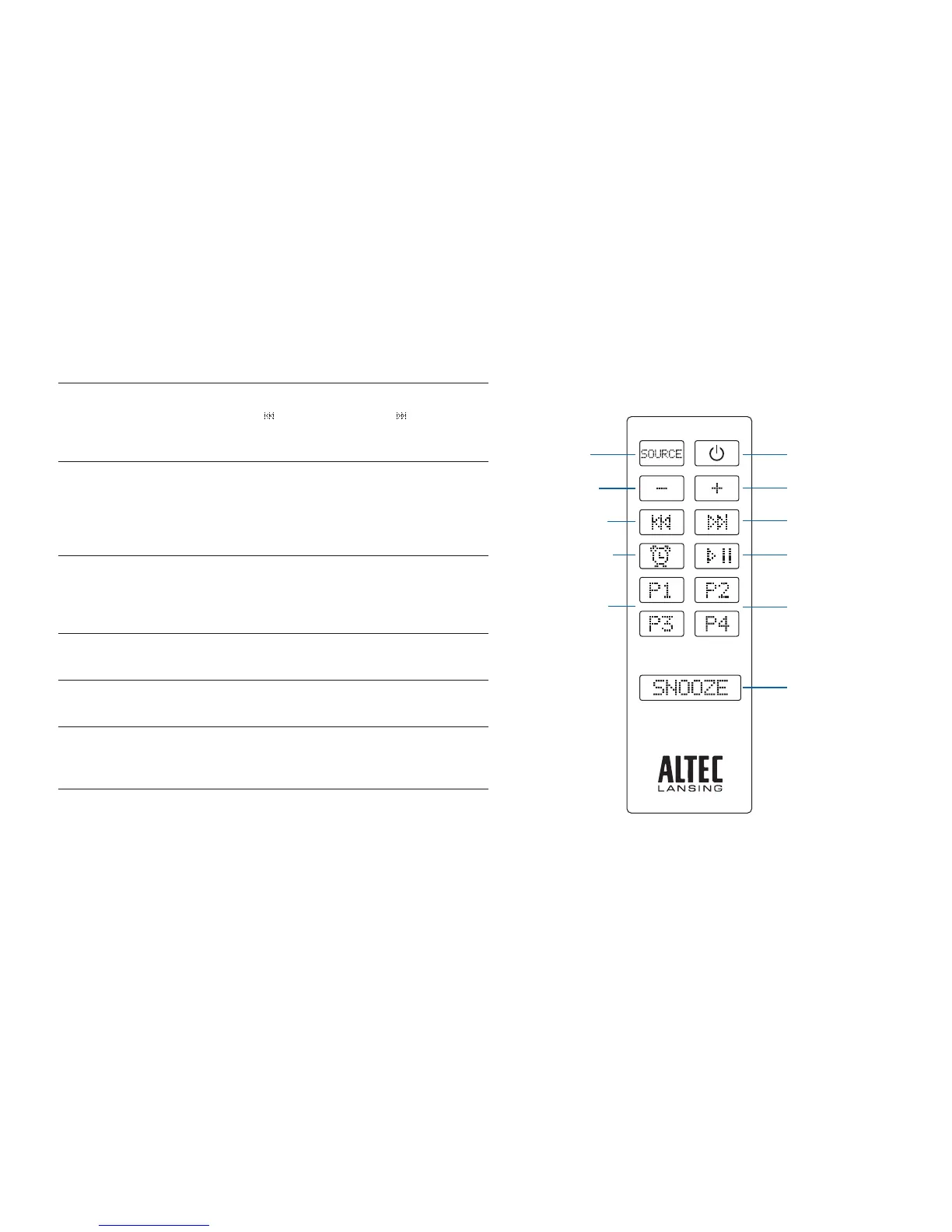
10
Poweron/offbutton
Source button
Play/pausebutton
Volume+button
Volume–button
Track back button
Track forward button
FM preset buttons
FM preset buttons
Alarm select button
Snoozebutton
Seek radio stations
InFMradiomode,pressandholdtheTRACK
BACK
orTRACKFORWARD button. See
the Listening to the Radio section for additional
information.
Store a radio station
In FM radio mode, tune to the station you’d
like to store, and then press and hold one of
thePRESETbuttons(P1,P2,P3orP4).See
the Listening to the Radio section for more
information.
Select a preset radio station
InFMradiomode,pressthePRESETbutton
(P1,P2,P3orP4)thatcorrespondstothe
station you’d like to hear. See the Listening to
the Radio section for more information.
Set the alarm
See the Setting the Alarm section for
instructions on setting the alarms.
Turn off the alarm
PresstheALARM1orALARM2buttonwhen
the alarm is sounding.
Snoozefor5to60minutes
(user-denable)
Press the SNOOZE button when the alarm is
sounding. See the Setting the Alarm section to
learnhowtosetthesnoozeduration.
NOTE Forbestresults,aimtheIRremotecontroltowardtheFPONAMEspeaker
system.


 To Next Page