The new way to work.
9
Set up and Adjust
6
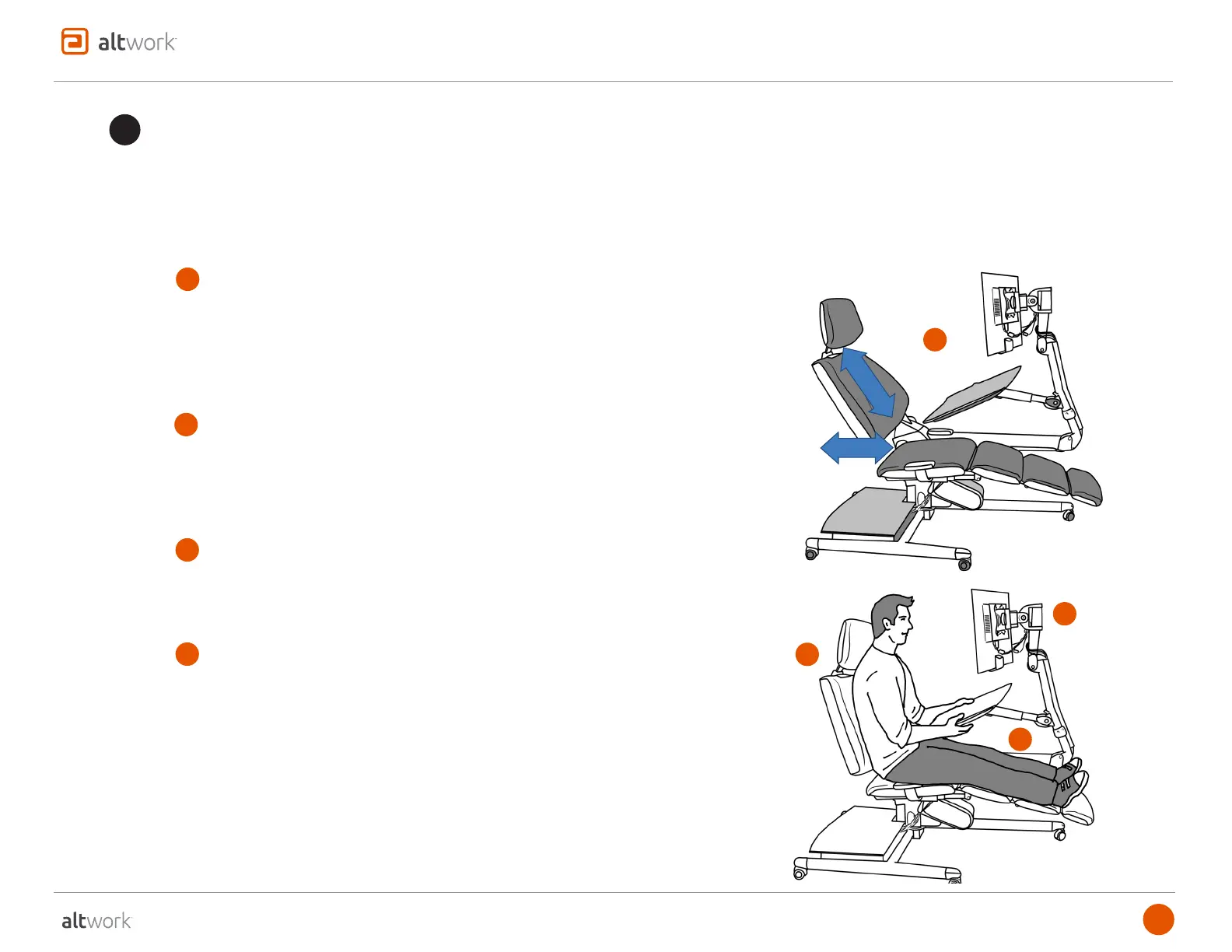
1. Pull bottom toward you to disengage the Seat-back from lock device
2. Push up or pull down the Seat-back to best position
3. Push the bottom back to reengage Seat-back onto lock device (it will
stay in position when engaged)
1. Squeeze left lever to set height – move up or down
2. Squeeze right lever to set location - move forward or back
3. Pivot Headrest for additional support
1. Swing Monitor to side
2. Squeeze Monitor Height Adjust Lever and raise or lower Monitor
1. With legs positioned at approx. 4pm
2. Adjust Desktop height by raising (to click sound) and then lowering to
preferred location
3. Move Desktop toward or away from body by squeezing Desktop
Travel Adjust Lever
4. Adjust Desktop angle for comfortable hand and wrist positon
a
ADJUST SEAT-BACK
support@altwork.com
The unique feature of the Altwork Station is once you have adjusted your Station components – they will remain in the correct positions as
you move. The Desktop, Monitor, and Headrest will continuously adjust to you as you recline, sit, or stand.
Our suggested adjustment procedure is below. The following pages will provide more detail on the fine points of the adjustment process.
b
ADJUST HEADREST
c
ADJUST MONITOR ARM
d
ADJUST DESKTOP
a
b
c
d



 To Next Page