The new way to work.
8
a
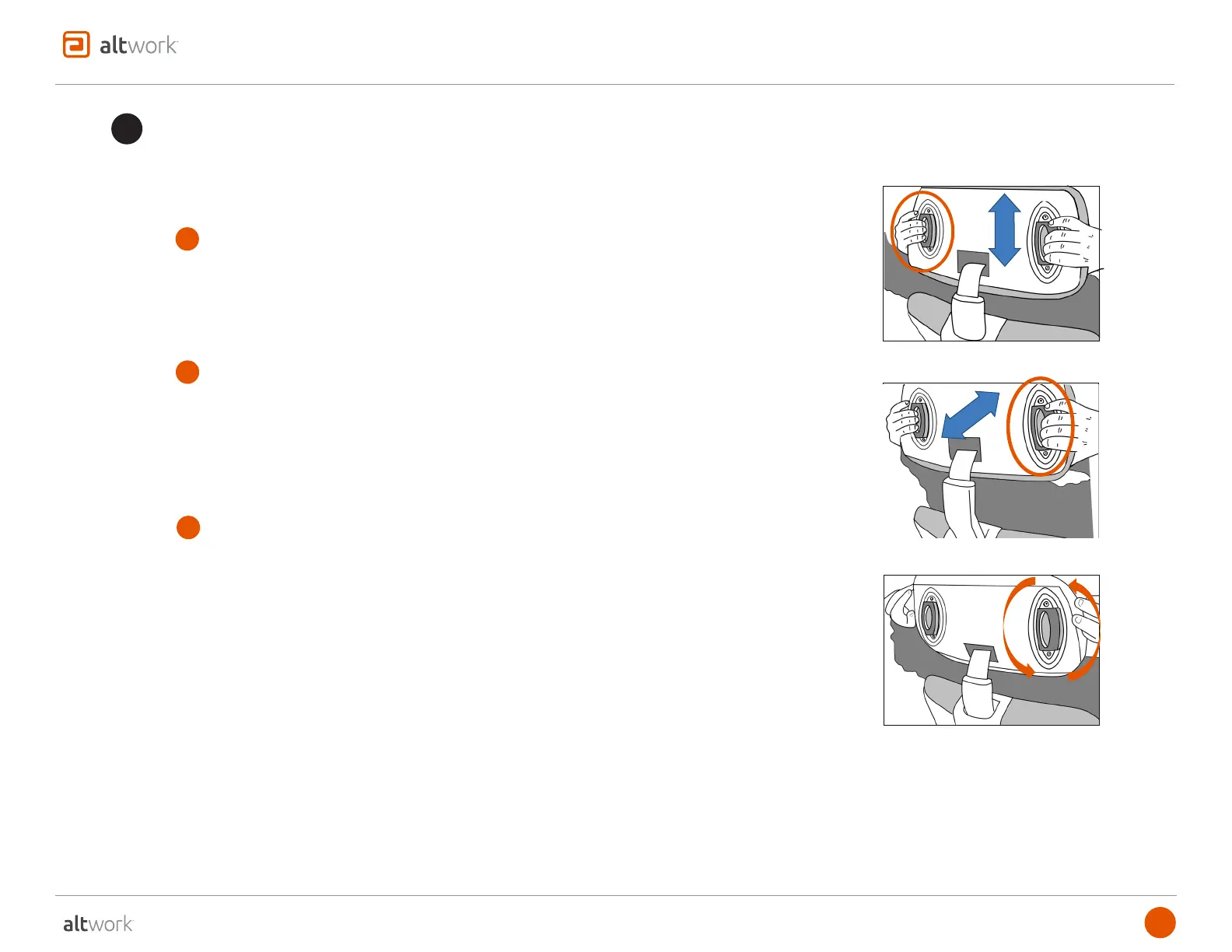
HEIGHT (left lever)
To find the most comfortable Headrest position to support your head while in
Focus or Reclined:
• grasp the left lever and pull the Headrest up or down to find your most
comfortable position
The angle provides more fine tuning to determine your most comfortable head
position:
• grasp the Headrest with both hand and pivot it upward or downward (you do
not need the Headrest Adjustment Levers for this adjustment)
The Headrest Support Arc allows the Headrest to move forward or back to
support your head:
• adjust the height first (above)
• grasp the right lever and pull the Headrest forward or back when you have a
comfortable position
There are two (2) Adjustment Levers in the Headrest to adjust height and arc (forward/back) position.
Headrest Adjustments
5
b
ARC (right lever)
c
ANGLE
support@altwork.com
HEIGHT (left lever)
ARC (right lever)
ANGLE
Once you have adjusted the Headrest, it will remain in the correct position as you
move throughout the motion of the Altwork Station.



 To Next Page