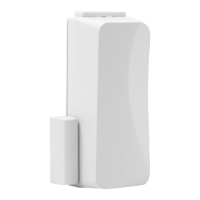
RE601 Door Window Sensor is a full-featured security
transmitter with industry-leading wireless range and battery
life. It is typically used to sense opening and closing of
doors and windows, but can secure just about anything using
its two external contact zones. It will alarm when the magnet
is pulled away from the sensor or when an external contact is
opened.
Features
• Industry-leading wireless range and battery life
• One door window zone and two external contact zones
• Secure encrypted wireless transmissions
• 5 year warranty
Enroll by placing the panel into wireless enrollment mode,
and then sending an enrollment signal from the sensor by
removing the cover to trip the tamper. Alternatively, the
sensor can be enrolled by scanning its bar code using the
Connect+ Installer App or by entering its 8-character serial
number on the interactive service provider’s web portal.
Install by mounting the sensor and magnet on a door or
window using the mounting screw locations. Make sure to
align the alignment marks on the sensor and magnet when
mounting. Additionally, the sensor can be used with up to
two external contacts. CE installations must use a cover-
securing screw.
External Contacts (not evaluated by ETL)
• Use normally-closed contacts because the door
window sensor will transmit an alarm when it
sees an external contact open.
• Do not use end-of-line resistors.
• Wire contact wires to one or both outside
terminals, using the center terminal as
common.
Mounting Screw Holes
Cover-Securing Screw Hole
Use the panel installation guide to verify proper system setup.
RE601 Door Window Sensor
Connect+
™
Encrypted
I
N
S
T
A
L
L
G
U
I
D
E

 Need help?
 General

 To Next Page