Need help?
Do you have a question about the AMA Instruments GC 5000 BTX and is the answer not in the manual?
Guide on manual usage and symbols.
Guidelines for safe and correct product operation.
Checklist for verifying shipment contents and condition.
Information on harmonized European standards.
Compliance with Low-Voltage and EMC Directives.
Contact information for support and malfunction reporting.
Explains warning symbols and terms like Danger, Warning, Caution.
Outlines operator duties and safety requirements.
Details on application range, type approval, and typical uses.
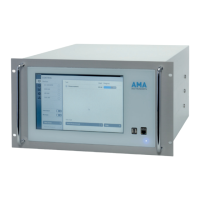
Describes the 19” plug-in case and integrated components.
Details on system control, GC oven, columns, detector.
Comprehensive technical specifications of the instrument.
Explains optional modules like calibration gas selector.
Crucial warnings for electrical, hydrogen, and gas pressure safety.
Requirements for ambient temperature and location.
Details on fittings, gas pressures, and tubing connections.
Information on power supply and additional connections.
Safety precautions before starting operation.
Step-by-step guide for powering on and initializing the analyzer.
Procedures for safely shutting down for repair or transport.
Overview of the main interface showing system status.
Procedure to bypass software password protection.
Explains manual, cyclic, and remote operation modes.
Configuration for master/slave operation in multi-analyzer systems.
Settings for analog outputs, alarms, and communication protocols.
Steps to initiate a measurement run, including timed starts.
Method for defining peak integration windows in chromatograms.
Techniques for adjusting the view of chromatogram data.
Adjusting parameters for peak detection and integration.
Procedures and intervals for instrument calibration.
Inputting concentration values for calibration gases.
Steps for manual and automatic calibration runs.
Configuration and execution of automated calibration processes.
Principles, types, and procedures for validating instrument performance.
Explains the system's operation for sampling, enrichment, and GC analysis.
Detailed explanation of parameters like purging time, temperature, and volume.
Illustrates a typical operational cycle with timing and steps.
Overview of software architecture and configuration files.
Detailed description of the primary control software interface.
Explanation of the main menu options (Unlock, Parameters, View, etc.).
Procedure for unlocking software features via password.
Accessing and modifying various instrument and analysis parameters.
Reviewing the analyzer's operational sequences.
Accessing events, results, status, and oven program data.
Initiating manual and automatic calibration procedures.
Starting initial, standard, and test validation runs.
Accessing remote support and software version information.
General methods for changing parameters and values.
Setting up temperature programs for the GC oven.
Procedures for starting and stopping program cycles.
Reprocessing acquired chromatograms and data analysis.
Critical safety warnings before performing maintenance.
Recommended replacement intervals for key components.
Detailed procedures for replacing and maintaining parts.
Common issues and their detection/repair methods.
Explains automatic alarm messages and their causes/solutions.
Describes warning messages and recommended actions.
Lists severe hardware errors and necessary manufacturer contact.
Explanation of telegram formats and data representation.
Command format for requesting instrument status.
Response format detailing instrument status.
Command format for requesting data from the monitoring station.
Response format for instrument data.
Command format for outputting control words.
Acknowledgement of control commands.
Protocol byte configurations for the GC5000BTX.
Overview of digital inputs/outputs for remote control and status monitoring.
Explains the function and coding of digital output signals.
Describes how to use digital inputs for control commands.
 General
| Brand | AMA Instruments |
|---|---|
| Model | GC 5000 BTX |
| Category | Laboratory Equipment |
| Language | English |

 To Next Page