8
Setup
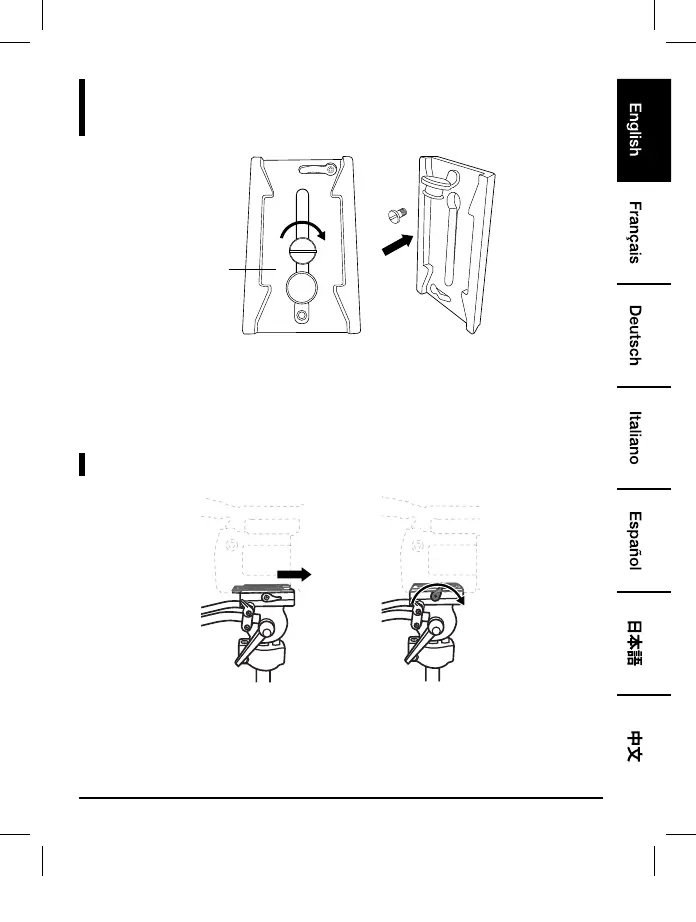
Step 6
Bottom
• Fix the quick-release mounting plate onto the bottom of your camera.
• Note: If the 1/4” screw is too small, use the 5/8” screw located under the mounting plate. Lift the
rubber stopper from the quick-release mounting plate and insert the replacement screw.
Step 7
• Press the safety lock and slide the quick-release mounting plate onto the mounting plate base until
the safety lock clicks in place. Tighten the locking knob of the mounting plate.
B01LW14QNB-67-inch Tripod-02-INT.indb 8 4/7/17 12:03 PM



 To Next Page