RCT
Thermostatic On/Off Remote Control
INSTALLATION AND OPERATING INSTRUCTIONS
This thermostatic on/off remote control system provides a safe,
reliable, and user-friendly remote control for millivolt valve gas
appliances. The system can be operated in a thermostatically or
manual mode. Always check the appliance home owner’s manual
for additional information, or warnings regarding accessory instal-
lation before connecting this remote control system.
Carefully inspect the contents for shipping damage. If any parts
are missing or damaged, immediately contact the dealer from
whom you purchased the kit. Do not attempt to install any part of
the kit unless all parts are in good condition. Please keep this
manual for future reference.
CONTENTS OF KIT
Description Qty
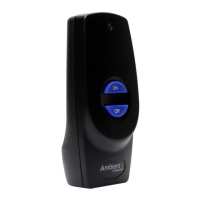
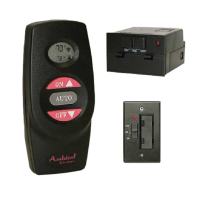
Transmitter 1
Battery Alkaline AAA ( for Transmitter) 3
Receiver (Assembly) consists of: 1
Receiver Box
Slide Button-Black (On/RS/Off)
L-Bracket (Floor Mount)
Battery Alkaline AA (for Receiver) 4
Wall Cover Plate-Black 1
Wall Cover Plate-White 1
Slide Button-White (On/RS/Off) 1
Screws (for Wall Cover Plate) 2
Plug-In Wiring Assembly – 18" Inches 1
Velcro (Loop and Hook) 1
Wall Holster 1
Wall Holster Screws 2
Wall Anchor 2
Installation Instructions 1
Screws (for fireplace system control covers) 2
FEATURES/SPECIFICATIONS
• Contemporary Ergonomic Style Transmitter with Large LCD
Display
• Backlit LCD Display
• Battery Powered Transmitter and Receiver
• Easy Access Front Battery Door
• Pre-Programmed for Quick Installation
• Low battery Indication
• Child Proof Lock-out
• 256 Security Codes
• Quick Disconnect Wiring Assembly
• On/Off, Thermostatic, Timer, and 5-2 Day Thermostatic
Programming Flexibility
• Reset Button
WARNING
Important Safety Information
• Read this manual thoroughly prior to installing, programming
or operating any remote control.
• This remote control system is designed for use with a milli-
volt gas valve system. Do not use this remote control system
on applications with voltages above 30 Volts AC.
• This remote control system requires three (3) "AAA" and four
(4) "AA" alkaline batteries to power the transmitter and
receiver. Wiring must conform to appliance requirement and
building codes/ordinances as required by local and national
code authorities having jurisdiction.
• Do not short (or jumper) across the gas valve terminals to test
the remote control installation. This could damage the unit
and void the warranty.
• This remote control system should only be used as described
in this manual. Any other use is not recommended and will
void the warranty.
Due to the sensitive temperature monitoring
components in the transmitter, it is necessary to
allow the transmitter to stabilize to room
temperature before accurate room temperatures
are displayed. If the transmitter is activated from
a severe cold condition, allow 15 minutes for
accurate temperature readings to appear on the
LCD.
Turn appliance OFF and allow to cool before
installing or servicing. DO NOT connect
110-120 VAC wiring to the milli-volt gas control
valve. The remote operator must be installed
exactly as outlined in these instructions. Read all
instructions completely before attempting
installation. Follow instructions carefully during
installation. Any modification of components will
void the warranty and may cause a fire hazard.
Low battery power in the transmitter or receiver
can affect the operation of the remote control in
the AUTO mode. In some cases the unit may not
cycle off when the target temperature is reached.
INSTALLATIONS
Remote Receiver:
The remote receiver may be wall mounted or installed in the
appliance per the appliance homeowner’s manual. Refer to the
Homeowner’s Manual for special installation instructions. If
wall mounted, the remote receiver must be installed in a junction
box with cover plate provided. Failure to follow the installation
instructions found in the appropriate Homeowner’s Manual will
void the warranty and may cause a fire hazard.
Installing Batteries:
The remote receiver uses four (4)
"AA"- size batteries. To install
batteries,
1.Remove the slide switch by
gently pulling straight out.
2.Use your thumb and index
finger to gently pull down the
L-bracket.
3.Open the battery door by
pressing the two tabs located on
the door.
4.Install the batteries as indicated
in the receiver cover.
5.Close the battery door until the
door tab snaps in place.
6.To install the receiver into a
wall junction box, install the
receiver with the screws
provided.
7.If you decided to install the receiver into the appliance, reinstall
the L-bracket.
8.Gently, install the slide switch back to the receiver stem.
9.The batteries should be replaced at least once every 6 months or
when the battery indicator flashes.
Installing
Wire:
This system comes with an 18 inch pre-assembled wire assembly.
Insert the white terminal to the back of the receiver. The terminal
wire block can only be installed one way. Do not force the termi-
nal plug onto the receiver.
Follow the homeowner’s manual for connecting the two (2) 1/4"
female spade terminals to the millivolt valve.
For applications longer than 18 inches, use 18 gauge wire, 105ºC
rated, with no splices. Connect to the two (2) 1/4" female spade
wiring terminals. Wire can be no longer than 20 feet.
Make sure that the wires do not contact the
appliances any place other than at the terminals.
Exposure to temperatures higher than 105C
(250ºF) may cause the receiver to malfunction or
fire hazard.
Remote Transmitter:
Installing Batteries:
The remote transmitter uses three
(3) "AAA"- size batteries. To install
batteries,
1.Press down the battery door tab
and lift up and remove the battery
door.
2.Install the batteries as indicated on
the receiver cover.
3.Close the battery door by
snapping in place.
4. The batteries should be replaced at least once every 6 months or
when the battery indicator flashes.
Setting Privacy (DIP) Switch on Receiver and Transmitter:
The remote receiver and transmitter privacy (DIP) switches are
preset at the factory. Do not set all DIP switches to "OFF" posi-
tion or "ON" position. The receiver and transmitter privacy (DIP)
switches are preset at the factory. In the event of activation or
interference from other nearby transmissions, reset the code using
the following procedure:
1.Slide the code switches on the transmitter or receiver to your
choice of ON or OFF position. Switches #1 to #6 are preset to
"ON", and #7 and #8 are preset to "OFF" for both the
transmitter and receiver.
2.The switches on the transmitter and receiver must match in
order for the system to work.
3.The system is now ready to operate.
Do not use two (2) or more remote control systems
in the same area with the same dip switch settings,
as they will communicate with each other. This
may cause the appliances to malfunction.
1.The reset button can be used to reset the systems such as the
clock setting. The reset button is located behind the battery
door cover.
2.Using a paper clip, press the button and the system will reset
and go into clock setting mode. Follow the instructions on how
to set the time in the next section.
Installing
Wall Holster:
The transmitter wall holster can be attached to any wall. Use the
wall anchors and screws to secure the wall holster.
OPERATIONS:
Transmitter:
General:
The RCT Remote Control has four (4 )
operating modes: Manual, Timer, Auto,
and Auto-P. The control system can be
set to temperature ranges between 45°F
and 90°F.
The transmitter will operate the remote
receiver from 1foot to a maximum of 30
feet. The distance is reduced when bat-
teries are low or when the receiver is
inside a metal enclosure.
Initial start up:
1.After initial power up or when RESET button is pressed, the
transmitter is reset. The reset button is located inside the battery
door.
2.During system reset, all features of the LCD will be visible.
After one second, the LCD will be initialized. A typical reset
display is shown above. Note that the temperature scale is
degree F.
3.Press SET and TIME/CANCEL more than 3 seconds to select
between °C and °F display. It will exit setting mode
automatically after 10 seconds if no key is pressed.
4.After reset the transmitter is operating in manual mode. The
time and room temperature are shown as above.
Setting Clock:
1.While in Manual model, press SET to enter clock setting mode.
2.In clock setting mode, only clock is displayed. Press SET to
select item (hour, minute or day). Selected item is flashing.
Press 4 or 3 to change. Selected item is flashing.
Manual Mode:
1.Press the ON button once to turn on the appliance. Press the
OFF button to turn it off.
2.In manual mode, the transmitter will not turn the appliance off
even if the room temperature is above the target temperature.
L-Bracket
Slide Switch
Battery Door
WARNING
WARNING
Back of the Transmitter
Battery
Door
Tab
NOTEWARNING
WARNING
Dip Switch
(Default)
Receiver
Reset Button
Transmitter

 Need help?
 General

 To Next Page