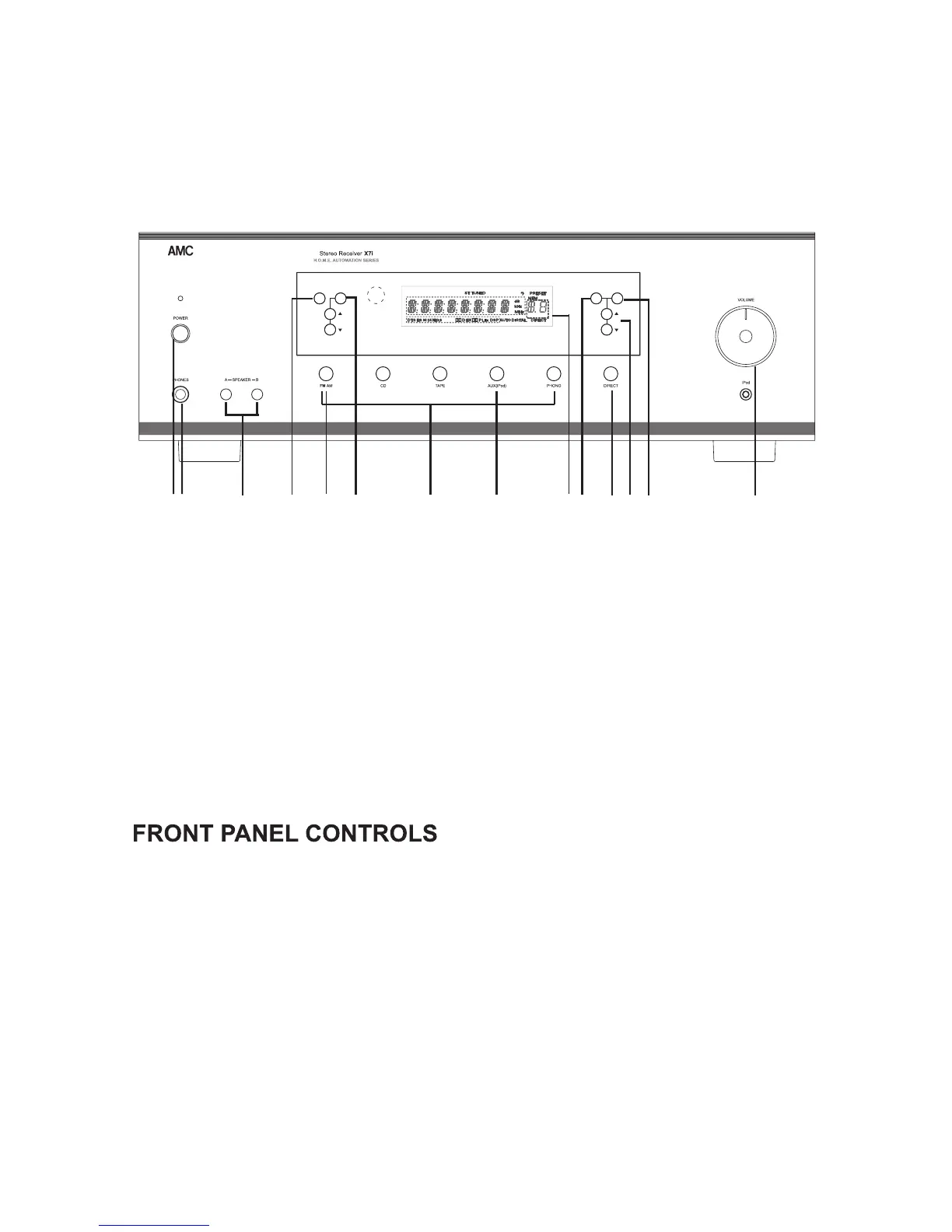
MEMORY MODE
TONE
BALANCE
TUNE PRESET
FRONT PANEL
FRONT PANELCONTROL
1
23
4
5
6
7
8
9
10
11
12 13
14
1. POWER ON/STANDBY
2.PHONES
3.SPEAKER A/B
4.INPUT SELECTOR
When X7i is connected to AC manis,
the STANDBY indicator LED will light
up. Depressing the POWER
ON/STANDBY switch turns on the X7i
receiver. LED light off.
Speaker selector switches allow you
to switch speaker A/B ON or OFF
separately.
These switches allow you to select the
input sources.
The headphone socket will accept any
headphones fitted with a standard
1/4"(6.35mm) stereo jack plug. When
Headphones are in use, both of
SPEAKER A/B shall be switched off.
1. POWER ON/STANDBY
2. PHONES
3. SPEAKER A/B
4. INPUT SELECTOR
5. TONE DIRECT
6. FM/AM MEMORY
7. MODE
8. TUNE/PRESET UP/DOWN
9. DISPLAY
10. TONE
11. BALANCE
12. TONE/BALANCE UP/DOWN
13. VOLUME CONTROL
14. IPod INPUT
7


 To Next Page