Chapter 4
Display Configuration
This section describes how to configure displays and lists available display
connections for your graphics card.
4.1 AMD Radeon™ R9 270X/R9 270 Connections
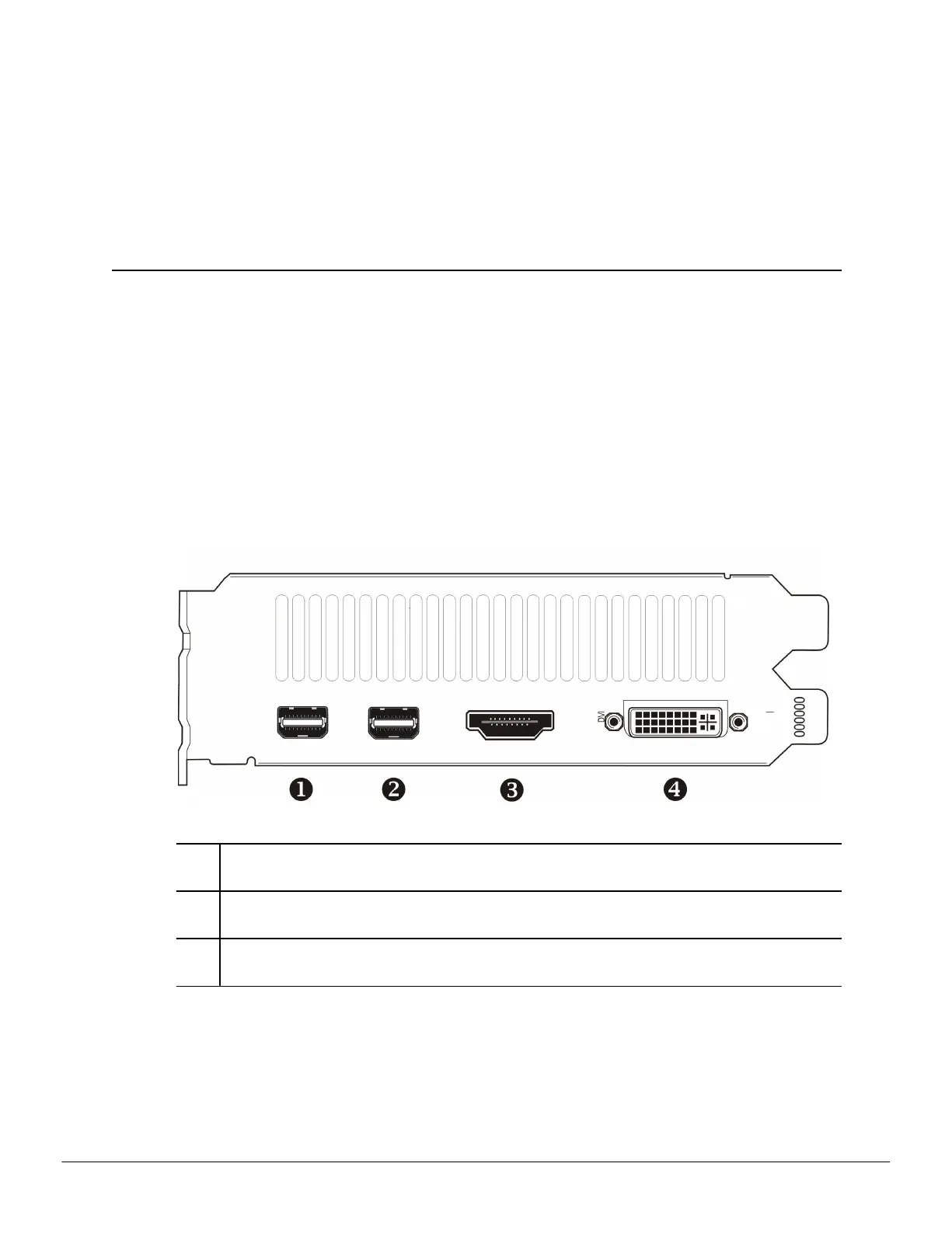
The following figure shows the display connections available on your AMD Radeon™
R9 270X/R9 270 graphics card.
Note: The baseplate may not appear exactly as depicted.
Figure 4–1 AMD Radeon™ R9 270X/R9 270 Display Connections
1, 2 Mini DisplayPort (DP+) connection. Carries video and audio signals to
DisplayPort-compliant devices.
3 HDMI™ connection (Type A). Carries video and audio signals to HDMI-
compliant devices.
4 Dual-link DVI-I connection. Provides video digital signals and HDMI output
that is compatible with most HDMI-compliant devices.
4.2 Display Configurations
The following table lists options for attaching displays that are indirectly supported by
the connections on your graphics card.
©
2014 Advanced Micro Devices, Inc. AMD Radeon™ R9 270X/R9 270 Graphics



 To Next Page