
 Need help?
Do you have a question about the AMEC Camino-108 and is the answer not in the manual?
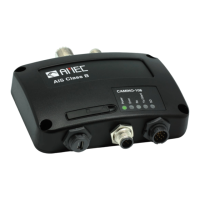
Detailed overview of the CAMINO-108 AIS Class B transponder features and capabilities.
Lists all items included in the product packaging for verification.
Illustrates the various ports and external device connections for the transponder.
Explains the Automatic Identification System (AIS) technology and its purpose.
Compares the features and applications of AIS Class A and Class B transponders.
Details the types of static and dynamic data broadcasted by Class B AIS.
Outlines the reporting intervals for ship static and dynamic data transmissions.
Step-by-step guide for the proper installation of the AIS transponder unit.
Guidelines for selecting an appropriate and safe location to mount the transponder.
Recommendations for optimal placement and installation of VHF and GPS antennas.
Specifies requirements for GPS antenna placement for clear sky view.
Wiring diagram and instructions for connecting power and data cables.
How to connect the transponder to other NMEA0183 compatible marine electronics.
Instructions for enabling AIS silent mode via an external switch.
Details on integrating the transponder with an NMEA2000 network.
Specifies power requirements and connection procedures for the transponder.
Guides on establishing a connection between the transponder and a PC.
Steps for connecting the transponder via a serial port using USB.
Instructions for wireless connection setup for the CAMINO-108W.
How to configure essential vessel information like MMSI and name.
Configuration options for DSC monitoring, GPS output, and alarms.
How to set communication baud rates for NMEA0183 ports.
Overview of diagnostic tools for system checks and data logging.
Performing a system check for firmware, serial number, and device status.
Monitoring GPS status, satellite connectivity, and position accuracy.
Accessing and managing collected AIS voyage data.
Instructions on how to power on and initiate the transponder's operation.
Explanation of LED lights and their meanings for device status.
How to use an SD card for recording voyage data.
Steps to configure Wi-Fi connectivity for the CAMINO-108W.
How the device monitors its integrity and indicates errors.
Overview of the complementary AIS Viewer charting software.
Information about the mobile application for monitoring AIS traffic.
Detailed technical specifications of the CAMINO-108 AIS transponder.
Physical dimensions of the transponder unit and mounting hardware.
List of NMEA 2000 Parameter Group Numbers (PGNs) supported.
List of NMEA0183 data sentences transmitted and received.
Addresses the issue of the transmitting LED not being illuminated.
Explains why other vessels may not be visible or why the user is not visible to others.
Troubleshoots issues related to the silent mode feature not functioning correctly.
Explains why vessel names might take a long time to appear or not appear at all.
Provides solutions for when no data is being received by the chart plotter.
Addresses the problem of the vessel name not being displayed on other systems.
Explains the meaning of the illuminated red error LED and its causes.
Glossary of acronyms and technical terms used in the manual.
Regulatory information regarding FCC rules and potential interference issues.
Safety instructions related to radio frequency (RF) electromagnetic energy exposure.
Statements of product compliance with relevant directives.
Details the terms and conditions of the manufacturer's worldwide limited warranty.
Step-by-step guide to finding the correct serial port for PC connection.
 General
| Brand | AMEC |
|---|---|
| Model | Camino-108 |
| Category | Marine Equipment |
| Language | English |

 To Next Page