a. TO SET CLOCK ON INITIAL MART UP
(When circuit breaker is first turned on, hour of day will be flashing)
1. Push arrow I' or '1" buttons to desired hour - ('PM" light will glow to indicate afternoon and
evening hours)
1 3
2. Push 'Enter' button to set hour - (minutes will then begin flashing)
2 4
3. Push arrow
"I'
or
"1"
buttons to desired minutes
4. Push 'Enter button to set minutes
Helpful Hint: If desired, once the clock is set no other programming is necessary to operate the
sauna heater. The factory has selected 175 degrees for 30 minutes as average settings. Simply
push the 'ON' button and enjoy your sauna bath.
b. TO CHANGE CLOCK
(Atter time-of-day has already been set on initial start up, hour of day won't be flashing)
Make sure control is in 'OFF" mode - (only the time-of-day is displayed)
1. Push "Prog" button - (hour of day will begin flashing)
3 5
2. Push arrow "r or
"1"
buttons to desired hour - ("PM" light will glow to indicate afternoon and
evening hours)
3.
Push "Enter" button to set hour - (minutes will then begin flashing)
4.
Push arrow "r or 1" buttons to desired minutes
5.
Push "Enter" button to set minutes (correct time should now be displayed or see #6)
(6.) If the 7 day programming feature has been turned on, the hour will then begin flashing at
"12' PM and you must push the "Prog" button to exit setting the clock - (correct time
should now be displayed)
c. TO SET ROOM TEMPERATURE AND LENGTH OF HEATING TIME
2
1. Push "ON' button - (time, set room temperature, and present length of heating time will be
displayed and the unit will begin heating)
3 5
2. Push "Prog' button - (temperature will change to a flashing temperature
desired)
4 6
3. Push arrow "r or
"1"
buttons to set desired room temperature
4.
Push "Enter button to set temperature - (length of heating time will then begin flashing)
5.
Push arrow "r or 1* buttons to desired length of heating time
6.
Push 'Enter button to set length of heating time - (the unit will come on and the 'Heating" light
will glow, the set room temperature will be displayed along with the remaining length of
heating time)
7.
To stop the unit push "OFF' button - (only the time of day will be displayed when the unit is off
and not heating)
d. TO TURN UNIT ON
1.
Set room temperature and length of heating time as described above - (if you have not
previously done this)
2.
Push the "ON' button - (the unit will come on and the "Heating' light will glow. The set room
temperature will be displayed along with the remaining length of heating time)
3.
The unit will automatically shut off at the end of the length of heating time you programmed or
sooner if you push the 'OFF" button
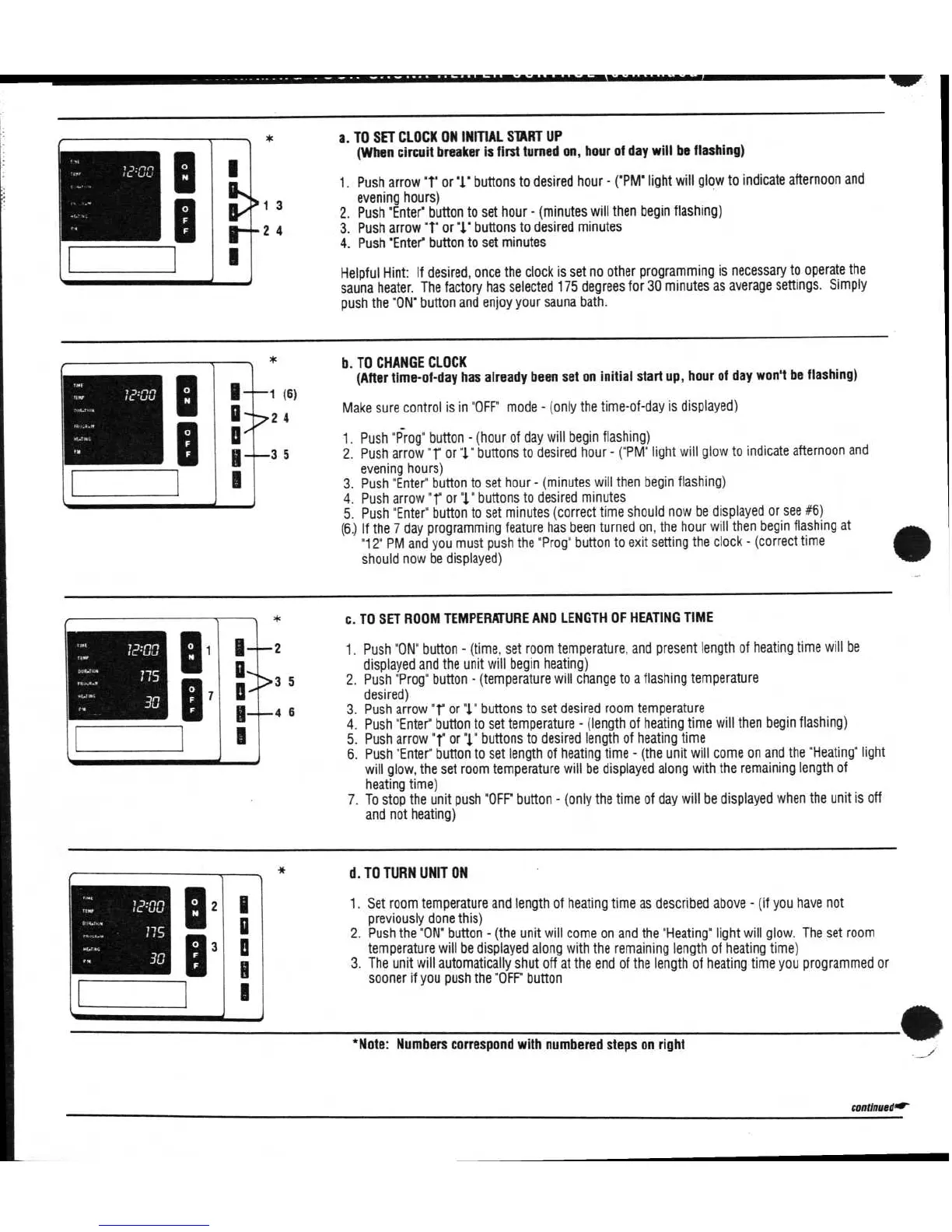
*Note: Numbers correspond with numbered steps on right
continuedor



 To Next Page
 Loading...