Need help?
Do you have a question about the American Audio RADIUS 3000 and is the answer not in the manual?
Specific safety warnings and cautions for US/Canada models regarding fire, shock, and liquid.
Advisories on product use, potential interference, and reading the manual.
Guidelines for safe electrical connections, grounding, and avoiding hazards.
Detailed instructions for safe operation, handling, and environmental considerations.
Further safety advice on operation, servicing, and product warnings.
Fields for recording Model No., Serial No., and Purchase Notes.
Steps for checking the unit, product overview, and customer support contact.
Guidelines for connections, power-up, and operating environment conditions.
Lists primary playback, recording, and sound manipulation features.
Details on specific modes like Fader "Q" Start, Flip-Flop, Memory Backup, and Sleep Mode.
Requirements and recommendations for using SD cards and USB devices.
Procedures for verifying package contents and making audio/control connections.
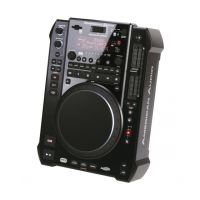
Explanation of key top panel controls like Source Selector, Eject, VFD Display, and Pitch Slider.
How to select audio sources and navigate tracks using buttons and knobs.
Detailed explanation of Pitch Bend buttons, Pitch On/Off, and Pitch Slider.
How to use Tempo Lock, adjust pitch range, and use the Jog Wheel for various functions.
Jog Wheel light modes, touch sensitivity, Play/Pause, and Cue button functions.
Explanation of IN, OUT, and RELOOP buttons for seamless loops and cue points.
Using search buttons, fast track buttons, and folder/track knobs.
Using Beat-Sync, Smart Loop, Parameter Ratio, and Filter effect.
Detailed functions of Echo, Trans, Skid, Hold, Phase, and Flanger effects.
Using Sample, Bank, Bank Program, and Memory buttons.
Using the Time button, SGL/CTN function, and MIDI button.
Connecting main power, relay jack, digital out, and audio out R&L.
Connecting headphones, volume control, and USB MIDI jack.
Explanation of Play, Pause, Cue, Folder, Source, and Character indicators.
Details on BPM, Memory Bucket, Time Bar, and Time Meter indicators.
Explanation of Elapsed, Remaining, and Total time displays.
Indicators for Track, Single mode, Reloop, and Auto Cue status.
How to enter and adjust menu options like Jog Mode, Playlist, and MIDI settings.
Procedures for saving custom settings and restoring factory defaults.
Instructions for loading SD cards, USB devices, CDs, and selecting the audio source.
Methods for selecting tracks using track buttons and the track knob.
How to start, pause, and stop playback using the play/pause button.
Setting automatic cue points and using the jog wheel for frame-by-frame searching.
Using search buttons and methods for setting cue points.
How to store up to four cue points in bank buttons for recall.
Steps to set the start and end points for a seamless loop using IN and OUT buttons.
How to create and store samples into bank buttons using the memory function.
How to exit a seamless loop and replay a stored loop using the RELOOP button.
Procedures for editing the end point of an existing seamless loop.
Steps to create and store samples (max 5.5s) into bank buttons using the memory function.
How to recall and play stored samples, either as a continuous loop or a single playback.
Adjusting sample speed and volume using parameter knobs.
Using the hold button to lock parameter adjustments.
Using bank buttons to store and recall samples or cue points.
How to program a sequence of up to 12 stored samples.
Switching between Elapsed, Remaining, and Total time displays.
Procedures for recalling bank memory for CD and SD/USB devices.
How to adjust jog wheel sensitivity and enable touch sensitivity mode.
How touch sensitivity functions in playback and cue modes.
How to use the pitch slider to increase or decrease track playback speed.
Steps to activate the pitch slider and how to operate it.
Changing the pitch percentage range (4%, 8%, 16%, 100%).
Using pitch bend buttons and the jog wheel to momentarily alter track speed.
Detailed explanation of using the jog wheel for pitch bending and its effects.
Introduction to eight built-in effects and using beat select buttons for presets.
How to use the scratch and skid effects with the jog wheel and adjust their parameters.
Description and adjustment of Filter, Phase, Flanger, and Echo effects.
Description and adjustment of Trans and Pan effects.
How to adjust effect parameters using knobs and lock them with the hold button.
How to enter advanced track search mode using the ADV. TRACK button.
Using folder and track knobs to find desired tracks.
Configuring the unit for USB link play between two Radius 3000 units.
Physical connection steps using USB cables for linked playback.
Introduction to the DbBuilder software for scanning and managing music libraries.
Instructions for formatting drives and rebuilding the database.
How to set up and navigate playlists by artist, album, genre, etc.
Mapping of MIDI messages for various buttons, knobs, and encoders on the unit.
MIDI mapping for playback, cue, effects, and other function buttons.
MIDI mapping for sample, cue, source select, and tempo-related controls.
MIDI mapping for beat sync, live FX, and specific pitch settings.
MIDI mapping for CD, SD, and SD_IN status indicators.
Connecting and setting up two players for sequential track playback.
Instructions for connecting the Radius 3000 to a compatible mixer for Flip-Flop control.
Terms and conditions of the one-year limited warranty, including coverage and exclusions.
Details on unit type, media compatibility, dimensions, weight, and power supply.
Technical audio characteristics including output level, frequency response, and noise levels.
 General
| Brand | American Audio |
|---|---|
| Model | RADIUS 3000 |
| Category | DJ Equipment |
| Language | English |

 To Next Page