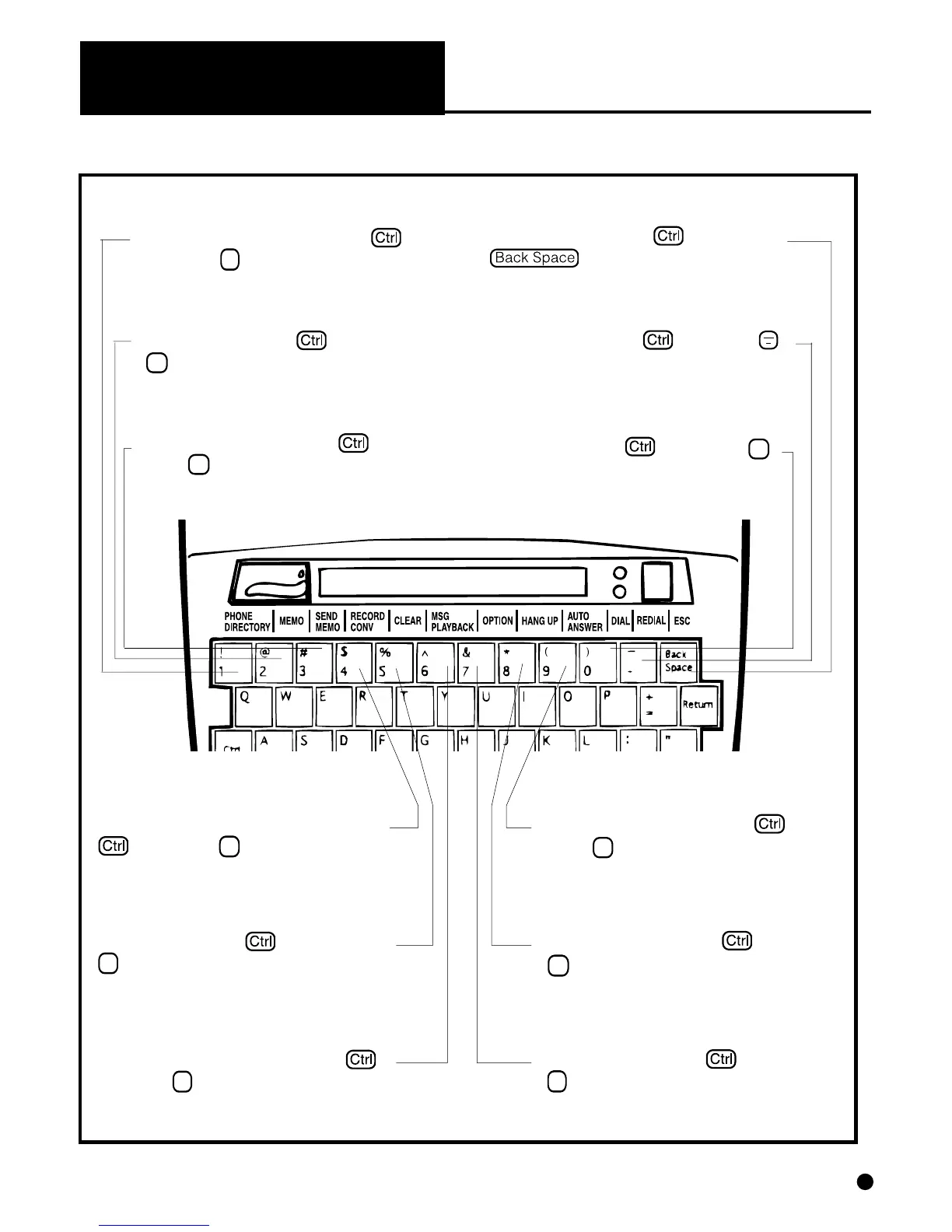
Memo – Hold down and press
2 to create or edit memos.
(Pages 8, 13)
Escape – Hold down and press
to exit from special function
modes and go back to normal TTY opera-
tion. (Page 7)
Redial – Hold down and press
to redial the last dialed number. (Page 11)
Dial – Hold down and press 0
to dial a phone number from the key-
board or Phone Directory. (Page 10, 11)
Phone Directory – Hold down
and press 1 to create or change a
phone number in memory directory.
(Page 7)
Special Function Keys on DIALOGUE III / III–P
Message Playback – Hold down
and press 6 to playback recorded mes-
sages. (Page 12)
Record Conversation – Hold down
and press 4 to record a conversa-
tion and put it into memory. (Page 13)
Send Memo – Hold down and
press 3 to send memo from memory.
(Page 13)
Auto Answer – Hold down and
press 9 to turn on your automatic an-
swering system. (Page 12)
Option – Hold down and press
7 to review or change the operation
settings of your TTY. (Pages 7, 8, 9, 10)
Hang Up – Hold down and press
8 to hang up on your telephone con-
nection without turning your TTY off.
(Page 10)
Clear – Hold down and press
5 to clear all memos, conversations
or recorded messages in memory.
(Page 16)
CHAPTER 3
(CONTINUED)
5


 To Next Page