Page 7For technical questions, please call 1-888-866-5797.Item 64623
Installing/Replacing Batteries
CAUTION! Do not mix old and
new batteries. Do not mix alkaline,
standard (carbon-zinc), or rechargeable
(nickel-cadmium) batteries. Position
batteries in proper polarity. Do not
use swollen or leaking batteries.
The battery compartment is located
on the bottom of the handle.
1. Remove screw, then
remove Battery Cover.
2. Insert batteries.
3. Replace Battery Cover,
then replace screw.
Tool Set Up
TO PREVENT SERIOUS INJURY FROM ELECTRICAL SHOCK:
Make sure that the Unit is OFF before performing any procedure in this section.
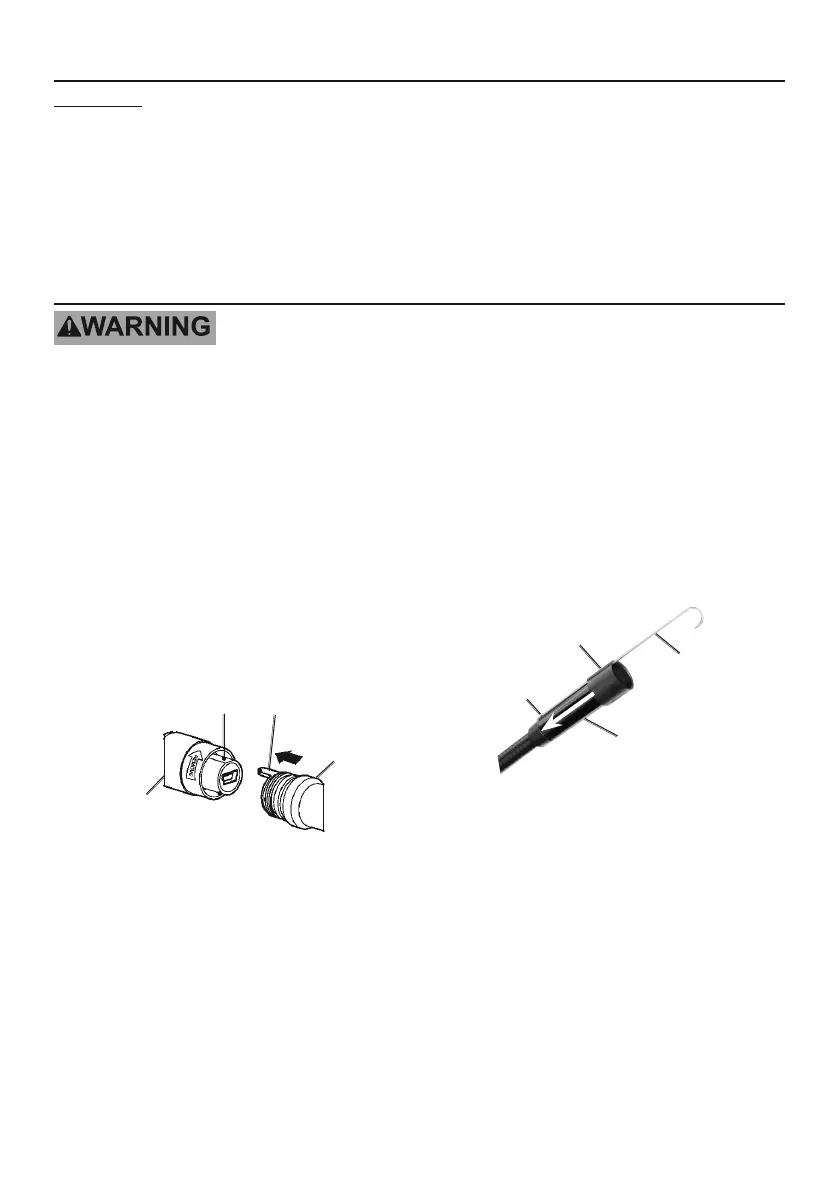
1. Connecting Cable:
a. Carefully push Cable’s key
into Cable Connector’s slot.
b. Turn Cable Connector
counterclockwise until the
Cable and Cable Connector
are securely attached.
2. Disconnecting Cable:
a. Turn Cable Connector clockwise
until the Cable and Cable
Connector are detached.
b. Remove Cable.
Cable
Key
Slot
Cable
Connector
3. Attaching Accessories:
a. Hold the accessory against
the Imager Head, placing
the Hook in the hole.
b. Match the slot on the Sleeve
to the accessory, then slide the
Sleeve down the Imager Head
until it covers the Hook.
Imager
Head
Accessory
Sleeve
Hook


 To Next Page