- 11 -
OPERATION
Cooker hood controls
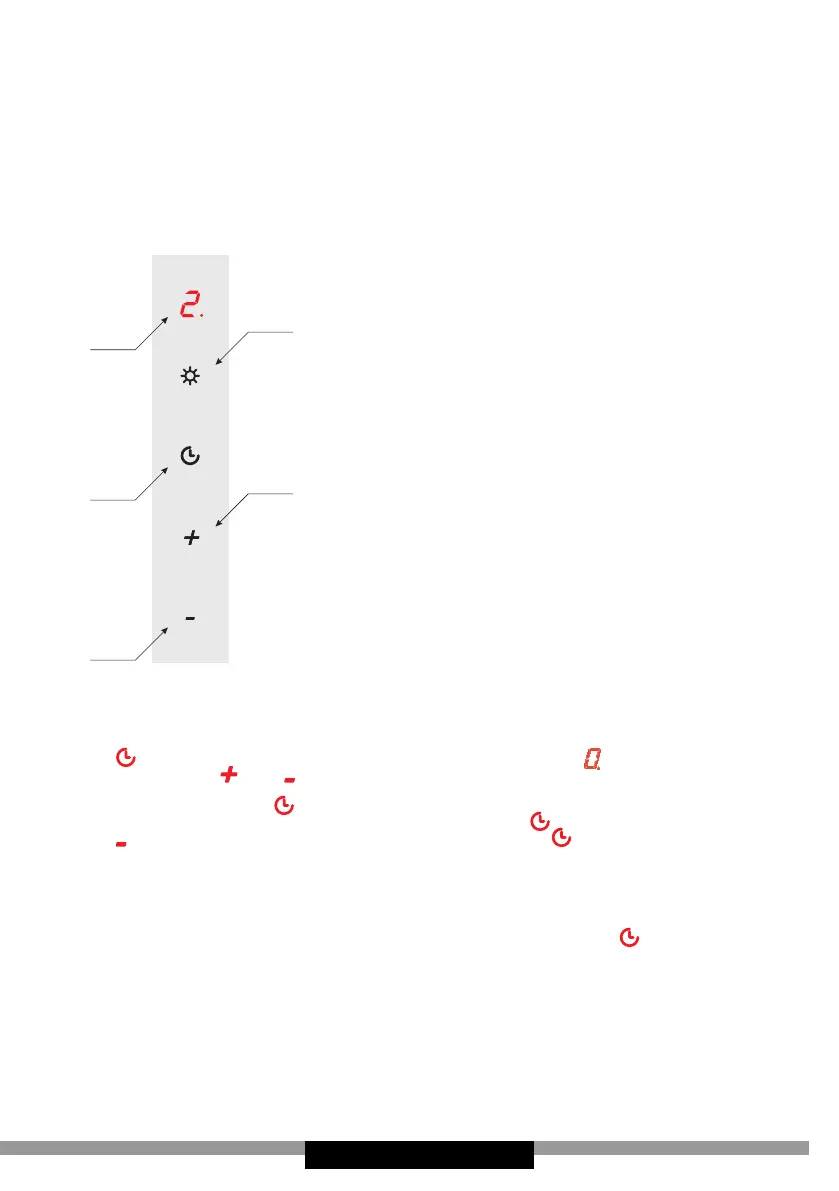
Control Panel is shown in Figure 4, for reference it is also shown below:
2
3
5
4
Control Panel
It is equipped with a touch controls. Touch one
the sensors to enable the desired function:
1 — Reduce fan speed
2 — Increase fan speed
3 — Speed display The hood fan can run at 3 or
4 speeds (depending on the model).
4 — O timer
5 — Lighting on/o The lighting operates inde-
pendently of hood fan.
Available fan speeds:
- Low speed (1). Use this speed when cooking
a little food with hardly any fumes.
- Medium speeds (2 and 3*). Use this speed
when cooking multiple dishes at the same
time with moderate amount of fumes.
- High speed (4*). Use this speed when frying
or grilling, with large amount of fumes.
* Varies depending on the model
O Timer
Use o timer to turn o the hood after a specied time. Use o timer to lter
the fumes out of the air after cooking. Maximum delay time is 90 minutes.
Touch to cancel the o-timer at any time. The number will ash on the
display. Then use and to select the delay in the range 1–9 (multiply the
number by ten to obtain delay in minutes, 1 – 10 minutes, 2 – 20 minutes ...
5 – 50 minutes). Touch again to activate the function. The o timer is set
a dot will ash on by the digit on the display. Touch to cancel the o timer.
Touch to reduce the delay time down to zero. Touch .to conrm the o-tim-
er has been cancelled. Cancelling the o-timer does not turn o the lighting.
Child Lock
The cooker hood has a child lock safety device. This function is also useful
when cleaning the cooker hood control panel. Touch and hold for 3 seconds
to activate or deactivate the Child Lock function.



 To Next Page