iDesign Advanced WaveScan Studio System
Operator’s Manual
Designing Advanced CustomVue Treatments
0110-0624 Rev. D 0217 10-17
Calculating the Advanced CustomVue Treatment
1. Click on the OD/OS Calc sub-tab.
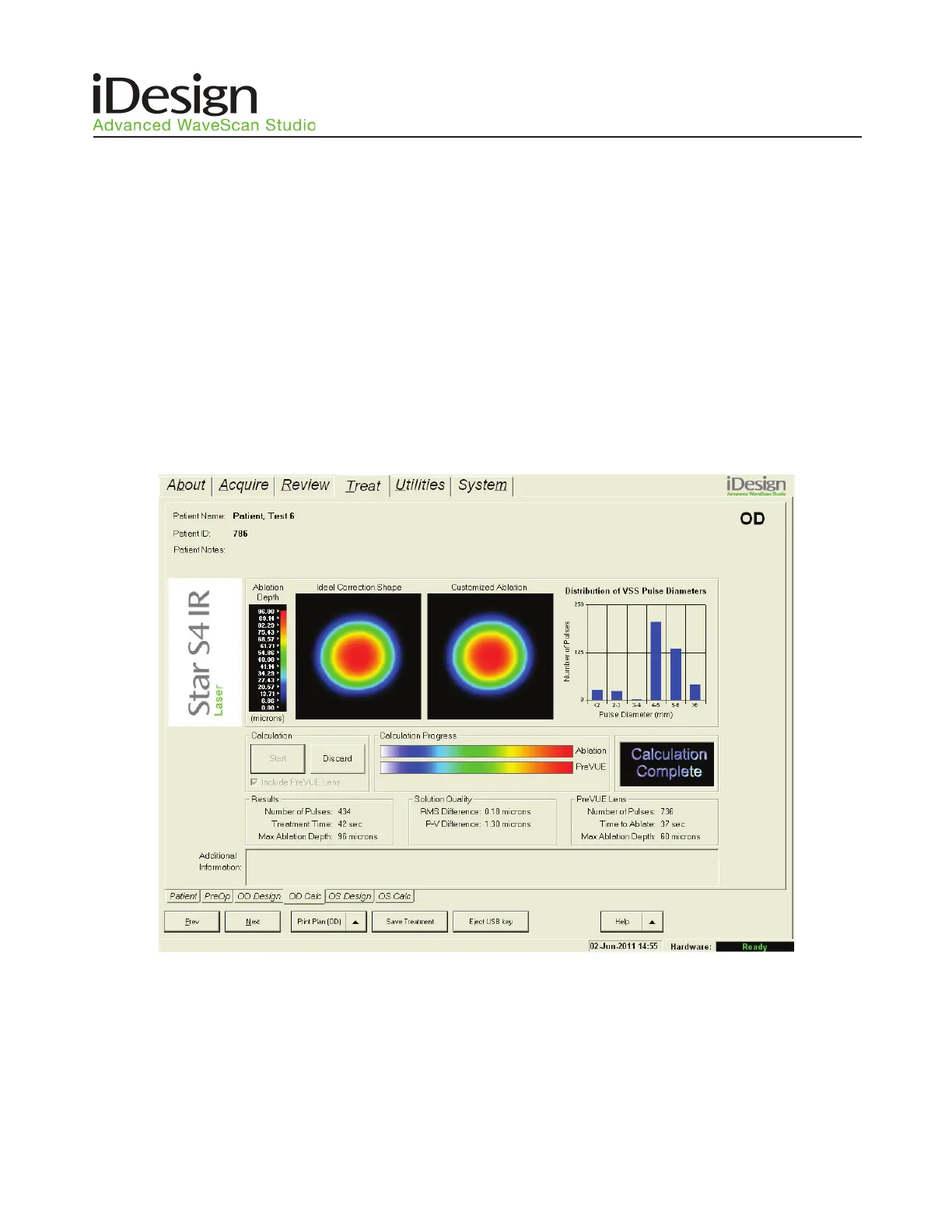
2. Click the Start button to begin the treatment calculation process. The Calculation Progress bar will
indicate when the calculation is in progress, which may require several seconds to complete. When
the treatment calculation is complete, the status box will display Calculation Complete. The screen
will display a graphic of the planned ablation shape and the distribution of Variable Spot Scanning
(VSS) pulse diameters to be used for the treatment. The desired treatment shape (Ideal Correction
Shape) is illustrated (only in Expert Mode) by a static map (Figure 10.12). To discard the treatment
calculation, click on the Discard button.
NOTE: The user cannot select another patient while the treatment is being calculated, but is able to calculate a
treatment for the other eye of the same patient, if desired.
NOTE: A warning message will be displayed if the difference between the manifest refraction and the selected
wavefront refraction is outside the limits set by the iDesign System software. See Table 10.1 for the tolerance range.
Table 10.2 displays a list of warning messages and corrective actions.
Figure 10.12 – Treat/OD Calc Sub-Tab Screen (Expert Mode)



 To Next Page