EasyManua.ls Logo

AMP BH-420 - User Manual

AMP BH-420
12 pages
Print Icon
To Next Page IconTo Next Page
Loading...
Question and Answer IconNeed help?

Do you have a question about the AMP BH-420 and is the answer not in the manual?

Summary

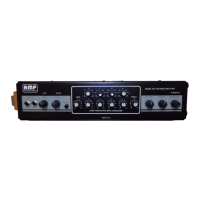
Front Panel Features

Input Jacks

Details on using the two available input jacks for varying signal levels and gain.

Gain Control

Explanation of the variable gain control for setting the signal level before EQ and limiting.

Clip Light Indicator

Describes the clip light monitoring four stages to warn of potential distortion.

Limiter Control

Sets the threshold for compression or limiting to achieve uniform output levels.

Active Light

Indicates when the signal exceeds the limiter threshold, showing gain reduction.

Enhance Button

Boosts low bass and upper end frequencies for a clearer, more transparent sound.

Bass Control

Provides wide adjustment for bass frequencies with up to 15 dB boost or cut.

Semi Parametric Bass Equalizer

Four bands of tunable equalization for precise frequency response adjustment.

Treble Control

Allows adjustment of treble frequencies with up to 15 dB boost or cut.

Tone Balance Control

Boosts lows while cutting highs, or vice versa, for tonal shaping.

Volume Control

Adjusts the overall loudness or output level of the amplifier.

Crossover Control

Selects crossover frequency for biamp outputs, splitting low and high frequencies.

Power On Indicator

Green LED indicating the amplifier is plugged in and ready for use.

Specifications

Back Panel Features

Recording Outputs

Describes balanced direct (PRE-EQ) and line (POST-EQ) outputs for recording.

Effects Loop

Connects external effects units to the amplifier for sound modification.

Biamp Outputs

Provides separate low and high frequency outputs for biamplification setups.

Power Amplifier Input

Allows direct signal insertion into the power amplifier section.

Headphone Jack

Enables quiet practice or warmup using headphones.

Speaker Outputs 1 and 2

Connects the amplifier's output to speaker cabinets.

Power On;Off Switch

Located on the rear for controlling power, with a delay circuit.

Operating Voltage Settings

Instructions for switching line voltage for worldwide compatibility.
Limited Warranty

Summary

Front Panel Features

Input Jacks

Details on using the two available input jacks for varying signal levels and gain.

Gain Control

Explanation of the variable gain control for setting the signal level before EQ and limiting.

Clip Light Indicator

Describes the clip light monitoring four stages to warn of potential distortion.

Limiter Control

Sets the threshold for compression or limiting to achieve uniform output levels.

Active Light

Indicates when the signal exceeds the limiter threshold, showing gain reduction.

Enhance Button

Boosts low bass and upper end frequencies for a clearer, more transparent sound.

Bass Control

Provides wide adjustment for bass frequencies with up to 15 dB boost or cut.

Semi Parametric Bass Equalizer

Four bands of tunable equalization for precise frequency response adjustment.

Treble Control

Allows adjustment of treble frequencies with up to 15 dB boost or cut.

Tone Balance Control

Boosts lows while cutting highs, or vice versa, for tonal shaping.

Volume Control

Adjusts the overall loudness or output level of the amplifier.

Crossover Control

Selects crossover frequency for biamp outputs, splitting low and high frequencies.

Power On Indicator

Green LED indicating the amplifier is plugged in and ready for use.

Specifications

Back Panel Features

Recording Outputs

Describes balanced direct (PRE-EQ) and line (POST-EQ) outputs for recording.

Effects Loop

Connects external effects units to the amplifier for sound modification.

Biamp Outputs

Provides separate low and high frequency outputs for biamplification setups.

Power Amplifier Input

Allows direct signal insertion into the power amplifier section.

Headphone Jack

Enables quiet practice or warmup using headphones.

Speaker Outputs 1 and 2

Connects the amplifier's output to speaker cabinets.

Power On;Off Switch

Located on the rear for controlling power, with a delay circuit.

Operating Voltage Settings

Instructions for switching line voltage for worldwide compatibility.

Limited Warranty

AMP BH-420 Specifications

General IconGeneral
BrandAMP
ModelBH-420
CategoryAmplifier
LanguageEnglish