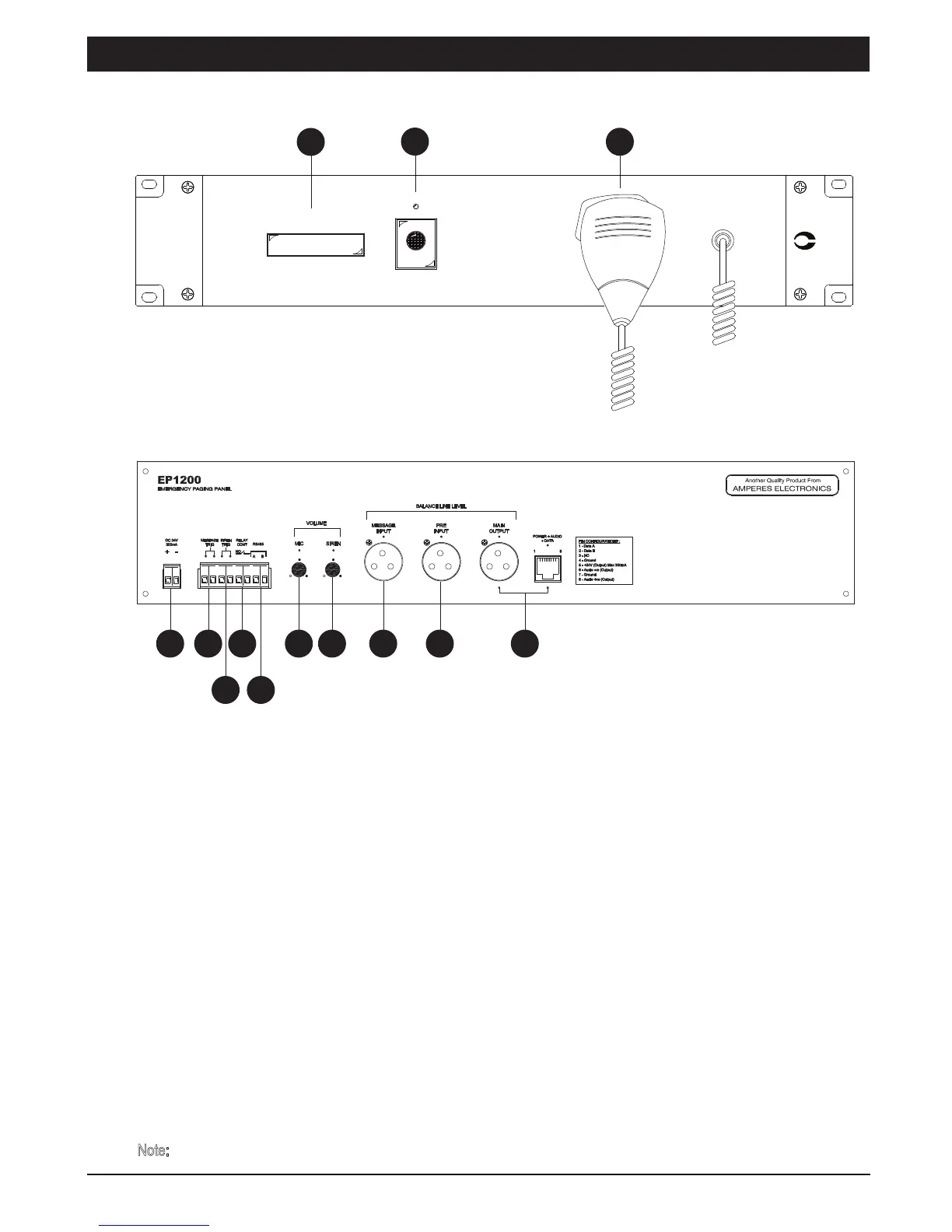
Parts Identification
PAGE 2 EP1200 | EMERGENCY PAGING MICROPHONE PANEL
Front View:
Rear View:
1
2
4
3
5
6
7
8
9 10 11 12 13
1. FIRE INDICATOR
2. SIREN SWITCH
3. HANDHELD PAGING MICROPHONE
Pressing the microphone switch shall have priority over other inputs such as Siren, External Message input as well as
normal paging or BGM feeds. To page, just pick up the handset, press the button and start talking. Releasing the switch,
the previous operating mode shall resume.
Press the siren button shall activate the siren. FIRE indicator shall lit and the MIC switch relay contact (7) shall close.
Press the siren switch again will turn Off the siren.
Whenever siren or external activation device is triggered, the FIRE indicator shall flash alongside with siren audio
broadcast. Activate the paging microphone will also turn on the flashing.
EP 1200
amperes
EMERGENCY PAGING PANEL
MIC
SIREN SWITCH
SIREN
FIRE
EMERGENCY / SIREN ACTIVE
4. 24V INPUT
The unit operates on 24V DC. It is preferred that the unit to be supplied directly from the uninterrupted power source. ie.
power supplies linked to back up batteries.
Note:
Do not connect directly to the terminals of back up battery. It shall damage the equipment.



 To Next Page