EasyManua.ls Logo

Ampex 351 - Page 61

Default Icon
103 pages
Print Icon
To Next Page IconTo Next Page
To Previous Page IconTo Previous Page
Loading...
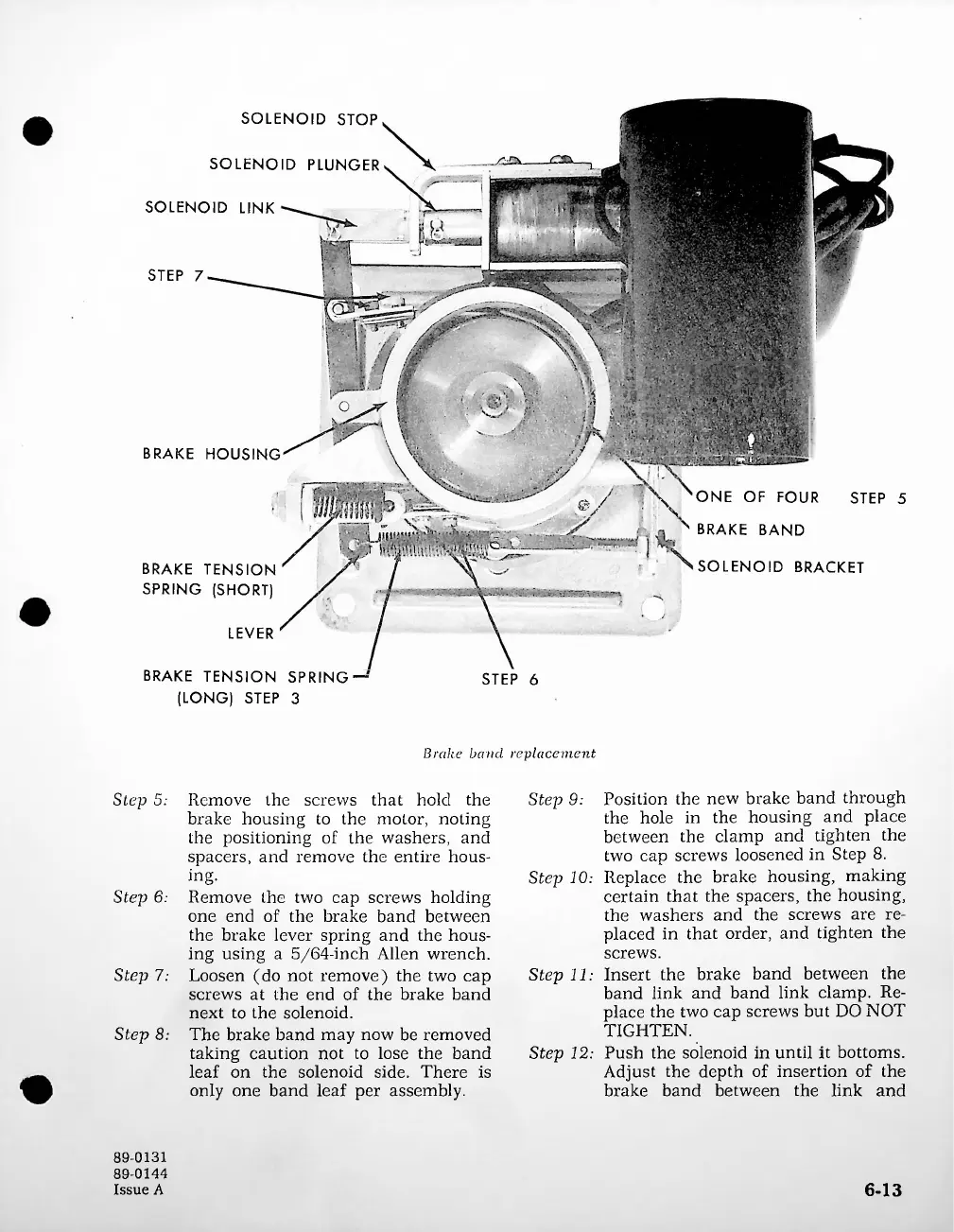
SOLENOID
STOP
SOLENOID
PLUNGER
SOLENOID
LINK
STEP
7
BRAKE
HOUSING
ONE
OF
FOUR
STEP
5
x
BRAKE
BAND
SOLENOID
BRACKET
LEVER
STEP
6
Brake
baacl
replacement
Step
9:
Step
5:
Step
6;
Step
7;
Step
8:
6-13
BRAKE
TENSION
SPRING
(SHORT)
89-0131
89-0144
Issue
A
,
g
g
;
/A
-
;g.'
..
■'/
BRAKE
TENSION
SPRING
(LONG)
STEP
3
Position
the
new
brake
band
through
the
hole
in
the
housing
and
place
between
the
clamp
and
tighten
the
two
cap
screws
loosened
in
Step
8.
Step
10:
Replace
the
brake
housing,
making
certain
that
the
spacers,
the
housing,
the
washers
and
the
screws
are
re
placed
in
that
order,
and
tighten
the
screws.
Step
11:
Insert
the
brake
band
between
the
band
link
and
band
link
clamp.
Re
place
the
two
cap
screws
but
DO
NOT
TIGHTEN.
Step
12:
Push
the
solenoid
in
until
it
bottoms.
Adjust
the
depth
of
insertion
of
the
brake
band
between
the
link
and
Remove
the
screws
that
hold
the
brake
housing
to
the
motor,
noting
the
positioning
of
the
washers,
and
spacers,
and
remove
the
entire
hous
ing.
Remove
the
two
cap
screws
holding
one
end
of
the
brake
band
between
the
brake
lever
spring
and
the
hous
ing
using
a
5/64-inch
Allen
wrench.
Loosen
(do
not
remove)
the
two
cap
screws
at
the
end
of
the
brake
band
next
to
the
solenoid.
The
brake
band
may
now
be
removed
taking
caution
not
to
lose
the
band
leaf
on
the
solenoid
side.
There
is
only
one
band
leaf
per
assembly.
g
..
;ggg>
@/
\

Related product manuals