EasyManua.ls Logo

Ampex 351 - Page 85

Default Icon
103 pages
Print Icon
To Next Page IconTo Next Page
To Previous Page IconTo Previous Page
Loading...
ion
PIN
2
■>PIN
I
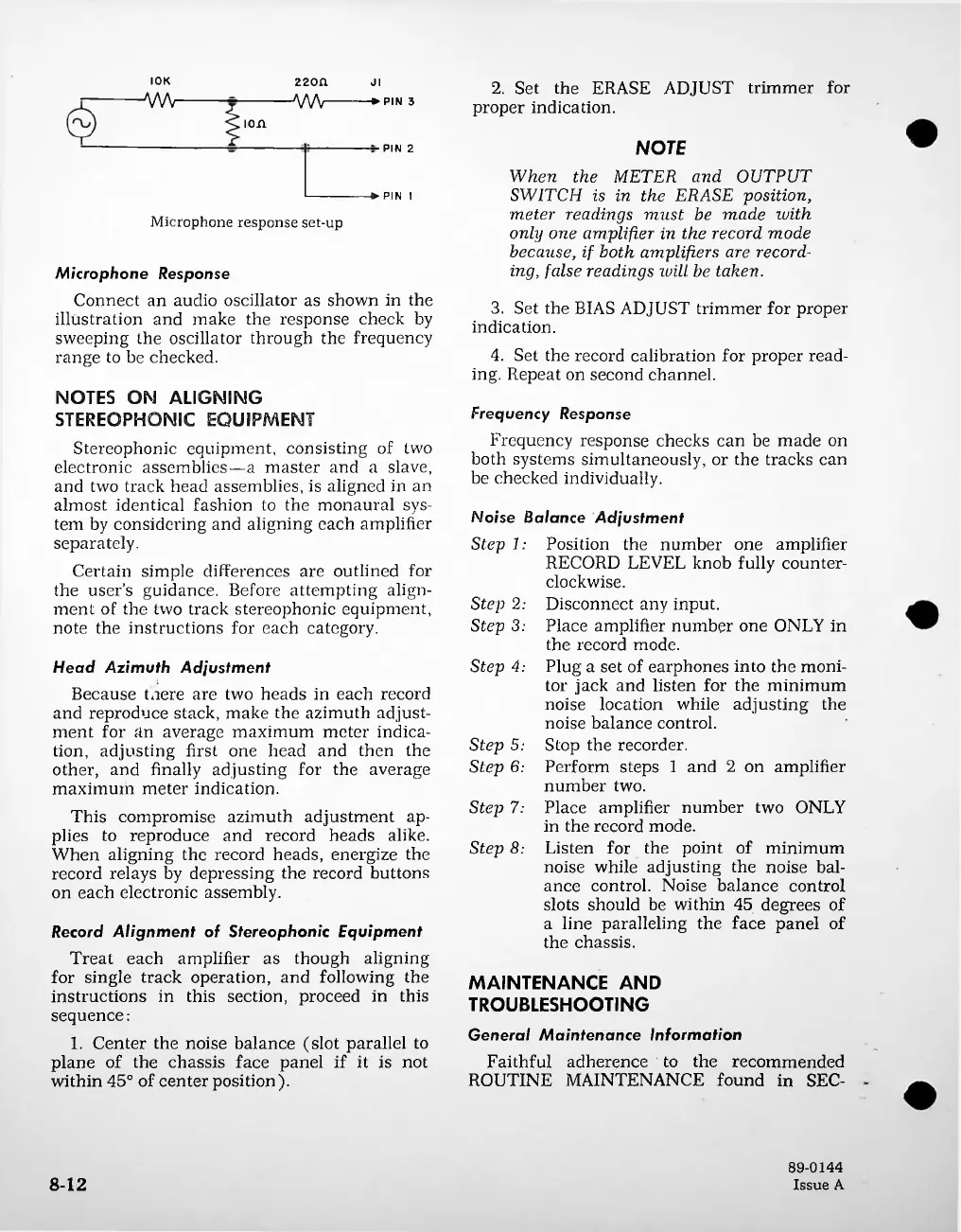
Microphone
response
set-up
Step
4:
Step
7:
Step
8:
8-12
Step
5:
Step
6:
Step
2:
Step
3:
Record
Alignment
of
Stereophonic
Equipment
Treat
each
amplifier
as
though
aligning
for
single
track
operation,
and
following
the
instructions
in
this
section,
proceed
in
this
sequence:
1.
Center
the
noise
balance
(slot
parallel
to
plane
of
the
chassis
face
panel
if
it
is
not
within
45°
of
center
position).
Head
Azimuth
Adjustment
Because
taere
are
two
heads
in
each
record
and
reproduce
stack,
make
the
azimuth
adjust
ment
for
fin
average
maximum
meter
indica
tion,
adjusting
first
one
head
and
then
the
other,
and
finally
adjusting
for
the
average
maximum
meter
indication.
This
compromise
azimuth
adjustment
ap
plies
to
reproduce
and
record
heads
alike.
When
aligning
the
record
heads,
energize
the
record
relays
by
depressing
the
record
buttons
on
each
electronic
assembly.
NOTES
ON
ALIGNING
STEREOPHONIC
EQUIPMENT
Stereophonic
equipment,
consisting
of
two
electronic
assemblies
a
master
and
a
slave,
and
two
track
head
assemblies,
is
aligned
in
an
almost
identical
fashion
to
the
monaural
sys
tem
by
considering
and
aligning
each
amplifier
separately.
Certain
simple
differences
are
outlined
for
the
user
s
guidance.
Before
attempting
align
ment
of
the
two
track
stereophonic
equipment,
note
the
instructions
for
each
category.
Microphone
Response
Connect
an
audio
oscillator
as
shown
in
the
illustration
and
make
the
response
check
by
sweeping
the
oscillator
through
the
frequency
range
to
be
checked.
Frequency
Response
Frequency
response
checks
can
be
made
on
both
systems
simultaneously,
or
the
tracks
can
be
checked
individually.
3.
Set
the
BIAS
ADJUST
trimmer
for
proper
indication.
4.
Set
the
record
calibration
for
proper
read
ing.
Repeat
on
second
channel.
2.
Set
the
ERASE
ADJUST
trimmer
for
proper
indication.
89-0144
Issue
A
NOTE
When
the
METER
and
OUTPUT
SWITCH
is
in
the
ERASE
position,
meter
readings
must
be
made
with
only
one
amplifier
in
the
record
mode
because,
if
both
amplifiers
are
record
ing,
false
readings
will
be
taken.
22Ofl
AW
I0K
A/W
Position
the
number
one
amplifier
RECORD
LEVEL
knob
fully
counter
clockwise.
Disconnect
any
input.
Place
amplifier
number
one
ONLY
in
the
record
mode.
Plug
a
set
of
earphones
into
the
moni
tor
jack
and
listen
for
the
minimum
noise
location
while
adjusting
the
noise
balance
control.
Stop
the
recorder.
Perform
steps
1
and
2
on
amplifier
number
two.
Place
amplifier
number
two
ONLY
in
the
record
mode.
Listen
for
the
point
of
minimum
noise
while
adjusting
the
noise
bal
ance
control.
Noise
balance
control
slots
should
be
within
45
degrees
of
a
line
paralleling
the
face
panel
of
the
chassis.
ji
->
PIN
3
Noise
Balance
Adjustment
Step
1:
MAINTENANCE
AND
TROUBLESHOOTING
General
Maintenance
Information
Faithful
adherence
to
the
recommended
ROUTINE
MAINTENANCE
found
in
SEC-

Related product manuals