OPERATION INTRODUCTION
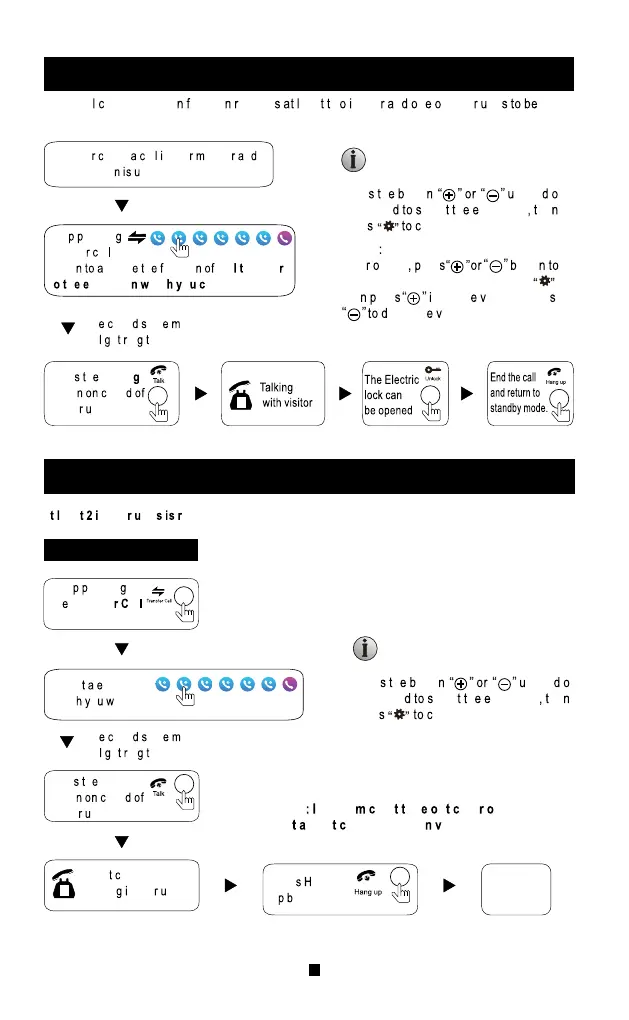
VISITOR CALL
Standby mode
The visitor press
the call button on
outdoor camera 1
The visitor press
the call button on
outdoor camera 2
Outdoor station and
Indoor monitor can
hear the ring tone,
default ring tone time
30s.
NOTICE:
I res al utto ro w utdoo nit h am ime,
th
first outdoor unit will ring, another one no response,
unles
ommunicatio ac tandb interface then press
cal
utto gain.
Th o nito it ard e t ecor od ide nd
ope
essag unction onito o ic h al 0s
outdoo tatio il emin isito P leas eav essage”
an
ecor 0 ide he to n ac tandb tatus.
Unloc h oc he all res nloc utton
t
nloc h oor in on top.
1 onversatio nde utomaticall 0 fte nlock.
2
urin inging on res h al utto ance h all.
3 h
onito hic it ar il ecor h ide from call to end of talk.(The record
od ideo
4 he monitor which with SD card will make a snapshot while outdoor station make call,
se a ak napsho nytim hil alkin anual
5
a o res onito utto witc mag hil alking.
6
nothe utdoor station call to indoor monitor or trigger alarm signal will have prompt
or
n oice.
7
leas s n utdoo tatio al onito oment, the second outdoor station wil
o in nothe n lread akin all.
8
operat ing mode, outdoo r s tation cal onitor, monitor ill interrupt the operating mode
and enter t he call mode.
The visitor’s image
automatically displayed on
the screen
NOTICE:
End
release the
door lock
The conversation
duration is 120s
at a time
Start conversation
with outdoor camera
Stop ringing
Press the talking
button on indoor
monitor
Press the unlock
button on indoor
monitor
Press the hang up button
on indoor monitor
NOTICE:


 To Next Page
 Loading...