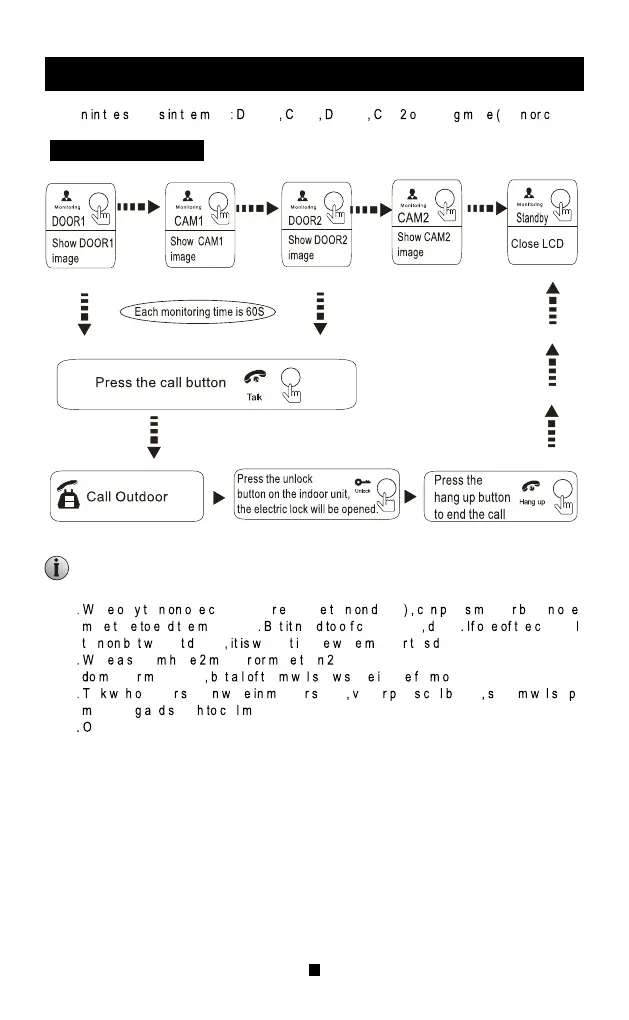
MONITORING
Standby mode
Optio h etting h enu OOR1 AM1 OOR2 AM peratin od ope losed)
1
hil nl ur n hannel(Fo xampl ur oor1 a res onito utto n
or i m n h onitoring u ee f am1,cam2 oor2 n h hanne
ur u ithou evice ithou mag hil onito hi evice.
2
hil yste av onito or ha monitors, both master on e a nd slave one can
onito eanwhile u l he il ho am mag ro utdoor.
3
al it utdoo tatio hil onito tatus isito res al utton yste il to
onitorin n witc al ode.
4
n monitoring status, ind oor monitor will n ot make snapshot o r r ecord automatically, users
need to mak e i t b y m anual.
5.The duration of monito ring the outdoor p anel is 1 minute, and t he duration of the monitoring
camera is 5 minutes. After the monitoring time, the indoor monitor will automatically return to
the standby interface.
NOTICE:
MOTION DETECTION
2 tandb tatus res ettin utton>setting>Syste etting>pres ettin utto hoos
D option switch, press increasing button or decreasing button to turn on pre-view motion
etection.
Motio
etectio it ollowin onditions
3 nabl
oo tation or camera motion detection, o n standby status , motion detection will
ctivate omeon ov ron oor statio amera onitor turn on motion detec tion
re-vie unction o nito il pe ispla n ho mag hil ecording; if monitor t urn off
otio etectio re-vie unction onito il o ho mag hil ecording(bu il ak
ecor ackstag a hec h ictur ide ecor istory)
1
hil nl ur hanne otio etection o xampl oor1 her omeon ov
ron oor1 oor otio etectio il ctivated the evic otio etectio o
ctivat ls av omethin ov ron hem.
2 Whil
or h a Channe otio etectio ur n he device which detec t f irst will activa ted
otio etectio irst h the evic ee ai he first device end of motion detection the
a ctivated.
3 onito it ard il ak napsho ecor ide utomaticall hil otio
etectio ctivated
4
urin igita hot ram unning f motion detection pre-view turn on, th igita hoto frame
il
toppe n witc otion detection status while motion detection activated otion
etecti on pre-view off, digital photo frame will interrupted and remind “Motion detect ion happened”
hil
otio etectio appened
Note Doo
statio an AM otion etection ecord uration efault 0seconds, 0seconds
it ill nd otio detectio automaticall whil tim i up
1
tandb tatus ress setting butt on> setting> door setting> camera setting> choose device
res etting button to start set motion detection status, press increasing or decreasing
utto witc otio etection
11


 To Next Page
 Loading...