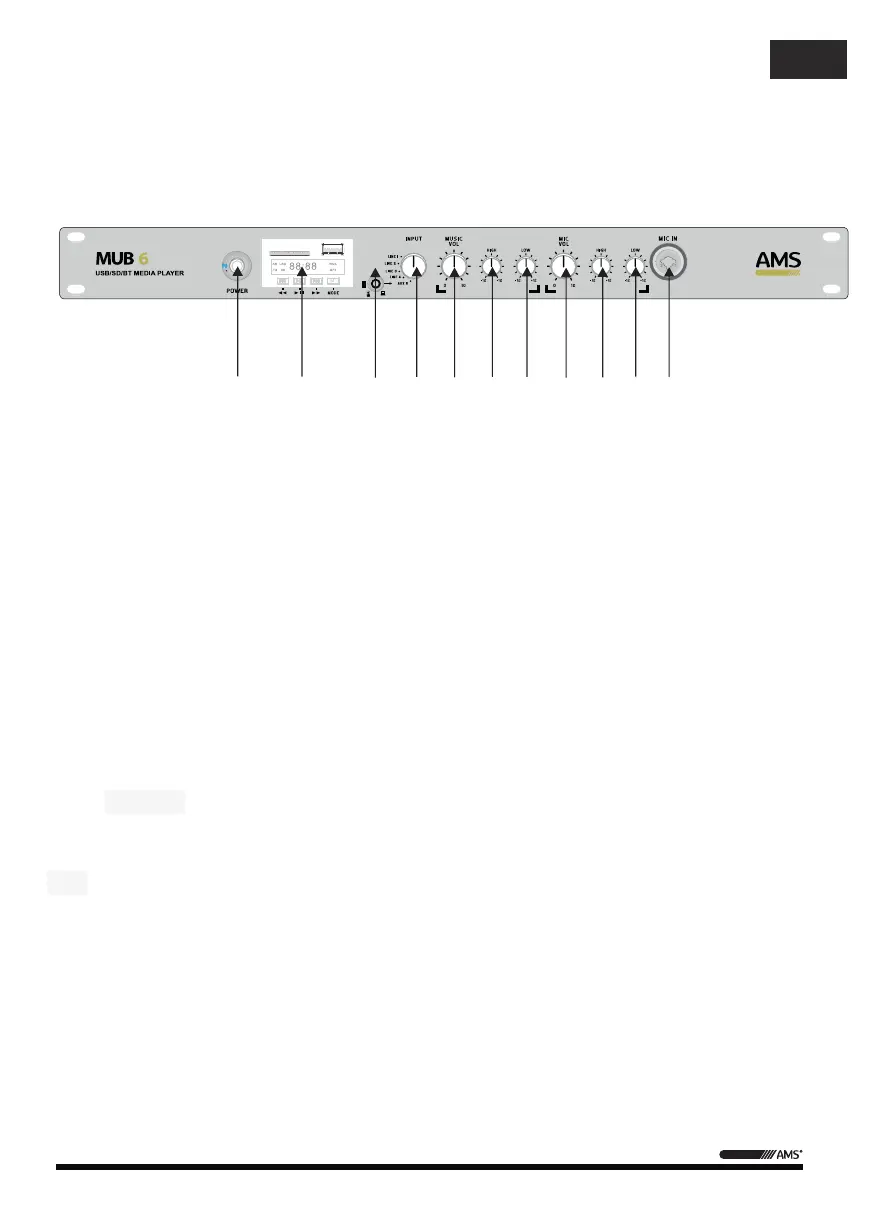
1 – POWER ON : Toggle to switch on/off the power,Blue LED light indicates
2 – Multimedia Player:
I
ncludes
SD \ USB \ Bluetooth playback. "M" is a functional
selection, "> II" means to play or pause, "I <" represents the one or retreat
or forward.(AUX 5 output selection signal)
3 – AUX Signal input jack: Input jack of mini-stereo type (unbalanced input).Connect a
stereo audio source such as portable audio players.(AUX 5 output selection signal
disconnect
"multimedia players" signal
)
4 –
Signal
input selection:
LINE1 \
2 \
3 \
4 \
AUX5
signal input
selector switch.
5 –
MUSIC Output
Volume : You can
increase or decrease
6 –
EQ
treble:
You can
increase or decrease the
size of
the output volume
7 –
EQ
bass: You can
increase or decrease
the size of
the bass
output volume
8
–
MIC Output
Volume : You can
increase or decrease
the size of the output volume
9
–
EQ
treble:
You can
increase or decrease the
size of
the output volume
10–
EQ
bass: You can
increase or decrease
the size of
the bass
output volume
11
–
MIC input
: You can enter
two ways
JACK
and
XLR.
power on.
mode
, "> I" indicates one
,Automatically
the output volume
treble.
.
.
treble.
.
- 2 -
User Manual / Manual de uso
MUB 6
FRONT PANEL
1 2 3 4 5 6 7 8 9 10 11
EN


 To Next Page
 Loading...