EasyManua.ls Logo

AMSEC DL5000 - User Manual

AMSEC DL5000
3 pages
Print Icon
To Next Page IconTo Next Page
Loading...
Each AMSEC safe is professionally hand-crafted with quality materials and is equipped with a precision-quality, digital
lock. To become familiar with the lock, operate the lock (as outlined below) several times before closing the door and
locking the safe.
OPERATION INSTRUCTIONS:
Don’t slam the door. Extreme shock can damage the lock or jam the boltwork.
Don’t shut the door with the boltwork in the locked position. Damage to the boltwork and marring the safe’s
nish may result.
Don’t stack contents of the safe so that the door must be forced shut. Jamming of the boltwork may result.
Don’t store the combination card inside the safe.
Don’t use oil, grease or any other lubricant on the digital lock.
Keep all moving parts clean and free from obstruction, water and grease.
If you experience a dierence in the feel of the operation, inconsistency or diculty opening or operating the
safe, DO NOT LOCK THE SAFE. Immediately contact the security store from whom you purchased the safe. If this is
not practical, contact the AMSEC service department at 951-685-9680, Ext. 1036.
KEEP THE EXTERNAL BATTERY BOX IN A SAFE PLACE - BUT NOT IN THE SAFE!
Operating Your Safe
INITIAL SETUP
Install four (4) AA batteries into the power override box and plug connector into the jack on the bottom, right-hand edge of the
safes LCD screen. When connected, you will hear several conrmation tones followed by a ‘melody’ as the safe initializes, followed
by an All Ready’ word prompt once this is complete. At this point the LCD display should show:
Battery Indicator, Year/Month/Day, Week and Time.
Press #1234# (personal code) or #123456# (administrator code) to unlock safe (the # key awakens the screen from sleep’ mode).
Upon entering the code successfully the LCD screen will turn blue and display “OPEN. You will now have 5 seconds to turn Knob
to open safe door before the action times out and relocks. If this happens re-enter either of the above codes, remembering to
turn the knob within 5 seconds.
Before proceeding any further, disconnect breakout box from the front of safe and either remove the batteries from the breakout
box to be used in the battery box on the inside of the safes door, or, alternatively, use 4 additional AA batteries. Once the
breakout box is disconnected and the new batteries are in place, power-up sequence will be repeated.
SETTING THE DATE
The time, date, etc., can all be set regardless of whether the safe’s door is open or closed. The date format for the safe is MONTH/
DAY/YEAR. To set the date, rst press * and then press 0 to descend or 8 to ascend. You will have 6 seconds to make an entry
between elds or the operation will be canceled. If this happens press the * key to again enter time/date mode, skipping to the
last eld of entry using the #. Once the desired year value is reached, press the # to move to the next eld, again using 0 or 8 to
reach the desired month, day and so on.
T
urn Knob
Keypad
External Battery Plug
LCD Display
Time Display
Emergency Ov
erride
Key Hole
Low Battery Indicator
Internal Battery
Compartment
Reset Button/C
ombination
Internal Battery Compartment
Reset Button/Combination
Protected by Lift-Off Cap
LOCATION OF BATTERY COMPARTMENT AND RESET BUTTON
- IMPORTED RESIDENTIAL FIRE SAFES
LOCATION OF BATTERY COMPARTMENT AND RESET BUTTON
- ELECTRONIC SECURITY SAFES
DL5000 LOCK FEATURES
EXTERNAL BATTERY BOX
Question and Answer IconNeed help?

Do you have a question about the AMSEC DL5000 and is the answer not in the manual?

Summary

DL5000 Lock Features Overview

Initial Setup and Configuration

Operating Your Safe

Guides the user through the initial setup and operation of the safe, including battery installation and code entry.

Setting the Date and Time

Explains how to set the date and time in the safe, including format and entry limits.

Door Mechanism and Code Management

Opening the Safe

Detailed steps on how to unlock and open the safe using the keypad and knob.

Changing User Codes

Instructions for changing user codes, including reset procedures and important cautions.

Concealing Your Code Entry

Method to hide code entry on the display by using a specific key sequence.

Tamper Alarm Function

How to set and disable a tamper alarm that sounds when the safe is attacked.

Open Door Record Query

Instructions on how to query the safe's log for access times, dates, and codes used.

Emergency Procedures and Maintenance

Emergency Opening Bypass Key

Instructions for using the emergency bypass key to open the safe.

Battery Override Procedures

Steps for using external power or replacing batteries when the safe is unresponsive.

Safe Finish Maintenance

Guidelines for cleaning and maintaining the safe's durable paint finish.

Door Mechanism and Hinges

Troubleshooting for difficulty with the door's mechanical parts or noisy hinges.

Damage Claims Process

Instructions for handling freight damage and filing general claims.

Overview

This document describes the AMSEC DL5000 safe, a security device featuring a digital lock and various operational and maintenance instructions.

Function Description:

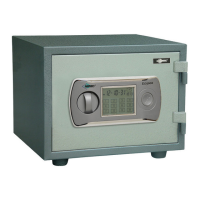
The AMSEC DL5000 safe is designed to secure valuables using a precision-quality digital lock. It offers multiple access methods including a personal code, an administrator code, and an emergency bypass key. The safe is equipped with an LCD display that provides visual feedback on its status, including battery level, time, date, and operational prompts. It also features a tamper alarm to deter unauthorized access or movement. The safe is designed for both residential and electronic security applications, with specific instructions for battery compartment location depending on the model.
Important Technical Specifications:

  • Lock Type: Digital lock (DL5000)
  • Power Source: Four (4) AA batteries for internal operation. An external power override box, also using four (4) AA batteries, is provided for emergency power.
  • Code Length: User codes can be 1-8 digits long.
  • Code Storage: The lock can store two user codes (personal and administrator).
  • Display: LCD display with blue backlight, showing battery indicator, year/month/day, week, and time.
  • Time Format: Military time (00:00 to 23:59).
  • Date Format: MONTH/DAY/YEAR.
  • Open Door Record: Stores up to 14 past entries, including date, time, and the code used for access.
  • Time-out for Knob Turn: 5 seconds to turn the knob after successfully entering a code before the safe relocks.
  • Alarm Duration: 1 minute for wrong code entry or tamper alarm if not cleared.
  • Battery Replacement Time-out: User code defaults to factory settings if batteries are not replaced within 10 minutes.
  • Construction: Hand-crafted with quality materials.
  • Finish: Standard textured finish.
  • Security Feature: Must be bolted down using the supplied anchor kit for intended security level.

Usage Features:

  • Opening the Safe: Press the '#' key, enter the user or administrator code, press '#', and then turn the knob clockwise within 5 seconds.
  • Changing User Code: Open the safe, press '*' while the screen is blue, enter the new 1-8 digit code, and press '#'.
  • Resetting Codes (Factory Default): If codes are forgotten, remove the protective cap (if equipped) and press the "Red" reset button on the back of the door.
  • Concealing Code: Press '#' then '*' then your code '#' to prevent the actual numbers from appearing on the display.
  • Tamper Alarm: Activate by pressing '0' on the keypad in sleep mode. Deactivate by entering '#' followed by the current code and '#'.
  • Emergency Opening: Locate the key lock under the Emergency Override Cover, insert the tubular key, turn clockwise, and then turn the knob or handle clockwise to open.
  • External Battery Override: If internal batteries are drained, plug the external power override box into the port on the bottom of the keypad.
  • Setting Date and Time: Press '*' to enter time/date mode. Use '0' to descend or '8' to ascend values. Press '#' to move between fields.
  • Viewing Open Door Records: After opening the door and while the blue backlight is on, press '0'. Continue pressing '0' to view up to 14 past entries.
  • Fire Safe Content Storage: For fire safes, it's recommended to open the safe regularly to air out and store moisture-sensitive documents in sealed containers.

Maintenance Features:

  • Cleaning: The textured finish can be cleaned with a mild detergent and a soft cloth. Avoid abrasive scouring pads or chemical fluids.
  • Door Operating Mechanism: If difficulty is experienced, contact a qualified locksmith for service.
  • Door Hinges: If hinges become hard to open or emit noise, they may need lubrication. Contact a qualified locksmith for service.
  • Battery Replacement: When the LCD displays "Lo-BATTE," replace the four AA batteries located in the battery compartment on the back of the safe door. Ensure correct polarity.
  • Damage Claims (Freight):
    • Inspect shipment before signing delivery receipt.
    • Note damage on the freight bill and sign.
    • Save all cartons and packaging materials.
    • Call the freight carrier immediately for a damage inspection claim.
  • Damage Claims (General):
    • Contact your dealer immediately.
    • File claims within 15 days.
    • Provide proof of purchase receipt and photographs.
    • Return the safe in original packaging for replacement.
  • Important Caution: Liquids can damage the keypad.

AMSEC DL5000 Specifications

General IconGeneral
BrandAMSEC
ModelDL5000
CategorySafes
LanguageEnglish

Related product manuals