EasyManua.ls Logo

AMSTRAD TS80 - Page 4

Default Icon
24 pages
Print Icon
To Next Page IconTo Next Page
To Previous Page IconTo Previous Page
Loading...
|
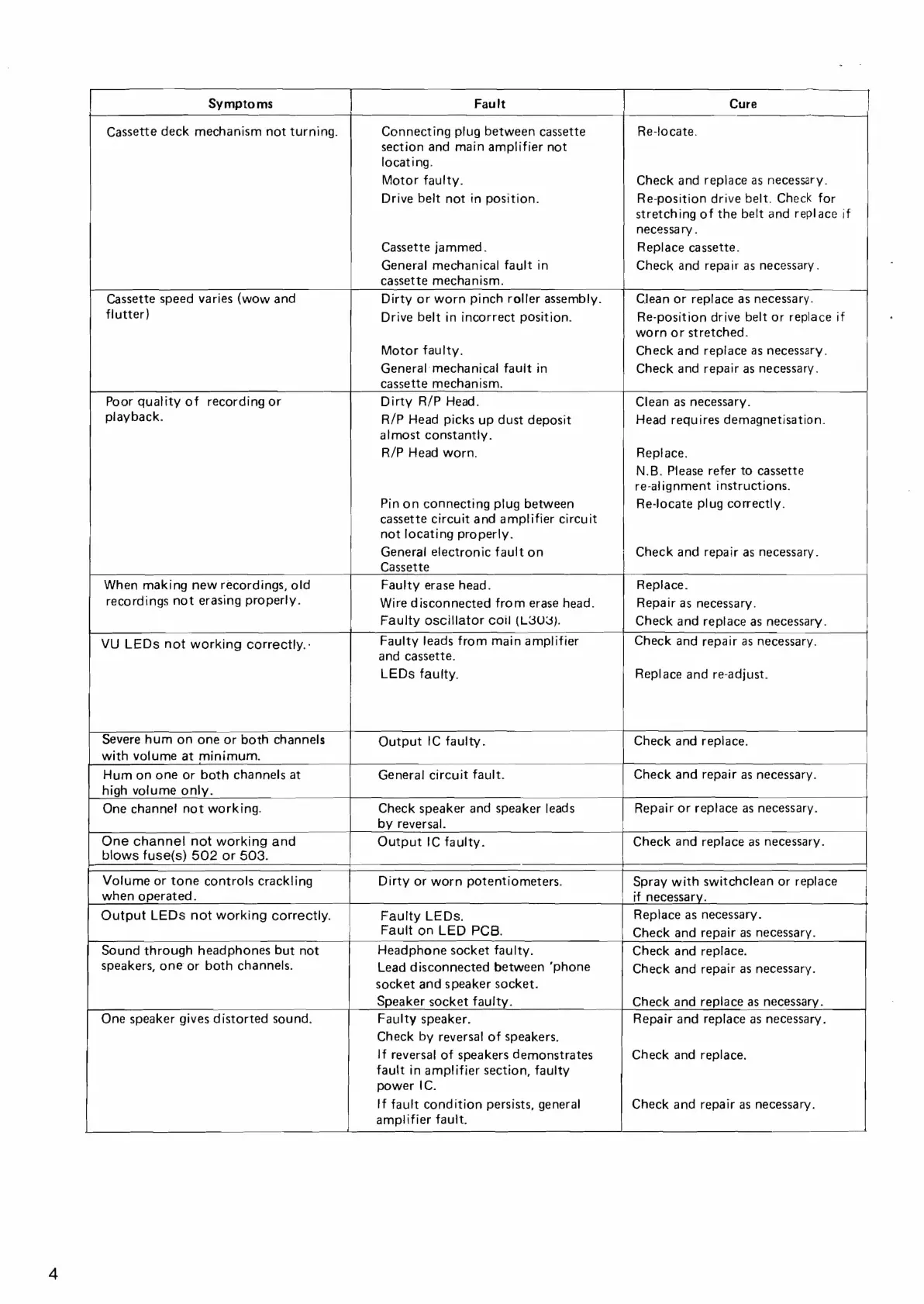
Symptoms
|
Fault
|
Cure
Connecting
plug
between
cassette
section
and
main
amplifier
not
locating.
Motor
faulty.
Drive
belt
not
tn
position.
Cassette
deck
mechanism
not
turning.
Cassette
jammed.
General
mechanical
fault
in
cassette
mechanism.
Cassette
speed
varies
(wow
and
flutter)
Drive
belt
in
incorrect
position.
Motor
faulty.
General:
mechanical
fault
in
cassette
mechanism.
Dirty
or
worn
pinch
roller
assembly.
Dirty
R/P
Head.
R/P
Head
picks
up
dust
deposit
almost
constantly.
R/P
Head
worn.
Poor
quality
of
recording
or
playback.
Pinon
connecting
plug
between
cassette
circuit
and
amplifier
circuit
not
locating
properly.
Generali
electronic
fault
on
Cassette
Faulty
erase
head.
Wire
disconnected
from
erase
head.
Faulty
oscillator
coil
(L303).
When
making
new
recordings,
old
recordings
not
erasing
properly.
Re-locate.
Check
and
replace
as
necessary.
Re-position
drive
belt.
Check
for
stretching
of
the
belt
and
replace
if
necessary.
Replace
cassette.
Check
and
repair
as
necessary
.
Clean
or
replace
as
necessary.
Re-position
drive
belt
or
replace
if
worn
or
stretched.
Check
and
replace
as
necessary.
Check
and
repair
as
necessary.
Clean
as
necessary.
Head
requires
demagnetisation.
Replace.
N.B.
Please
refer
to
cassette
re-alignment
instructions.
Re-locate
plug
correctly.
Check
and
repair
as
necessary.
Replace.
Repair
as
necessary.
Check
and
replace
as
necessary.
Faulty
leads
from
main
amplifier
and
cassette.
LEDs
faulty.
VU
LEDs
not
working
correctly.-
Check
and
repair
as
necessary.
Replace
and
re-adjust.
Severe
hum
on
one
or
both
channels
with
volume
at
minimum.
Output
IC
faulty.
Check
and
replace.
Hum
on
one
or
both
channels
at
General
circuit
fault.
high
volume
only.
Check
and
repair
as
necessary.
Check
speaker
and
speaker
leads
by
reversal.
Output
IC
faulty.
One
channel
not
working.
One
channel
not
working
and
blows
fuse(s)
502
or
503.
Volume
or
tone
controls
crackling
when
operated.
Output
LEDs
not
working
correctly.
Faulty
LEDs.
Fault
on
LED
PCB.
Headphone
socket
faulty.
Lead
disconnected
between
‘phone
socket
and
speaker
socket.
Speaker
socket
faulty.
Faulty
speaker.
Check
by
reversal
of
speakers.
If
reversal
of
speakers
demonstrates
fault
in
amplifier
section,
faulty
power
IC.
If
fault
condition
persists,
general
amplifier
fault.
Sound
through
headphones
but
not
speakers,
one
or
both
channels.
One
speaker
gives
distorted
sound.
Repair
or
replace
as
necessary.
|
Check
and
replace
as
necessary.
ee
Dirty
or
worn
potentiometers.
Spray
with
switchclean
or
replace
|
if
necessary.
Replace
as
necessary.
Check
and
repair
as
necessary.
Check
and
replace.
Check
and
repair
as
necessary.
Check
and
replace
as
necessary.
Repair
and
replace
as
necessary.
Check
and
replace.
Check
and
repair
as
necessary.

Related product manuals