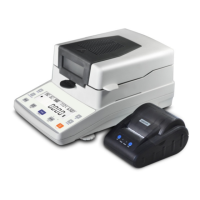
several samples, press “Mois –“ key, LCD will display the average
moisture value.
Caution: When press the gate lock, please make sure never put your
hand at right side, otherwise it will hurt your hand.
4. Press “Temp +” key continuously it will display temperature in ºC, in
ºF, and moisture.
5. After finish testing, use the brush to clean the cup.
Moisture Value Correction:
Due to different area the grains a little different, moisture maybe a little
different, you can adjust it so that make the test more accuracy. Long
press “Set” key 3 seconds, LCD will display “Adju(%)”, press “Temp +” key
or “Mois –“ key to adjust the correction value (range -9.9 ~ 9.9, then
press “Set” key to keep it.
Maintenance and service:
1. Before use it, please keep the meter and tested samples in same
place and make the temperature same. This can increase the
accuracy of tested value.
2. Handle it with care.
3. Use good quality Alkaline battery, bad battery if leakage will damage
the meter.
4. When clean the measuring cup, please use the brush and softly.
5. We provide one year quality limited guarantee but user’s wrong
operation, damage, broken not cover. Please contact the local
distributor or us for service.
Amtast USA Inc
438 Skyline Dr. E Lakeland FL. 33809 USA
info@amtast.com www.amtast.com
Distributor:


 To Previous Page
 Loading...