EasyManua.ls Logo

AMTIFO A6 - User Manual

AMTIFO A6
22 pages
Print Icon
To Next Page IconTo Next Page
Loading...
A6 Digital Wireless Backup Camera &
Monitor Kit
Product Manual / Installation Instructions
Please read this manual thoroughly before operating the device, and
keep it for future reference.
Question and Answer IconNeed help?

Do you have a question about the AMTIFO A6 and is the answer not in the manual?

Summary

Product Certifications

Package Inclusions

List of Included Components

Details all components provided in the kit, such as the camera, monitor, power cords, and accessories.

Package Contents Visual Overview

Working Range Specifications

Pre-Installation Voltage and Polarity

Voltage Input and Polarity Warnings

Details acceptable voltage ranges for monitor and camera, emphasizing polarity and over-voltage risks.

Antenna Installation Guide

Wiring and Power Connections

Monitor Power Options

Explains powering the monitor, typically via a cigarette lighter adapter.

Camera Power Connection Methods

Covers two methods for camera power: backup light for reversing or running light for continuous use.

Alternative Monitor Powering

Installation Video and Signal Repair

Wiring and Power Troubleshooting

Incorrect Wiring Issues

Addresses issues arising from reversed polarity or incorrect identification of car light wires, warning of camera damage.

Signal Pairing Procedure

Camera Installation and Features

Waterproof Camera Rating

Highlights the camera's IP69 waterproof rating, allowing operation in rain or underwater.

Camera Mounting Options

Describes bracket design for license plate attachment without drilling, front or rear mounting.

T-Taps Adapter Installation

Monitor Installation and Mounting

Monitor Mounting Options

Explains that the 5-inch monitor can be attached to the dash or windshield according to user preference.

Monitor Control Buttons

Button Functionality Overview

Details the functions of the monitor buttons: Up, Menu, Down, and FA (Guide Lines).

Guide Lines Adjustment and Control

Guide Lines ON;OFF and Customization

Explains how to turn guide lines on/off and customize their height, width, and position.

Monitor Channel Switching and Display

Switching Between Camera Views

Describes switching between CAM1, CAM2, and split screen views using the '+' key.

Product Function Introduction

Navigating Menu Options

Explains how to enter menu mode via the Menu button and navigate through different functions.

Menu Function: Signal Pairing

Re-pairing Camera and Monitor Signal

Guides through re-pairing the camera and monitor signal if connection is lost or the camera is changed.

Menu Function: Picture and Mirror Settings

Adjusting Picture Settings

Covers adjusting brightness, contrast, and saturation via the 'Picture' menu option.

Mirror and Flip Image Options

Explains how to switch between mirror view, normal view, and flip images using the MIR-Flip function.

Menu Function: System Settings

Configuring System Settings

Details how to access and adjust settings like language, delay time, scan time, and automatic channel switching.

Protective Film Removal

Customer Service and Warranty Information

Troubleshooting: No Image or Blackout

Diagnosing No Image Issues

Addresses issues where the monitor turns on then goes black, suggesting checks for camera connection and power.

Troubleshooting: Signal Stability and Power

Image Flashing and Interference

Provides solutions for image flashing, suggesting relays or filters, and notes on specific car models causing interference.

LED Headlight Power Issues

Explains why LED headlights may not power the camera correctly and recommends alternative power sources.

FCC Compliance and Precautions

FCC Cautionary Notes and Interference

Details FCC compliance rules, potential interference, and measures to correct reception issues.

Overview

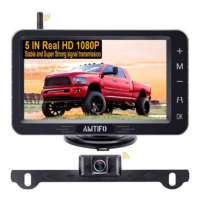
The AMTIFO A6 is a digital wireless backup camera and monitor kit designed to enhance driving safety and convenience. This system is primarily intended for use with cars, trucks, campers, SUVs, vans, and minivans, offering both high-speed driving observation and slow-speed driving/reversing capabilities.

Function Description:

The core function of the AMTIFO A6 system is to provide a clear, real-time view of the area behind a vehicle, displayed on a 5-inch monitor. This is achieved through a wireless license plate camera that transmits a stable and strong HD 1080P signal to the monitor. The system is particularly useful for backing up, parking, and monitoring blind spots while driving. It supports two channels, allowing for the display of either CAM1, CAM2, or a split screen view.

Important Technical Specifications:

  • Monitor: 5-inch display, HD 1080P resolution.
  • Camera: Wireless license plate camera, HD 1080P resolution, IP69 waterproof rating.
  • Voltage Range:
    • Monitor: 9V-35V
    • Camera: 9V-24V (DC 12V recommended for both monitor and camera)
  • Working Range:
    • Vehicles under 33FT: High-Speed Driving Observation
    • Vehicles under 40FT: Slow-Speed Driving or Reversing
  • Signal Transmission: Stable and super strong digital wireless signal.
  • Certifications: CE, FCC, EMC, RoHs, Waterproof.

Usage Features:

  • Easy Installation: The system is designed for straightforward installation. The camera bracket attaches to the license plate, and the monitor can be mounted on the dash or windshield. T-Taps adapters are included to simplify wiring to the vehicle's lights.
  • Wireless Connectivity: The camera and monitor are pre-paired at the factory, ensuring immediate functionality upon power-up. In case of signal loss or camera replacement, a simple pairing process is available.
  • Power Options:
    • Monitor: Can be powered via a cigarette lighter adapter or an additional power cord connected to ACC/Fuse/Radio.
    • Camera: Can be powered by the backup/reverse tail-light (for backup-only use) or the running light/tail-light (for continuous use while driving).
  • Adjustable Guide Lines: The monitor features customizable guide lines that can be turned on/off, and their height, width, and position can be adjusted to assist with parking and reversing.
  • Image Adjustment: Users can adjust brightness, contrast, and saturation of the display to suit their preferences and lighting conditions.
  • Image Flip Options: The monitor offers four image flip options: mirror rear view, normal front view, and vertical flip, providing flexibility for various mounting positions and viewing needs.
  • Multi-Channel Support: The monitor supports two camera channels (CAM1 and CAM2) and can display them individually or in a split-screen view. Automatic channel switching is also available with adjustable scan times.
  • Language Selection: The system allows for switching between different languages.
  • Pre-Installation Testing: It is crucial to test the device before full installation to ensure proper functioning and avoid potential damage from incorrect wiring.
  • Antenna Placement: The waterproof antenna connected to the camera can be affixed inside or outside the vehicle. For longer vehicles or signal issues, positioning the antenna closer to the monitor can improve transmission.

Maintenance Features:

  • Protective Films: Both the monitor and camera lens come with protective films that can be removed after installation for a clearer image.
  • Waterproof Camera: The IP69 waterproof rating ensures the camera can operate reliably in various weather conditions, including rain and underwater.
  • Troubleshooting Guide: The manual includes a troubleshooting section to address common issues such as no image, flickering images, or power connection problems.
  • Customer Support: The product comes with a two-year warranty and lifetime tech support. Users are encouraged to contact customer service for any issues or assistance.
  • Wiring Precautions: Emphasizes the importance of correct positive and negative pole connections to prevent damage to the camera or monitor. It also advises caution when connecting to LED headlights, as they may not provide a constant direct current suitable for the camera. For flickering issues, adding a relay or filter might be necessary, especially for certain car brands like BMW, Benz, or VW.

AMTIFO A6 Specifications

General IconGeneral
BrandAMTIFO
ModelA6
CategoryDash Cameras
LanguageEnglish