
 Need help?
Do you have a question about the Amulet Hotkey DXH4 and is the answer not in the manual?
Explains FCC compliance and device classifications (Class A/B).
Lists compliance with relevant EU directives (EMC, Low Voltage).
Introduces the DXH4 host card and PCoIP technology.
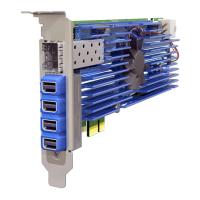
Describes the DXH4 and DXH4-M hardware variations.
Covers basic physical installation steps and requirements.
Explains the optional auxiliary power connection for the card.
Details SFP module usage for the DXH4-M model's network port.
Notes on obtaining and recording network addresses for setup.
Explains WoL and RPC functionality for host control.
Describes supported video resolutions and input types for monitors.
Introduces tools for managing PCoIP connections and devices.
Describes physical ports, connectors, and LEDs on the card's I/O bracket.
Explains the purpose and location of status indicators on the DXH4 card.
Defines conventions for LED status indications (color, flash, blink).
Details the specific indications of the STATUS (link) LED.
Describes the network activity and speed indicators.
Explains the initial BSM status indication upon power-up.
Details the function of the recessed button for reset or interface control.
Discusses setup for quad and dual monitors and input usage.
Describes internal sockets, jumpers, fan, and connectors on the card.
Safety and preparation steps before hardware installation.
Instructions for installing the appropriate I/O bracket.
Physical installation into a PCIe slot.
Details connecting auxiliary power.
Instructions for connecting the RPC cable for power cycling.
How to install an SFP module for network connectivity.
How to connect monitors to the DXH4's video inputs.
How to establish the network connection.
Final steps to finish hardware installation and driver setup.
Steps to connect the zero client to the host card.
Explains the host discovery method for connecting clients.
Security recommendation for changing the default password.
Concludes the installation section.
Preparation steps for installing two cards.
Installing the initial card in a dual setup.
Installing the second card in a dual setup.
Network connection configuration for dual DXH4s.
Connecting clients for dual host setup.
Verifying network connectivity in dual setup.
Preparation for installing the DXEC.
Installing the DXH4 in conjunction with the DXEC.
Installing the DXEC itself.
Connecting the zero client to the setup.
Verifying the Ethernet connection with DXEC.
Explains the PCoIP protocol and its core benefits.
Details the host rendering aspect of the PCoIP protocol.
Describes PCoIP's intelligent image encoding for efficiency.
Explains how PCoIP quality adjusts to network traffic.
Discusses the function and types of PCoIP host cards.
Explains what zero clients are and their basic functionality.
Lists advantages such as increased security and cost savings.
Introduces tools for managing PCoIP devices centrally.
Describes the AWI for remote configuration of devices.
Explains the OSD interface for zero client configuration and session management.
Steps to power on and initialize the zero client.
How to configure session connection types via OSD.
Describes the Auto Detect connection method.
Explains connecting via IP address or DNS name.
Host discovery method for clients on the same subnet.
Using a connection manager for centralized administration.
Automated connection setup with user credentials.
Connecting to a virtual desktop in a VMware View environment.
VMware View connection with automatic login.
Using a third-party broker for resource management.
Configuring zero clients for automatic connection upon login.
Procedures for ending a PCoIP session.
Points to additional documentation and resources for zero clients.
Discusses factors affecting network bandwidth usage.
Explains PCoIP's adaptive behavior under low bandwidth.
Discusses configurations for network redundancy.
Guidance on when and how to use a connection broker.
Explains the function of connection brokers in PCoIP systems.
How to configure a connection broker within the system.
References for instructions on broker usage.
Checking and updating the card's firmware.
Step-by-step instructions for safely removing the card.
Basic maintenance procedures for the cooling fan.
Explains LED indicators for fan failures.
Verifying Ethernet connectivity for dual card setups.
Details the product's warranty period.
Lists technical specifications like processor, bus, video, and network.
Covers cooling, form factor, weight, regulatory compliance, and operating temperature.
 General
| Brand | Amulet Hotkey |
|---|---|
| Model | DXH4 |
| Category | PCI Card |
| Language | English |

 To Next Page
