EasyManua.ls Logo

ANCEL FX3000 - User Manual

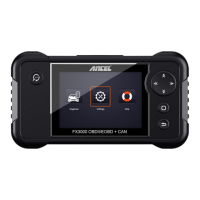
ANCEL FX3000
5 pages
Print Icon
To Next Page IconTo Next Page
Loading...
FX3000 Upgrade
There are 2 methods to upgrade the FX3000 scan tool, we would recommend
the method 1(Via Memory Card) which is easier than the method 1( Via USB
Cable).
The upgrade guide following:
Step 1: Before starting the upgrade, please connect this device to a computer via the
USB cable, then enter the device’s menu "Help--Tool- Information" and take a photo
to record the information displayed. (It supports WIN XP, 7, 8, 10(34bits) laptop.)
Step 2: Link to the website (Register & Log in).
https://anceltech.com/account/register
Question and Answer IconNeed help?

Do you have a question about the ANCEL FX3000 and is the answer not in the manual?

Overview

The ANCEL FX3000 is an automotive OBD2 scanner designed to provide diagnostic and maintenance capabilities for a wide range of vehicles. This device is capable of reading and clearing check engine lights, and performing diagnostics on transmission, SRS (Supplemental Restraint System), and ABS (Anti-lock Braking System). Beyond basic diagnostics, it also supports advanced maintenance functions such as EPB (Electronic Parking Brake) oil service light resets, SAS (Steering Angle Sensor) resets, and BMS (Battery Management System) resets.

Function Description:

The primary function of the ANCEL FX3000 is to act as a comprehensive diagnostic tool for automotive systems. It allows users to identify issues related to the engine, transmission, airbags, and braking systems by reading diagnostic trouble codes (DTCs). Once issues are identified, the device enables users to clear these codes, effectively turning off warning lights on the dashboard. The inclusion of EPB, oil service light, SAS, and BMS reset functions makes it a versatile tool for routine maintenance tasks that typically require specialized equipment or dealership visits. This broad functionality makes it suitable for both professional mechanics and advanced DIY enthusiasts.

Important Technical Specifications:

While specific technical specifications like screen size, processor speed, or memory capacity are not explicitly detailed in the provided manual pages, the upgrade process reveals some crucial software versioning and compatibility information. The device runs on various software components, including a Boot version (e.g., V10.04), Displays program version (e.g., V02.47 or V02.46), Diagnostic program version (e.g., V11.25), and Diagnostic library version (e.g., V11.49). These version numbers indicate a modular software architecture that allows for independent updates of different functionalities.

The upgrade process itself highlights compatibility with a range of Windows operating systems: WIN XP, 7, 8, and 10 (specifically 34-bit laptops are mentioned, though modern systems typically support 64-bit, suggesting this might be an older or specific compatibility note). The device connects to a computer via a USB cable for upgrades and can be powered via USB or an OBD2 cable during operation and after upgrades. The use of a memory card (TF card) for storing upgrade profiles is a key feature, allowing for offline updates once the files are downloaded to the card.

Usage Features:

The ANCEL FX3000 is designed for user-friendly operation, particularly concerning its upgrade process. The manual outlines two methods for upgrading: via memory card or via USB cable, with the memory card method being recommended for its ease of use.

  • Initial Setup and Information Retrieval: Before upgrading, users are instructed to connect the device to a computer via USB and navigate to the "Help--Tool- Information" menu to record essential details like boot version, program versions, serial number, and register code. This step is crucial for registration and ensuring the correct software is downloaded.
  • Online Registration and Software Download: Users must register and log in on the ANCEL website (anceltech.com/account/register). The website provides access to the necessary update software. There are often two versions of the software available: one that does not require extraction and another (WinRAR.rar) that needs to be extracted into a folder to find the "Product Update Tool Setup." This flexibility caters to different user preferences and system configurations.
  • Update Tool Installation: The downloaded software includes an "InstallShield Wizard" for installing the "Product Update Tool" on the computer. This wizard guides users through modifying, repairing, or removing the program, ensuring a smooth installation process.
  • Device Recognition and Upgrade Initiation: Once the update tool is installed and opened, users are prompted to remove the memory card from the FX3000 device, insert it into a TF card reader, and connect the reader to the PC. The "Product Serial Number" is automatically read, simplifying the process. Users then click "Device Upgrade" to proceed.
  • Software Download to Memory Card: The update tool displays a list of available software updates for various car brands (e.g., ACURA, AUDI, BENZ, BMW, CHRYSLER, CITROEN, DACIA, DAEWOO, EUROFORD, FIAT, GM, HOLDEN, HONDA, HYUNDAI, INFINITI, JAGUAR, JPISUZU, KIA, LANCIA). Users can "Select All" or choose specific updates and click "Download" to transfer them to the memory card.
  • Finalizing the Upgrade: After the download is complete, the memory card is reinserted into the FX3000 device. The device is then powered on via USB or OBD2 cable. A successful upgrade is indicated by the display of new version information on the device screen. The manual notes that the upgrade profile is already on the memory card, and users can press the "NO-ESC" button to enter the diagnosis menu directly.

Maintenance Features:

The ANCEL FX3000's design inherently supports ongoing maintenance through its upgradability. The ability to update software ensures that the device remains compatible with newer vehicle models and diagnostic protocols, and that its diagnostic and maintenance functions are kept current.

  • Software Updates: Regular software updates are a critical maintenance feature. These updates can introduce new vehicle coverage, improve existing diagnostic algorithms, fix bugs, and enhance performance. The structured upgrade process, involving downloading files from the ANCEL website and transferring them to the device's memory card, facilitates this ongoing maintenance.
  • User Support: The manual emphasizes user support, stating, "Finally, if you have any question, please do not hesitate to contact us, and please be assured that we will be here to help you." This commitment to customer service is an important aspect of maintaining the device's usability and ensuring users can resolve any issues encountered during operation or upgrades.
  • Memory Card Based Updates: The use of a memory card for updates allows for a robust and flexible maintenance approach. It means that even if internet connectivity is intermittent or unavailable at the vehicle's location, the device can still be updated as long as the memory card can be prepared on a computer with internet access. This also simplifies the process by reducing direct device-to-computer communication complexities during the actual update installation.

In summary, the ANCEL FX3000 is a versatile diagnostic and maintenance tool that combines broad vehicle system coverage with user-friendly upgrade procedures. Its modular software, memory card-based updates, and manufacturer support ensure its long-term utility and adaptability in the evolving automotive diagnostic landscape.

ANCEL FX3000 Specifications

General IconGeneral
BrandANCEL
ModelFX3000
CategoryDiagnostic Equipment
LanguageEnglish

Related product manuals