EasyManua.ls Logo

ANCEL VOD700 - Page 21

ANCEL VOD700
25 pages
Print Icon
To Next Page IconTo Next Page
To Previous Page IconTo Previous Page
Loading...
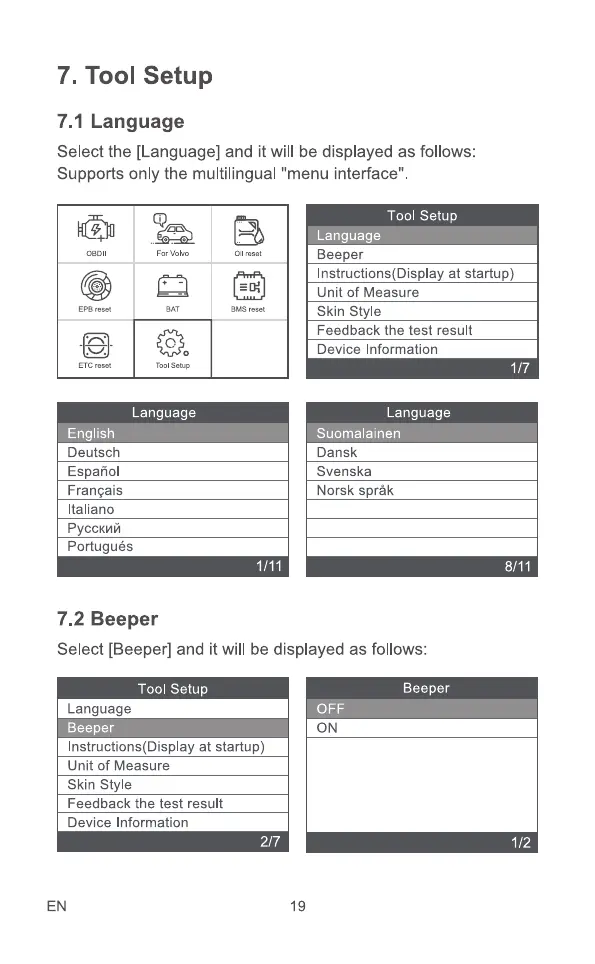
7. Tool setup
7.1 Language
Select the [Language] and it will be displayed as follows:
Supports only the multilingual "menu interface"
reset
ETC reset
For
TOOI Setup
3
Oil reset
BMS reset
1/11
Tool Setup
anguage
Beeper
Instructions(DispIay at startup)
Language
ng IS
Deutsch
Espaäol
Franqais
Italiano
Portugués
7.2 Beeper
Unit of Measure
Skin style
Feedback the test result
Device Information
Language
uoma amen
Dansk
Svenska
Norsk språk
Select [Beeper] and it will be displayed as follows:
Tool Setup
Language
Beeper
Instructions(Display at startup)
Beeper
ON
Unit of Measure
Skin style
Feedback the test result
Device Information
EN
2/7
1/7
8/11
1/2
19