Anderic®
RR7096T & RR7096TR and UC7067FCRX Receiver
Installation Instructions.
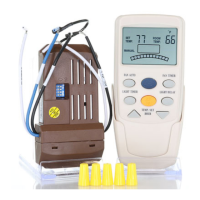
Operating the remote:
BLUE FAN KEY – For fan speed control – with each press cycle, the fan speeds from High -> Medium -> Low -> Off
FAN AUTO KEY – For setting fan speeds to adjust depending on the temperature you set here. Click the FAN AUTO key, Then TEMP UP/DOWN keys to adjust the
desired temperature. The fan will now change the speeds according to temperature.
If the indoor temperature is lower than the set temperature: The fan will be off.
If the indoor temperature is 0-2 degrees Celsius warmer than the set temperature: The fan will turn to the low-speed setting.
If the indoor temperature is 2-4 degrees Celsius warmer than the set temperature: The fan will turn to the medium-speed setting.
If the indoor temperature is greater than 4 degrees Celsius warmer than the set temperature: The fan will turn to the high-speed setting.
TIMER KEY (RR7096T remote only) – Set timer option of FAN or LIGHT
HOUR ^ KEY – Have time or temp. UP.
HOUR v KEY – Have a timer or temp. DOWN.
FAN/REV KEY (RR7096TR remote only) – Will reverse the fan spin direction.
LIGHT KEY – Toggles light ON/OFF. Press and hold to cycle dimming.
LIGHT DELAY KEY – Turns the light off automatically after 3 minutes.


 To Previous Page
 Loading...