7English
Get started:
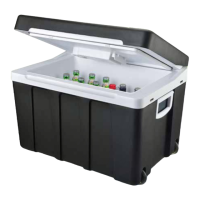
1. Remove all packaging material from the cooler box.
2. Make sure both eco/max and cold/hot switch is set to
“OFF” mode.
3. Place the cooler box on a flat surface and connect the
power plug to a wall outlet.
Note: The cooler box can also be powered by a 12 V
power outlet. If desired, connect the 12 V cable between
the power input and a 12 V power outlet.
4. Set the cold/hot switch and eco/max switch to a desired
mode.
Note: Eco mode is not applicable when the cooler box is
power supplied by 12 V cable.
Note: When the unit is in Eco mode, the cooler box
keeps the current temperature. If you need more cooling,
put the cooler box in Max mode.
Note: Do not switch between the cool/warm function
abruptly. Let the appliance be in “OFF” mode for 30
minutes before you change the function.
5. Open the lid and place the desired beverages and food in
the cooler box.
Note: We recommend that you pre-cool the beverages
and foods before you place them in the cooler box for a
more effective cooling.
Note: The hot mode is not meant to heat up beverages
and food, but to maintain its heat.
Maintenance:
1. Unplug the power cable from the power outlet.
2. Let the cooler box reach room temperature if it has been
used recently.
3. Clean the air vent and fan compartment with a moist
towel to remove any dust.
4. Wipe the exterior and interior with a damp towel. Then
dry it with a towel.
Note: Do not use any abrasive cleaning products or
scouring pads to clean any part of the cooler box. This
may damage its surfaces.
5. If there is residue stuck inside the cooler box, rub a moist
sponge on the residue until it softens and rubs off.
Storing:
Æ Store the cooler box in an environment where it is not
exposed to moisture, dust, direct sunlight or extremely
high or low temperatures.
Operation


 To Next Page