9English
USB Source:
1. Insert an USB device to the USB port on the speaker.
2. Press the mode button to enter USB mode.
Note: The speaker will automatically enter USB mode when USB is
inserted.
Note: The speaker only support mp3 and wma format.
3. You can charge your devices through the USB port with a suitable USB
cable.
Recording:
1. Press “Recording” button on the remote control to start recording.
2. After recording, press “Recording play” button to play the records.
Note: The recording function
only work in USB mode, the files will save
in USB.
3. If you want to delete the records, press “Recording delete” button to
delete.
Line in Mode:
1. Press mode button to enter Line in mode.
2. Connect the audio device to the speaker by using a 3.5mm audio cable.
3. Start and control the playback by the device.
Microphone/Guitar jack:
1. Plugging the microphone/guitar into Microphone/Guitar jack on the unit.
Notes: If microphone is near the loudspeaker, a howling effect (acoustic
feedback) may occur. If this happens, place microphone away from the
loudspeaker.
2. Adjust Microphone volume by pressing “
M.VOL -/+” on the remote
control.
3. Adjust the echo intension by pressing ”ECHO -/+” button on the remote
control.
4. Press the
Microphone priority
button, which can make the microphone
volume louder than the music volume during singing. Press the button
again to resume.
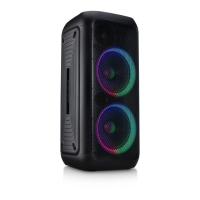
Light mode:
1. Press
LED on/off button on the control panel to turn on or off the light.
2. Press LED color button on the remote control to switch 7 LED colors.
3. Press LED mode
button
on the remote control
to switch 3 light modes:
whole circle, half circle, bump with regular.
Operation


 To Next Page