EasyManua.ls Logo

Andrea USB-MA - User Manual

Andrea USB-MA
2 pages
Print Icon
To Next Page IconTo Next Page
Loading...
C46-5446-2 Rev E
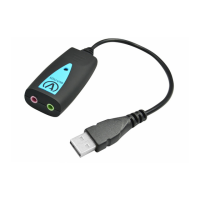
Package includes: One (1) USB-MA Adapter
and
One (1) USB-MA Adapter Publication.
C46-5446-2 Rev E
Congratulations on your
purchase of the Andrea
USB-MA Adapter!
USB-MA
Audio
Adapter
WARRANTY INFORMATION
Please visit our website at:
www.andreacommunications.com/warranty
for all warranty information.
TROUBLESHOOTING
If you encounter the following problems:
Microphone does not record sound when
using a voice-recording application.
A. Check all connections.
B. Bring the microphone closer to your mouth.
C. Check input control for proper level in
software.
D. Check that microphone is not muted on
cable module or in the PCs microphone
audio panel.
CONNECTING YOUR USB-MA ADAPTER TO
YOUR COMPUTER.
To connect the Andrea USB-MA Adapter to
your computer:
1. Plug USB connector into USB slot on your
computer.
2. Plug you microphone into the color coded
jack on the USB-MA.
COMPATIBILITY
The USB-MA Adapter is compatible with most
major computers and laptops.
Andrea's USB-MA Digital Audio Adapter is a high
fidelity external sound card device with stereo
microphone input support.
TECHNICAL SERVICE
We hope that you enjoy your USB-MA Adapter.
If you have additional questions, please visit
our website at:
www.andreacommunications.com/support
or call Andrea Communiucations Technical
Service team at 1-800-442-7787 (USA &
Canada) for assistance.
NOTES:
Question and Answer IconNeed help?

Do you have a question about the Andrea USB-MA and is the answer not in the manual?

Summary

Connecting Your USB-MA Adapter to Your Computer

Step 1: Connect Adapter to Computer

Plug the USB connector of the adapter into a USB slot on your computer.

Step 2: Connect Microphone

Plug your microphone into the color-coded jack on the USB-MA adapter.

USB-MA Adapter Compatibility

Troubleshooting Common Issues

Microphone Not Recording Sound

Steps to resolve issues when the microphone does not record sound in applications.

Technical Service and Support

Warranty Information

Overview

The Andrea USB-MA Digital Audio Adapter is a high-fidelity external sound card designed to provide stereo microphone input support. This adapter allows users to connect a microphone to their computer via a USB port, effectively acting as an external sound card.

Function Description:

The primary function of the USB-MA Adapter is to facilitate the connection of a microphone to a computer, particularly for voice recording applications. It converts the analog audio signal from a microphone into a digital signal that can be processed by the computer. This is especially useful for computers that may lack a dedicated microphone input or for users who require an external sound card for improved audio quality.

Technical Specifications (Inferred):

  • Connectivity: USB (Universal Serial Bus) for connection to the computer, and a color-coded jack for microphone input.
  • Audio Type: Digital Audio Adapter with stereo microphone input support.
  • Compatibility: Compatible with most major computers and laptops.

Usage Features:

Connecting the USB-MA Adapter to Your Computer:

  1. Plug USB Connector: Insert the USB connector of the USB-MA Adapter into an available USB slot on your computer.
  2. Plug Microphone: Connect your microphone into the color-coded jack on the USB-MA Adapter.

Troubleshooting:

If you encounter problems such as the microphone not recording sound when using a voice-recording application, follow these steps:

  • A. Check all connections: Ensure that both the USB adapter and the microphone are securely plugged in.
  • B. Bring the microphone closer to your mouth: Proximity to the sound source can significantly improve recording quality and detectability.
  • C. Check input control for proper level in software: Verify that the microphone input level is appropriately set within your computer's audio settings or the recording software you are using.
  • D. Check that microphone is not muted: Confirm that the microphone is not muted either on any inline cable module (if present) or within your PC's microphone audio panel settings.

Compatibility:

The USB-MA Adapter is designed to be compatible with most major computers and laptops, making it a versatile solution for various setups.

Maintenance Features (Inferred):

While the manual does not explicitly detail maintenance features, the troubleshooting section implies that ensuring proper connections and software settings are key to maintaining optimal performance. No specific cleaning or physical maintenance instructions are provided, suggesting it is a low-maintenance device.

Package Contents:

The package includes:

  • One (1) USB-MA Adapter
  • One (1) USB-MA Adapter Publication (this manual)

Technical Service and Warranty:

  • Technical Service: For additional questions or support, users can visit the Andrea Communications website at www.andreacommunications.com/support or call the Andrea Communications Technical Service team at 1-800-442-7787 (USA & Canada).
  • Warranty Information: All warranty information can be found on the Andrea Communications website at www.andreacommunications.com/warranty.

The Andrea USB-MA Adapter is a straightforward, plug-and-play device aimed at simplifying microphone connectivity and enhancing audio input capabilities for computer users.
Andrea USB-MA Specifications

General IconGeneral
BrandAndrea
ModelUSB-MA
CategoryAdapter
LanguageEnglish

Related product manuals